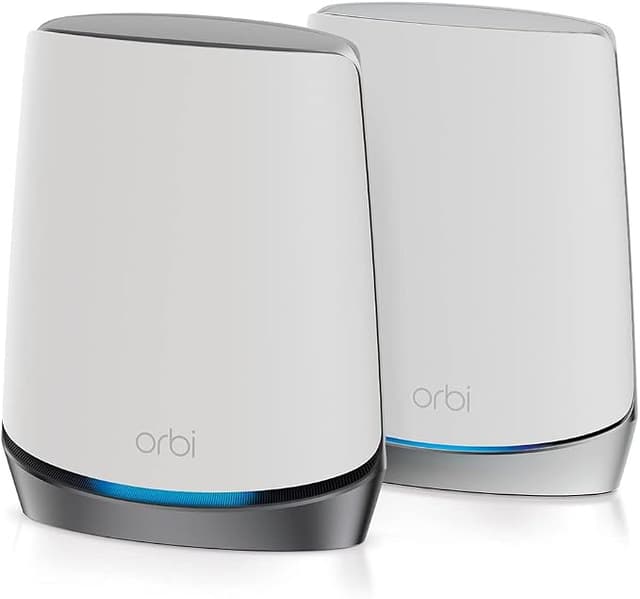
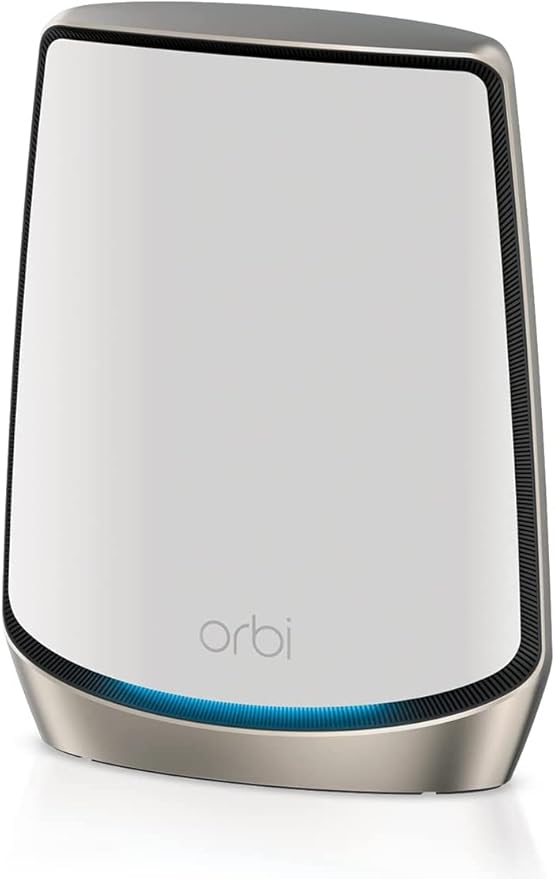
Netgear Orbi RBK852 AX6000 Tri-Band Wifi 6 Mesh System- 2 Pack
Orbi Tri-Band WiFi 6 Mesh System, 6Gbps, Router + 1 Satellite Cover up to 465 sq m with blazing-fast, reliable WiFi with speeds of up to 6Gbps for over 100 devices. Stream, browse, and work uninterrupted in every room of your home. Award-Winning, Unmatched Performance Tri-band mesh technology creates the ultimate WiFi experience. It uses a third dedicated WiFi connection between your router and satellites to deliver maximum speeds throughout every square inch of your home, even hard-to-reach places. Stay constantly connected on all your devices, even as you move through the house. WiFi Built for Your Smart Home Orbi's award-winning mesh WiFi paired with WiFi 6 technology covers every square inch of your home with the best WiFi available, so you get a strong, reliable connection on all your connected devices. NETGEAR Armor NETGEAR Armor cybersecurity keeps your network and private data safe from online threats, at home and on the go. One subscription protects an unlimited number of connected devices, from phones and laptops to thermostats and security cameras. Easy Setup and Use with the Orbi App With the Orbi app, setup takes just minutes, so you can start enjoying better WiFi sooner. You can also see your connected devices, run an internet speed test, manage your NETGEAR service subscriptions, and more from the palm of your hand.
Orbi Tri-Band WiFi 6 Mesh System, 6Gbps, Router + 1 Satellite Cover up to 465 sq m with blazing-fast, reliable WiFi with speeds of up to 6Gbps for over 100 devices. Stream, browse, and work uninterrupted in every room of your home. Award-Winning, Unmatched Performance Tri-band mesh technology creates the ultimate WiFi experience. It uses a third dedicated WiFi connection between your router and satellites to deliver maximum speeds throughout every square inch of your home, even hard-to-reach places. Stay constantly connected on all your devices, even as you move through the house. WiFi Built for Your Smart Home Orbi's award-winning mesh WiFi paired with WiFi 6 technology covers every square inch of your home with the best WiFi available, so you get a strong, reliable connection on all your connected devices. NETGEAR Armor NETGEAR Armor cybersecurity keeps your network and private data safe from online threats, at home and on the go. One subscription protects an unlimited number of connected devices, from phones and laptops to thermostats and security cameras. Easy Setup and Use with the Orbi App With the Orbi app, setup takes just minutes, so you can start enjoying better WiFi sooner. You can also see your connected devices, run an internet speed test, manage your NETGEAR service subscriptions, and more from the palm of your hand.
Orbi Tri-Band WiFi 6 Mesh System, 6Gbps, Router + 1 Satellite Cover up to 465 sq m with blazing-fast, reliable WiFi with speeds of up to 6Gbps for over 100 devices. Stream, browse, and work uninterrupted in every room of your home. Award-Winning, Unmatched Performance Tri-band mesh technology creates the ultimate WiFi experience. It uses a third dedicated WiFi connection between your router and satellites to deliver maximum speeds throughout every square inch of your home, even hard-to-reach places. Stay constantly connected on all your devices, even as you move through the house. WiFi Built for Your Smart Home Orbi's award-winning mesh WiFi paired with WiFi 6 technology covers every square inch of your home with the best WiFi available, so you get a strong, reliable connection on all your connected devices. NETGEAR Armor NETGEAR Armor cybersecurity keeps your network and private data safe from online threats, at home and on the go. One subscription protects an unlimited number of connected devices, from phones and laptops to thermostats and security cameras. Easy Setup and Use with the Orbi App With the Orbi app, setup takes just minutes, so you can start enjoying better WiFi sooner. You can also see your connected devices, run an internet speed test, manage your NETGEAR service subscriptions, and more from the palm of your hand.
Orbi Tri-Band WiFi 6 Mesh System, 6Gbps, Router + 1 Satellite Cover up to 465 sq m with blazing-fast, reliable WiFi with speeds of up to 6Gbps for over 100 devices. Stream, browse, and work uninterrupted in every room of your home. Award-Winning, Unmatched Performance Tri-band mesh technology creates the ultimate WiFi experience. It uses a third dedicated WiFi connection between your router and satellites to deliver maximum speeds throughout every square inch of your home, even hard-to-reach places. Stay constantly connected on all your devices, even as you move through the house. WiFi Built for Your Smart Home Orbi's award-winning mesh WiFi paired with WiFi 6 technology covers every square inch of your home with the best WiFi available, so you get a strong, reliable connection on all your connected devices. NETGEAR Armor NETGEAR Armor cybersecurity keeps your network and private data safe from online threats, at home and on the go. One subscription protects an unlimited number of connected devices, from phones and laptops to thermostats and security cameras. Easy Setup and Use with the Orbi App With the Orbi app, setup takes just minutes, so you can start enjoying better WiFi sooner. You can also see your connected devices, run an internet speed test, manage your NETGEAR service subscriptions, and more from the palm of your hand.
in 10 offers
The lowest price for Netgear Orbi RBK852 AX6000 Tri-Band Wifi 6 Mesh System- 2 Pack right now is $375.00 at Device Deal, compared across 9 retailers.
The all-time low was $295.91 on 31 July 2026 — today's price is 27% above the lowest ever. It has been notably cheaper before — worth setting a price alert.
Prices last updated 29 Sept 2026.
Last updated at 29/09/2026 12:39:02
NETGEAR RBK852 Orbi Whole Home Tri-Band Mesh WiFi 6 System AX6000
Delivery $12.99
Netgear Orbi Ax6000 Tri-band Mesh Wi-fi 6 System Rbk852 2 Pack Aussie
Free delivery
Affiliate Disclosure: We may receive a small commission for purchases made through this link at no extra cost to you. This helps support our site. Thank you!
Netgear Orbi Ax6000 Tri-band Mesh Wi-fi 6 System Packrbk852 2 Pack
Free delivery
Affiliate Disclosure: We may receive a small commission for purchases made through this link at no extra cost to you. This helps support our site. Thank you!
NETGEAR Orbi Whole Home Tri-Band WiFi 6 Mesh Network System RBK852 Router with 1 Satellite
Delivery $59.04
Netgear RBK852 Tri-band WiFi 6 Mesh System - 2 Pack (RBK852-100AUS)
30-day returns
Netgear RBK852 Tri-band WiFi 6 Mesh System - 2 Pack (RBK852-100AUS)
30-day returns
Rbk852
Free delivery
Rbk852
Delivery between 6–9 Oct $29
Netgear Orbi WiFi 6 Ultra-Performance Whole Home Mesh WiFi System
Free delivery between 1–7 Oct
Netgear Orbi RBK852 AX6000 Tri-Band Mesh Wi-Fi 6 System (2 Pack)
Delivery between 1–8 Oct $18.32
originally posted on bestbuy.com
These are probably the easiest mesh Wi-Fi routers to install. You basically take them straight out of the box plug them in and you can log into them with the default IP address and select manual configuration and set this up yourself. If you are an advanced user. If you are a novice user you can use the cellular phone app either on android or Apple and it will take you through the steps to set them up. I purchased this item to cover a 4800 square-foot house and with my 450 make a bit down Internet connection. My Wi-Fi speeds are at 325 Mb down on all my devices. I have selected both my 2.4 and my 5.0 wireless networks to SSID identified as the same name. Coverage is enter end of the home and top and bottom floors. I have one Netgear unit upstairs and one Netgear ... MoreThese are probably the easiest mesh Wi-Fi routers to install. You basically take them straight out of the box plug them in and you can log into them with the default IP address and select manual configuration and set this up yourself. If you are an advanced user. If you are a novice user you can use the cellular phone app either on android or Apple and it will take you through the steps to set them up. I purchased this item to cover a 4800 square-foot house and with my 450 make a bit down Internet connection. My Wi-Fi speeds are at 325 Mb down on all my devices. I have selected both my 2.4 and my 5.0 wireless networks to SSID identified as the same name. Coverage is enter end of the home and top and bottom floors. I have one Netgear unit upstairs and one Netgear unit downstairs and it completely floods the entire home with perfect Wi-Fi signal. I like that these units give you a status with the LED right below the Orbi logo. Overall, they do a wonderful job and have no glitches so far. Remember when you install this for the first time, make sure to do all the firmware updates to the device and make sure that you change the default login password. I couldn’t be any more happier with these devices, and they do just perfect.
originally posted on netgear.com
My Orbi RBK852 is an awesome improvement over my old Linksys WRT3200ACM with D-Link access point home network setup. The installation was quick and easy, even in my neighborhood's crowded WI-FI landscape. My wireless signal is much stronger than before and the default channels selected by the Orbi have worked well (no dropped or laggy connections). I have my satellite Orbi setup with wired backhaul and my wi-fi speeds are very fast. The combination of 2.4, 5, and 6 bands seems to be working seamlessly so far. The Orbi app is user friendly and easy to manage all of my network devices with. I am running a guest network for visitors and I put all my IOT (internet of things) devices on it as well for added security (sprinklers, flood sensors, plugs, etc). This setup ... MoreMy Orbi RBK852 is an awesome improvement over my old Linksys WRT3200ACM with D-Link access point home network setup. The installation was quick and easy, even in my neighborhood's crowded WI-FI landscape. My wireless signal is much stronger than before and the default channels selected by the Orbi have worked well (no dropped or laggy connections). I have my satellite Orbi setup with wired backhaul and my wi-fi speeds are very fast. The combination of 2.4, 5, and 6 bands seems to be working seamlessly so far. The Orbi app is user friendly and easy to manage all of my network devices with. I am running a guest network for visitors and I put all my IOT (internet of things) devices on it as well for added security (sprinklers, flood sensors, plugs, etc). This setup works seamlessly.I was pleasantly surprised by the Netgear Armor network security software. It seems to work well protecting my network and all my PCs, Macs, cell phones, and tablets with the included Bitdefender antivirus. Unless they increase the price for the Netgear Armor service in the future, I will be replacing all my antivirus with Netgear Armor. I did have some trouble pairing the Netgear Orbi app with the Bitdefender Antivirus app for one PC laptop and one Mac laptop, but was eventually able to get them paired. Even if you can't pair the antivirus with the Orbi app, the antivirus still works standalone program just fine. It just doesn't show in the Orbi app.This is an awesome system, that is WORTH THE MONEY.
originally posted on netgear.com
I just finished installing this product. It works great! I had a bit of an issue since I had a previous (older) ORBI System installed. I made a couple of mistakes during the installation. However, after a bit of research, I have now installed both ORBI systems (the OLD and the NEW one!)How? - I will try to explain it as easy as possible:1. Unplug ALL YOUR DEVICES from your OLD Orbi system (in my case was the AC300) (Router and satellite(s)) and of course, disconnect them (Router and Satelite(s) from grid power.2. Follow TO THE DOT the instruction on your NEW Orbi System (AX6000) (e.g. use the App, etc) when you reach to the point of renaming your SSID/password, use the SAME credentials as your previous system.3. Verify that your devices (mobile phones, ... MoreI just finished installing this product. It works great! I had a bit of an issue since I had a previous (older) ORBI System installed. I made a couple of mistakes during the installation. However, after a bit of research, I have now installed both ORBI systems (the OLD and the NEW one!)How? - I will try to explain it as easy as possible:1. Unplug ALL YOUR DEVICES from your OLD Orbi system (in my case was the AC300) (Router and satellite(s)) and of course, disconnect them (Router and Satelite(s) from grid power.2. Follow TO THE DOT the instruction on your NEW Orbi System (AX6000) (e.g. use the App, etc) when you reach to the point of renaming your SSID/password, use the SAME credentials as your previous system.3. Verify that your devices (mobile phones, computers, etc) are connected to the internet (via Ethernet, WiFi).4. Finally, reconnect your OLD Orbi system in the same way as it was installed before.(Connect router to your Modem, power it on, then the satellite(s), etc)At this point you should have BOTH Orbis working for you.There is one little caveat though: In your ORBI APP you will only see the NEW Orbi. The way you can check this is: if you have a device (a mobile phone purchased after 2020) you should see the little "6" next to your WiFi connection when you are connected to the NEW ORBI. If you get closer to the OLD Orbi satellite, the little "6" will go away. This means you are connected to the OLD Orbi.Good luck.
| Wireless Technology | Patented Tri-Band Wi-Fi |
| Data Transfer Speed | Up to 6Gbps |
| Manufacturer's Warranty | 2 Year |
| Memory | 512MB NAND Flash and 1GB RAM |
| Wi-Fi | Yes |
NETGEAR RBK852 Orbi Whole Home Tri-Band Mesh WiFi 6 System AX6000
Delivery $12.99
Netgear Orbi Ax6000 Tri-band Mesh Wi-fi 6 System Rbk852 2 Pack Aussie
Free delivery
Affiliate Disclosure: We may receive a small commission for purchases made through this link at no extra cost to you. This helps support our site. Thank you!
Netgear Orbi Ax6000 Tri-band Mesh Wi-fi 6 System Packrbk852 2 Pack
Free delivery
Affiliate Disclosure: We may receive a small commission for purchases made through this link at no extra cost to you. This helps support our site. Thank you!
NETGEAR Orbi Whole Home Tri-Band WiFi 6 Mesh Network System RBK852 Router with 1 Satellite
Delivery $59.04
Netgear RBK852 Tri-band WiFi 6 Mesh System - 2 Pack (RBK852-100AUS)
30-day returns
These are probably the easiest mesh Wi-Fi routers to install. You basically take them straight out of the box plug them in and you can log into them with the default IP address and select manual configuration and set this up yourself. If you are an advanced user. If you are a novice user you can use the cellular phone app either on android or Apple and it will take you through the steps to set them up. I purchased this item to cover a 4800 square-foot house and with my 450 make a bit down Internet connection. My Wi-Fi speeds are at 325 Mb down on all my devices. I have selected both my 2.4 and my 5.0 wireless networks to SSID identified as the same name. Coverage is enter end of the home and top and bottom floors. I have one Netgear unit upstairs and one Netgear ... MoreThese are probably the easiest mesh Wi-Fi routers to install. You basically take them straight out of the box plug them in and you can log into them with the default IP address and select manual configuration and set this up yourself. If you are an advanced user. If you are a novice user you can use the cellular phone app either on android or Apple and it will take you through the steps to set them up. I purchased this item to cover a 4800 square-foot house and with my 450 make a bit down Internet connection. My Wi-Fi speeds are at 325 Mb down on all my devices. I have selected both my 2.4 and my 5.0 wireless networks to SSID identified as the same name. Coverage is enter end of the home and top and bottom floors. I have one Netgear unit upstairs and one Netgear unit downstairs and it completely floods the entire home with perfect Wi-Fi signal. I like that these units give you a status with the LED right below the Orbi logo. Overall, they do a wonderful job and have no glitches so far. Remember when you install this for the first time, make sure to do all the firmware updates to the device and make sure that you change the default login password. I couldn’t be any more happier with these devices, and they do just perfect.
My Orbi RBK852 is an awesome improvement over my old Linksys WRT3200ACM with D-Link access point home network setup. The installation was quick and easy, even in my neighborhood's crowded WI-FI landscape. My wireless signal is much stronger than before and the default channels selected by the Orbi have worked well (no dropped or laggy connections). I have my satellite Orbi setup with wired backhaul and my wi-fi speeds are very fast. The combination of 2.4, 5, and 6 bands seems to be working seamlessly so far. The Orbi app is user friendly and easy to manage all of my network devices with. I am running a guest network for visitors and I put all my IOT (internet of things) devices on it as well for added security (sprinklers, flood sensors, plugs, etc). This setup ... MoreMy Orbi RBK852 is an awesome improvement over my old Linksys WRT3200ACM with D-Link access point home network setup. The installation was quick and easy, even in my neighborhood's crowded WI-FI landscape. My wireless signal is much stronger than before and the default channels selected by the Orbi have worked well (no dropped or laggy connections). I have my satellite Orbi setup with wired backhaul and my wi-fi speeds are very fast. The combination of 2.4, 5, and 6 bands seems to be working seamlessly so far. The Orbi app is user friendly and easy to manage all of my network devices with. I am running a guest network for visitors and I put all my IOT (internet of things) devices on it as well for added security (sprinklers, flood sensors, plugs, etc). This setup works seamlessly.I was pleasantly surprised by the Netgear Armor network security software. It seems to work well protecting my network and all my PCs, Macs, cell phones, and tablets with the included Bitdefender antivirus. Unless they increase the price for the Netgear Armor service in the future, I will be replacing all my antivirus with Netgear Armor. I did have some trouble pairing the Netgear Orbi app with the Bitdefender Antivirus app for one PC laptop and one Mac laptop, but was eventually able to get them paired. Even if you can't pair the antivirus with the Orbi app, the antivirus still works standalone program just fine. It just doesn't show in the Orbi app.This is an awesome system, that is WORTH THE MONEY.
I just finished installing this product. It works great! I had a bit of an issue since I had a previous (older) ORBI System installed. I made a couple of mistakes during the installation. However, after a bit of research, I have now installed both ORBI systems (the OLD and the NEW one!)How? - I will try to explain it as easy as possible:1. Unplug ALL YOUR DEVICES from your OLD Orbi system (in my case was the AC300) (Router and satellite(s)) and of course, disconnect them (Router and Satelite(s) from grid power.2. Follow TO THE DOT the instruction on your NEW Orbi System (AX6000) (e.g. use the App, etc) when you reach to the point of renaming your SSID/password, use the SAME credentials as your previous system.3. Verify that your devices (mobile phones, ... MoreI just finished installing this product. It works great! I had a bit of an issue since I had a previous (older) ORBI System installed. I made a couple of mistakes during the installation. However, after a bit of research, I have now installed both ORBI systems (the OLD and the NEW one!)How? - I will try to explain it as easy as possible:1. Unplug ALL YOUR DEVICES from your OLD Orbi system (in my case was the AC300) (Router and satellite(s)) and of course, disconnect them (Router and Satelite(s) from grid power.2. Follow TO THE DOT the instruction on your NEW Orbi System (AX6000) (e.g. use the App, etc) when you reach to the point of renaming your SSID/password, use the SAME credentials as your previous system.3. Verify that your devices (mobile phones, computers, etc) are connected to the internet (via Ethernet, WiFi).4. Finally, reconnect your OLD Orbi system in the same way as it was installed before.(Connect router to your Modem, power it on, then the satellite(s), etc)At this point you should have BOTH Orbis working for you.There is one little caveat though: In your ORBI APP you will only see the NEW Orbi. The way you can check this is: if you have a device (a mobile phone purchased after 2020) you should see the little "6" next to your WiFi connection when you are connected to the NEW ORBI. If you get closer to the OLD Orbi satellite, the little "6" will go away. This means you are connected to the OLD Orbi.Good luck.
I wasn't impressed with the speed difference from my old Netgear Nighthawk RAX80. There was about a 5% increase but not worth spending $700.00. As a cyber security professional, security is very important. That being said, Netgear doesn't have a baseline of free security applications/mechanisms incorporated in this device to provide some sort of protection for the consumer/family. They are mirroring Apple, nickel and dime a customer for everything that should be free standard security application within the product. I am sure a third party GUI interface could be replace with the current one but of course this may violate the warranty. Though the product may be pleasing to others but the purchaser should consider forcing Netgear to install basic security applications ... MoreI wasn't impressed with the speed difference from my old Netgear Nighthawk RAX80. There was about a 5% increase but not worth spending $700.00. As a cyber security professional, security is very important. That being said, Netgear doesn't have a baseline of free security applications/mechanisms incorporated in this device to provide some sort of protection for the consumer/family. They are mirroring Apple, nickel and dime a customer for everything that should be free standard security application within the product. I am sure a third party GUI interface could be replace with the current one but of course this may violate the warranty. Though the product may be pleasing to others but the purchaser should consider forcing Netgear to install basic security applications (Parental Controls,etc) as well as giving you more control to manage their devices. Their products are very expensive and the consumer shouldn't have to purchase a monthly subscription to protect their family. Netgear has given me a talking point at the next cyber security conference. For the lack of free basic security, I've returned the device and begun looking for a much better product that doesn't require a subscription.
I bought these because my older dual band router was starting to drop some of our connected devises. Did some research and found these this Orbi AX6000 received the highest rating with the price being the only drawback. It took me about 2 months to finally pull the trigger on this purchase.Had these for about 2 1/2weeks now. Thus far, absolutely great. We've had as many as 26 devices connected at once when our kids and grand kids are visiting (including all our devices). I wish reconnecting all my devices was as easy at setting these up. If the price point isn't an issue and your in the market for a new network, I'd recommend pulling the trigger.The Ordi app is nice to see what devices are connected and sharing your new network password with others. The app ... MoreI bought these because my older dual band router was starting to drop some of our connected devises. Did some research and found these this Orbi AX6000 received the highest rating with the price being the only drawback. It took me about 2 months to finally pull the trigger on this purchase.Had these for about 2 1/2weeks now. Thus far, absolutely great. We've had as many as 26 devices connected at once when our kids and grand kids are visiting (including all our devices). I wish reconnecting all my devices was as easy at setting these up. If the price point isn't an issue and your in the market for a new network, I'd recommend pulling the trigger.The Ordi app is nice to see what devices are connected and sharing your new network password with others. The app could have more control over your network. I'd like to be able to easily change the channels that the signals are broadcasting on and this would be a nice add to the app. I'll have to dig around in the web direct connection to see if I can figure it out. I can see the signal interference/overlap with the inSSIDer app, so I am able to fine tune the signals so they don't overlap with neighbors,The only con in my opinion is the security feature Armor. I disabled it after a few hours of activating it. Not something I'm interested in. But if you are, you only get 30 days free and then there is a fee.
I'll start with some basic facts about my environment:House size: 2500 sq ft. 2 storyInternet speed from ISP: 400 MB/s downloadOriginal setup: Spectrum wireless router downstairs, Netgear AC1750 upstairs setup as an access point hard wired with cat 5e to the downstairs wireless router.The above original setup was actually working rather well however due to several internet outages I was assuming that I was beginning to hit a device limit or that my cat 5e ethernet wire had gone bad as it was run outside and was over 10 years old. (It turned out my internet issues were actually caused by a frayed coaxial cable that Spectrum was unable to identify for 2 months.) My first attempt at an upgrade was the Linksys Velop MX8000 system. This system couldn't outperform ... MoreI'll start with some basic facts about my environment:House size: 2500 sq ft. 2 storyInternet speed from ISP: 400 MB/s downloadOriginal setup: Spectrum wireless router downstairs, Netgear AC1750 upstairs setup as an access point hard wired with cat 5e to the downstairs wireless router.The above original setup was actually working rather well however due to several internet outages I was assuming that I was beginning to hit a device limit or that my cat 5e ethernet wire had gone bad as it was run outside and was over 10 years old. (It turned out my internet issues were actually caused by a frayed coaxial cable that Spectrum was unable to identify for 2 months.) My first attempt at an upgrade was the Linksys Velop MX8000 system. This system couldn't outperform what I already had, and could barely achieve speeds over 300MB/s. I then decided to go with the Netgear Orbi system. Setup was pretty straight forward and I was up in running in 30 minutes or so. I have a 2 node system with the primary node downstairs and the satellite node upstairs. Initially I used the 5Ghz backchannel for the connection and I could get 230+ MB/s upstairs with this method. Honestly that was pretty impressive considering the Linksys velop could only get 50MB/s in the same setup (upstairs). I ended up running a new Cat 6 ethernet wire to connect the 2 and I am able to get over 400 MB/s from pretty much anywhere in the house. This is by far the fastest system I have used and did beat my original setup by over 100MB/s. The range is great and I can still sit out by the pool and work with no issues whatsoever. The extra security provided by Netgear does work and actually caught some Malware that a guest had run across while they were visiting. You do have to pay after the initial trial but for the first year they give you a deal for $40.CONS:The only reason I don't give this a full 5 stars is the fact that it is supposed to be able to handle more then 100 devices and I don't feel like it can. I recently had a houseful of company and everybody had multiple devices connected--according to the Orbi app there were close to 50. My Samsung S21 Ultra started getting kicked off as well as my brother-in-laws apple phone. After everybody left I rebooted and removed the devices that were no longer in use using the Orbi app and I haven't had a problem since. I normally have less then 20 devices connected at one time however.
I purchased this premium WiFi router with the expectation that I was going to get a premium experience and care-free operation. Wouldn’t you expect the same given the price?Nope.Netgear is notorious for poor quality control of their software, and over the last few weeks Netgear has bricked (permanently broken) many customers’ Orbi routers by uploading bad firmware updates – first a bad firmware Version 4.6.7.13, and then they doubled down with a worse firmware update V4.6.8.2 that fully locks you out of accessing the router.Netgear automatically updates the firmware on your router which sounds convenient, until they push bad software. That is when Netgear’s 90-day cutoff for support starts to feel as short as it is, leaving you to troubleshoot on your own. And ... MoreI purchased this premium WiFi router with the expectation that I was going to get a premium experience and care-free operation. Wouldn’t you expect the same given the price?Nope.Netgear is notorious for poor quality control of their software, and over the last few weeks Netgear has bricked (permanently broken) many customers’ Orbi routers by uploading bad firmware updates – first a bad firmware Version 4.6.7.13, and then they doubled down with a worse firmware update V4.6.8.2 that fully locks you out of accessing the router.Netgear automatically updates the firmware on your router which sounds convenient, until they push bad software. That is when Netgear’s 90-day cutoff for support starts to feel as short as it is, leaving you to troubleshoot on your own. And if you do connect with their version of tech support, it is over a flakey connection that drops every 10 minutes because you are talking to someone in India. And if you’ve owned your router for more than a year then you are "out of warranty" and their proposed solution is for you to purchase a new one.So, if you are comfortable spending $600-$1,000 every year on your WiFi router, and replacing it when Netgear uploads bad software, then this is your brand and model.
I bought this to replace a pair of Asus 86U WiFi routers that I run in meshed AP mode. The setup on the Orbi was really easy - plug in the main router, then the satellite, and they automatically mesh. In comparison, one needs to login to the Asus routers through the web browser interface and manually set them to mesh, designating one as the master and the other as the satellite. The Orbi smartphone app was easier to use than logging in to the Orbi router through a web browser and functioned beautifully, although it did not offer the option to switch from router (DHCP) mode into AP mode and use the Orbi solely as a WiFi radio without router functionality. Had to login through the web browser to do that. Range wise - I found the 5 Mhz band range a bit better than the ... MoreI bought this to replace a pair of Asus 86U WiFi routers that I run in meshed AP mode. The setup on the Orbi was really easy - plug in the main router, then the satellite, and they automatically mesh. In comparison, one needs to login to the Asus routers through the web browser interface and manually set them to mesh, designating one as the master and the other as the satellite. The Orbi smartphone app was easier to use than logging in to the Orbi router through a web browser and functioned beautifully, although it did not offer the option to switch from router (DHCP) mode into AP mode and use the Orbi solely as a WiFi radio without router functionality. Had to login through the web browser to do that. Range wise - I found the 5 Mhz band range a bit better than the Asus, and the 2.4 about the same. The Orbi system automatically switches to whichever band will provide the best signal, a nice feature. The system is pricey, but comes with a 1 year warranty and hopefully lasts awhile. Online support and "how tos" on the Netgear site are superior. I rate the system only 4 stars because of its price, and I had expected a bit more range from the radios. At a better price, it deserves 5 stars. I have a Netgear Nighthawk 7900 that has superior range over anything I have ever used, and given the Orbi price, expected something close. Orbi is very good, but not outstanding on that front.
A year ago I ordered a Linksys Velop AX4200 mesh wifi system to replace my 10 year old wifi setup. Without a long diatribe - the LINKSYS system initially worked fine, but over the period of 12 months progressively degraded and malfunctioned to the point of being almost useless, making me long for my old fashioned WiFi router. I had heard from several different sources that Orbi was a great system, and I really wanted to stay with WiFi 6 and a mesh network so I rolled the dice. Orbi has been operational now for a month and I feel that I can give some initial impressions. Setup was pretty smooth - some strange hiccups with the app required multiple resets of the nodes and a complete reset of the base node once. It took me about an hour to sort through the setup which ... MoreA year ago I ordered a Linksys Velop AX4200 mesh wifi system to replace my 10 year old wifi setup. Without a long diatribe - the LINKSYS system initially worked fine, but over the period of 12 months progressively degraded and malfunctioned to the point of being almost useless, making me long for my old fashioned WiFi router. I had heard from several different sources that Orbi was a great system, and I really wanted to stay with WiFi 6 and a mesh network so I rolled the dice. Orbi has been operational now for a month and I feel that I can give some initial impressions. Setup was pretty smooth - some strange hiccups with the app required multiple resets of the nodes and a complete reset of the base node once. It took me about an hour to sort through the setup which gave me some trepidation. However, once setup was complete - done. It has worked flawlessly ever since. Extremely high bandwidth, great coverage, excellent performance through walls and across two stories in an old house with very dense construction materials. I have not needed to reset Orbi (Linksys needed to be reset 1-2 times a week or it would completely shut down) since I installed it. We run multiple devices across the house simultaneously to include video streaming, multiple web applications, work computers, home security and monitoring devices, etc. Can't say enough good things about Orbi. Well worth the switch and deserved of it's great reputation.
| Wireless Technology | Patented Tri-Band Wi-Fi |
| Data Transfer Speed | Up to 6Gbps |
| Manufacturer's Warranty | 2 Year |
| Memory | 512MB NAND Flash and 1GB RAM |
| Wi-Fi | Yes |