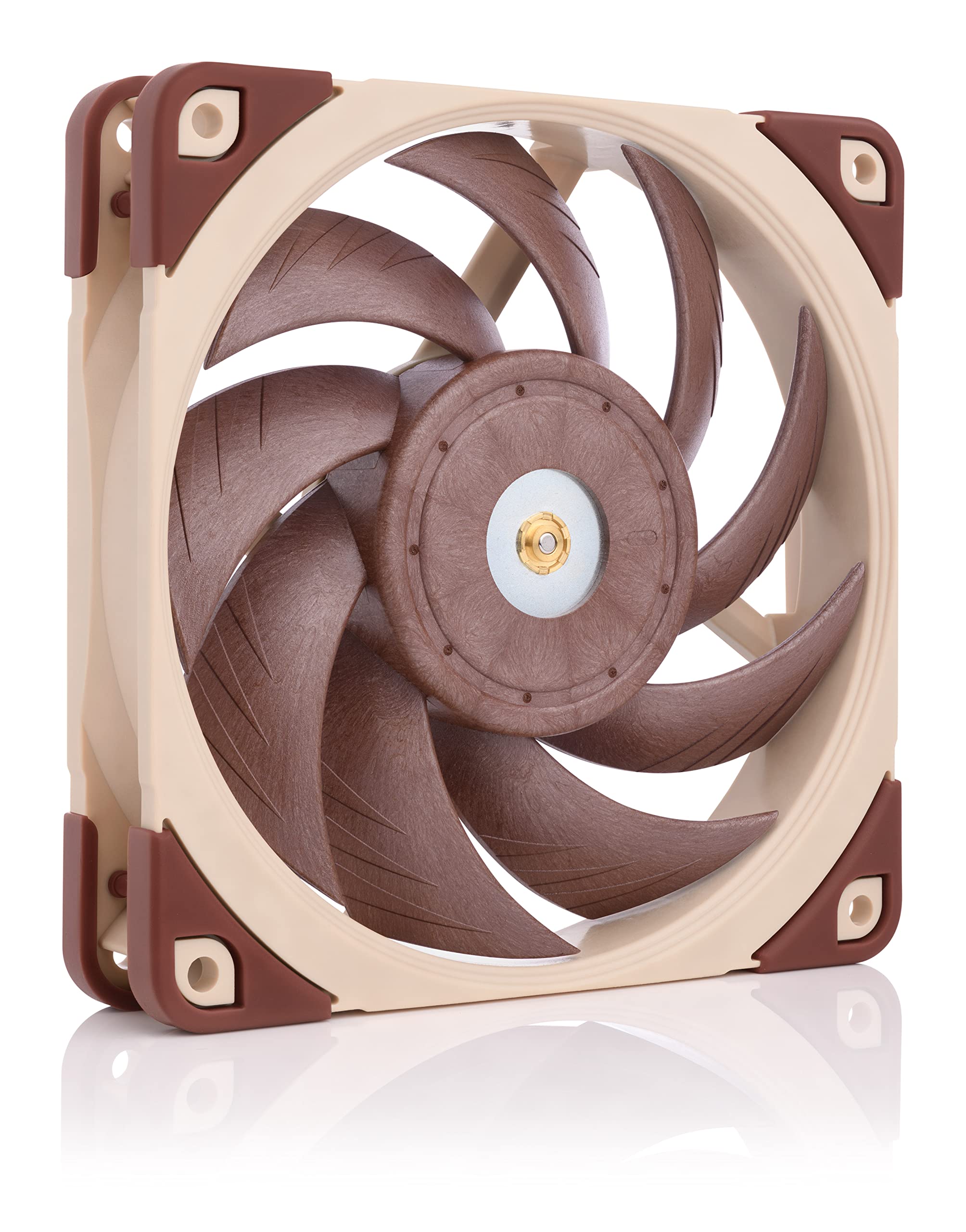
Noctua NF-P12 redux-1700 PWM, 4-Pin, High Performance Cooling Fan with 1700RPM (120mm, Grey)
This 120mm cooling fan is perfect for anyone looking to enhance the airflow and overall cooling capabilities of their desktop. Designed with a sleek grey finish, this fan not only performs flawlessly but also adds a touch of modern elegance to your computer setup. With its powerful 1700 RPM and 4-pin PWM connection, it ensures optimal cooling performance while operating quietly and efficiently. The Noctua NF-P12 redux-1700 PWM Cooling Fan is specifically engineered to provide top-notch cooling for desktop systems. Whether you are a gaming enthusiast, a content creator, or simply someone who demands a high level of performance from their computer, this fan is an essential component to have. Thanks to its high-quality construction and meticulous design, the Noctua NF-P12 redux-1700 PWM Cooling Fan provides superior airflow and heat dissipation. Say goodbye to overheating and system slowdowns, and say hello to a more stable and reliable computing experience. Not only does this fan excel in performance, but it is also incredibly versatile. Compatible with various desktop systems, it can easily be integrated into your existing build. The Noctua NF-P12 redux-1700 PWM Cooling Fan is a true plug-and-play option, making installation a breeze. Invest in the Noctua NF-P12 redux-1700 PWM Cooling Fan today and experience the difference it can make in your computer's overall performance. Don't let excess heat slow you down - keep your desktop cool, quiet, and running smoothly with this high-performance cooling fan.
This 120mm cooling fan is perfect for anyone looking to enhance the airflow and overall cooling capabilities of their desktop. Designed with a sleek grey finish, this fan not only performs flawlessly but also adds a touch of modern elegance to your computer setup. With its powerful 1700 RPM and 4-pin PWM connection, it ensures optimal cooling performance while operating quietly and efficiently. The Noctua NF-P12 redux-1700 PWM Cooling Fan is specifically engineered to provide top-notch cooling for desktop systems. Whether you are a gaming enthusiast, a content creator, or simply someone who demands a high level of performance from their computer, this fan is an essential component to have. Thanks to its high-quality construction and meticulous design, the Noctua NF-P12 redux-1700 PWM Cooling Fan provides superior airflow and heat dissipation. Say goodbye to overheating and system slowdowns, and say hello to a more stable and reliable computing experience. Not only does this fan excel in performance, but it is also incredibly versatile. Compatible with various desktop systems, it can easily be integrated into your existing build. The Noctua NF-P12 redux-1700 PWM Cooling Fan is a true plug-and-play option, making installation a breeze. Invest in the Noctua NF-P12 redux-1700 PWM Cooling Fan today and experience the difference it can make in your computer's overall performance. Don't let excess heat slow you down - keep your desktop cool, quiet, and running smoothly with this high-performance cooling fan.
This 120mm cooling fan is perfect for anyone looking to enhance the airflow and overall cooling capabilities of their desktop. Designed with a sleek grey finish, this fan not only performs flawlessly but also adds a touch of modern elegance to your computer setup. With its powerful 1700 RPM and 4-pin PWM connection, it ensures optimal cooling performance while operating quietly and efficiently. The Noctua NF-P12 redux-1700 PWM Cooling Fan is specifically engineered to provide top-notch cooling for desktop systems. Whether you are a gaming enthusiast, a content creator, or simply someone who demands a high level of performance from their computer, this fan is an essential component to have. Thanks to its high-quality construction and meticulous design, the Noctua NF-P12 redux-1700 PWM Cooling Fan provides superior airflow and heat dissipation. Say goodbye to overheating and system slowdowns, and say hello to a more stable and reliable computing experience. Not only does this fan excel in performance, but it is also incredibly versatile. Compatible with various desktop systems, it can easily be integrated into your existing build. The Noctua NF-P12 redux-1700 PWM Cooling Fan is a true plug-and-play option, making installation a breeze. Invest in the Noctua NF-P12 redux-1700 PWM Cooling Fan today and experience the difference it can make in your computer's overall performance. Don't let excess heat slow you down - keep your desktop cool, quiet, and running smoothly with this high-performance cooling fan.
This 120mm cooling fan is perfect for anyone looking to enhance the airflow and overall cooling capabilities of their desktop. Designed with a sleek grey finish, this fan not only performs flawlessly but also adds a touch of modern elegance to your computer setup. With its powerful 1700 RPM and 4-pin PWM connection, it ensures optimal cooling performance while operating quietly and efficiently. The Noctua NF-P12 redux-1700 PWM Cooling Fan is specifically engineered to provide top-notch cooling for desktop systems. Whether you are a gaming enthusiast, a content creator, or simply someone who demands a high level of performance from their computer, this fan is an essential component to have. Thanks to its high-quality construction and meticulous design, the Noctua NF-P12 redux-1700 PWM Cooling Fan provides superior airflow and heat dissipation. Say goodbye to overheating and system slowdowns, and say hello to a more stable and reliable computing experience. Not only does this fan excel in performance, but it is also incredibly versatile. Compatible with various desktop systems, it can easily be integrated into your existing build. The Noctua NF-P12 redux-1700 PWM Cooling Fan is a true plug-and-play option, making installation a breeze. Invest in the Noctua NF-P12 redux-1700 PWM Cooling Fan today and experience the difference it can make in your computer's overall performance. Don't let excess heat slow you down - keep your desktop cool, quiet, and running smoothly with this high-performance cooling fan.
in 12 offers
The lowest price for Noctua NF-P12 redux-1700 PWM, 4-Pin, High Performance Cooling Fan with 1700RPM (120mm, Grey) right now is $30.62 at eBay.com.au, compared across 7 retailers.
The all-time low was $19.86 on 5 Mar 2026 — today's price is 54% above the lowest ever. It has been notably cheaper before — worth setting a price alert.
Prices last updated 26 July 2026.
Last updated at 26/07/2026 22:04:38
Noctua Nf-p12 Redux-1700 Pwm 4-pin 120mm Computer Case Fan High
Delivery $44.42
Affiliate Disclosure: We may receive a small commission for purchases made through this link at no extra cost to you. This helps support our site. Thank you!
Nf-p12 Redux-1700 Pwm, High Performance Cooling Fan, 4-pin, 1700 Rpm
Delivery $321.80
Affiliate Disclosure: We may receive a small commission for purchases made through this link at no extra cost to you. This helps support our site. Thank you!
Nf-p12 Redux-1700 Pwm, High Performance Cooling Fan, 4-pin, 1700 Rpm
Delivery $315.86
Affiliate Disclosure: We may receive a small commission for purchases made through this link at no extra cost to you. This helps support our site. Thank you!
Noctua Nf-p12 Redux-1700 Pwm High-performance Quiet 120mm Fan Ideal
Delivery $30.37
Affiliate Disclosure: We may receive a small commission for purchases made through this link at no extra cost to you. This helps support our site. Thank you!
Noctua Nf-p12 Redux-1700 Pwm High-performance Quiet 120mm Fan Fast
Free delivery
Affiliate Disclosure: We may receive a small commission for purchases made through this link at no extra cost to you. This helps support our site. Thank you!
1pcs Nf-p12 Redux-1700pwm High Performance Cooling Fan For Desktop
Free delivery
Affiliate Disclosure: We may receive a small commission for purchases made through this link at no extra cost to you. This helps support our site. Thank you!
NF-P12 redux-1700 PWM, High Performance Cooling Fan, 4-Pin, 1700 RPM (120mm, Grey)
Delivery between 2–5 Aug $29
NOCTUA NF-P12-REDUX-1700-PWM Classic High-Performance 120mm Fan 4-Pin PWM, 1700RPM Case Fan
7-day returns
Noctua 120mm NF P12 Redux 1700RPM PWM Fan NF P12 REDUX 1700 PWM - 120mm Case Fans
Delivery $12.46
Noctua NF-P12 Redux-1700PWM 12cm Case Fan CPU Fan 4pin Fan 9 Blade Design SSO Bearing Eddy Current
Free delivery
originally posted on pbtech.co.nz
I bought a silent pc case which is known to increase temperatures a bit. It had room for an extra fan, so why not just use Noctua - it seems to be the industry lead in PC fans. Running quietly and PC is cool so it's likely doing it's job.
originally posted on newegg.com
The supplied rubber pins didn't fit with my radiator block. Fortunately Noctua also included conventional self-tapping screws that were able to mount into my case and hold the weight of the radiator and two fans. The supplied Y-cable doesn't support PWM (it's 3 pins on both outputs), but my motherboard has voltage control. The airflow is good, but not amazing. These are for radiators, etc. where there is a lot of obstruction to the airflow and pressure is what's required. If you need high CFM to move lots of air, pick a different fan. At stock clocks, my GPUs run 44C idle and 67C at full load after 30 minutes of rendering. About 3 minutes to return to idle after stopping the render. This is almost a 10C improvement in idle over the stock fans, full load is about the ... MoreThe supplied rubber pins didn't fit with my radiator block. Fortunately Noctua also included conventional self-tapping screws that were able to mount into my case and hold the weight of the radiator and two fans. The supplied Y-cable doesn't support PWM (it's 3 pins on both outputs), but my motherboard has voltage control. The airflow is good, but not amazing. These are for radiators, etc. where there is a lot of obstruction to the airflow and pressure is what's required. If you need high CFM to move lots of air, pick a different fan. At stock clocks, my GPUs run 44C idle and 67C at full load after 30 minutes of rendering. About 3 minutes to return to idle after stopping the render. This is almost a 10C improvement in idle over the stock fans, full load is about the same. Cooldown is almost twice as fast. That says to me these fans are doing their job, but cooling is limited by the performance of the card's pump. The R9-295X2 was a PSU-killing beast of a card, so a more conventional thermal load will have no problem running these fans! The polymer frames are thicker than typical 120mm fans. If your radiator has short mounting screws, be sure to check that they will fit! The ugly color scheme warranted knocking off half an egg, and the price is a bit much, even given how much you're getting with this product. At $15 these would be a fantastic deal!
originally posted on scan.co.uk
They're not cheap but if you want quality, Noctua are they only way to go. This was one of the companies originally released fans and are still going strong!Their PWM ICs (the chip inside the fan that controls it speed) are the best in the market. They give you the widest control (this fan for example can operate as low as 300RPM) and unlike other manufacturers do not emit switching noise.I found the sweet spot for airflow vs complete silence at idle to be around the 600RPM range. Performance at 1300 RPM and static pressure are also great. I have 3 of these in a M-ATX build enabling me to push its I7-4790K to 4.7GHz (see the attached images) using a custom PWM controller I made out of an Arduino board, in addition to some fan controller software I wrote.I've ... MoreThey're not cheap but if you want quality, Noctua are they only way to go. This was one of the companies originally released fans and are still going strong!Their PWM ICs (the chip inside the fan that controls it speed) are the best in the market. They give you the widest control (this fan for example can operate as low as 300RPM) and unlike other manufacturers do not emit switching noise.I found the sweet spot for airflow vs complete silence at idle to be around the 600RPM range. Performance at 1300 RPM and static pressure are also great. I have 3 of these in a M-ATX build enabling me to push its I7-4790K to 4.7GHz (see the attached images) using a custom PWM controller I made out of an Arduino board, in addition to some fan controller software I wrote.I've bough 6 of these now over the last 7 years (for various application such as heatsinks and case cooling) and have yet to have a problem with any of them.The only downside is their colour scheme but If you're like me and prefer function over form, you can't get any better.
| Fan Counts | 1 Fan |
| Fan Controller | No Controller |
| Fan Size | 120 mm |
| Bearing Type | SSO2 |
| Air Flow | 120,2m³/h |
Noctua Nf-p12 Redux-1700 Pwm 4-pin 120mm Computer Case Fan High
Delivery $44.42
Affiliate Disclosure: We may receive a small commission for purchases made through this link at no extra cost to you. This helps support our site. Thank you!
Nf-p12 Redux-1700 Pwm, High Performance Cooling Fan, 4-pin, 1700 Rpm
Delivery $321.80
Affiliate Disclosure: We may receive a small commission for purchases made through this link at no extra cost to you. This helps support our site. Thank you!
Nf-p12 Redux-1700 Pwm, High Performance Cooling Fan, 4-pin, 1700 Rpm
Delivery $315.86
Affiliate Disclosure: We may receive a small commission for purchases made through this link at no extra cost to you. This helps support our site. Thank you!
Noctua Nf-p12 Redux-1700 Pwm High-performance Quiet 120mm Fan Ideal
Delivery $30.37
Affiliate Disclosure: We may receive a small commission for purchases made through this link at no extra cost to you. This helps support our site. Thank you!
Noctua Nf-p12 Redux-1700 Pwm High-performance Quiet 120mm Fan Fast
Free delivery
Affiliate Disclosure: We may receive a small commission for purchases made through this link at no extra cost to you. This helps support our site. Thank you!
I bought a silent pc case which is known to increase temperatures a bit. It had room for an extra fan, so why not just use Noctua - it seems to be the industry lead in PC fans. Running quietly and PC is cool so it's likely doing it's job.
The supplied rubber pins didn't fit with my radiator block. Fortunately Noctua also included conventional self-tapping screws that were able to mount into my case and hold the weight of the radiator and two fans. The supplied Y-cable doesn't support PWM (it's 3 pins on both outputs), but my motherboard has voltage control. The airflow is good, but not amazing. These are for radiators, etc. where there is a lot of obstruction to the airflow and pressure is what's required. If you need high CFM to move lots of air, pick a different fan. At stock clocks, my GPUs run 44C idle and 67C at full load after 30 minutes of rendering. About 3 minutes to return to idle after stopping the render. This is almost a 10C improvement in idle over the stock fans, full load is about the ... MoreThe supplied rubber pins didn't fit with my radiator block. Fortunately Noctua also included conventional self-tapping screws that were able to mount into my case and hold the weight of the radiator and two fans. The supplied Y-cable doesn't support PWM (it's 3 pins on both outputs), but my motherboard has voltage control. The airflow is good, but not amazing. These are for radiators, etc. where there is a lot of obstruction to the airflow and pressure is what's required. If you need high CFM to move lots of air, pick a different fan. At stock clocks, my GPUs run 44C idle and 67C at full load after 30 minutes of rendering. About 3 minutes to return to idle after stopping the render. This is almost a 10C improvement in idle over the stock fans, full load is about the same. Cooldown is almost twice as fast. That says to me these fans are doing their job, but cooling is limited by the performance of the card's pump. The R9-295X2 was a PSU-killing beast of a card, so a more conventional thermal load will have no problem running these fans! The polymer frames are thicker than typical 120mm fans. If your radiator has short mounting screws, be sure to check that they will fit! The ugly color scheme warranted knocking off half an egg, and the price is a bit much, even given how much you're getting with this product. At $15 these would be a fantastic deal!
They're not cheap but if you want quality, Noctua are they only way to go. This was one of the companies originally released fans and are still going strong!Their PWM ICs (the chip inside the fan that controls it speed) are the best in the market. They give you the widest control (this fan for example can operate as low as 300RPM) and unlike other manufacturers do not emit switching noise.I found the sweet spot for airflow vs complete silence at idle to be around the 600RPM range. Performance at 1300 RPM and static pressure are also great. I have 3 of these in a M-ATX build enabling me to push its I7-4790K to 4.7GHz (see the attached images) using a custom PWM controller I made out of an Arduino board, in addition to some fan controller software I wrote.I've ... MoreThey're not cheap but if you want quality, Noctua are they only way to go. This was one of the companies originally released fans and are still going strong!Their PWM ICs (the chip inside the fan that controls it speed) are the best in the market. They give you the widest control (this fan for example can operate as low as 300RPM) and unlike other manufacturers do not emit switching noise.I found the sweet spot for airflow vs complete silence at idle to be around the 600RPM range. Performance at 1300 RPM and static pressure are also great. I have 3 of these in a M-ATX build enabling me to push its I7-4790K to 4.7GHz (see the attached images) using a custom PWM controller I made out of an Arduino board, in addition to some fan controller software I wrote.I've bough 6 of these now over the last 7 years (for various application such as heatsinks and case cooling) and have yet to have a problem with any of them.The only downside is their colour scheme but If you're like me and prefer function over form, you can't get any better.
I used two of these in a push/pull configuration for my Zalman closed-loop CPU radiator (replacing the original single Zalman radiator fan).Air flow was less then the original Zalman fan (it could spin at 1800rpm), but a couple of these run at 1300rpm (PMW enabled) each and cool my overclocked i5 3570k CPU at 4.4GHz with ease. The processor core never goes over 75c even under 1-2 hours of CPU stress testing (Intel Burn Test).Note to anyone using/considering a closed-loop water system (i.e. Corsair H80i) - Temperature/noise reductions will nearly always be better by using a pair of quality low-noise fans like these over a single fast-spinning 'push' fan.I recommend these fans are their quality is top-notch and the box contains my cables and plugs that should ... MoreI used two of these in a push/pull configuration for my Zalman closed-loop CPU radiator (replacing the original single Zalman radiator fan).Air flow was less then the original Zalman fan (it could spin at 1800rpm), but a couple of these run at 1300rpm (PMW enabled) each and cool my overclocked i5 3570k CPU at 4.4GHz with ease. The processor core never goes over 75c even under 1-2 hours of CPU stress testing (Intel Burn Test).Note to anyone using/considering a closed-loop water system (i.e. Corsair H80i) - Temperature/noise reductions will nearly always be better by using a pair of quality low-noise fans like these over a single fast-spinning 'push' fan.I recommend these fans are their quality is top-notch and the box contains my cables and plugs that should cater for any situation.
If you're looking to add these to your case, I would have to say that these fans (for 120mm's) are some of the best you can buy. Specifically, if you're looking for a solution that will not add a lot of noise to your setup. With these you can add as many as you desire, without really increasing your noticeable db much at all. I ended up adding two to my case, on top of the 2x240mm fans and 1x120mm I already had and my system is still very tolerable. However, if you're looking to add one of these to aide in cooling your chip/heatsink, then you should consider other options. Its performance in cooling my chip was very lackluster at best. If you're not overclocking or only doing mild overclocks then you could probably get away with it. But, if you want to really push ... MoreIf you're looking to add these to your case, I would have to say that these fans (for 120mm's) are some of the best you can buy. Specifically, if you're looking for a solution that will not add a lot of noise to your setup. With these you can add as many as you desire, without really increasing your noticeable db much at all. I ended up adding two to my case, on top of the 2x240mm fans and 1x120mm I already had and my system is still very tolerable. However, if you're looking to add one of these to aide in cooling your chip/heatsink, then you should consider other options. Its performance in cooling my chip was very lackluster at best. If you're not overclocking or only doing mild overclocks then you could probably get away with it. But, if you want to really push your chip, you're going to need something better. Just check the RPM and CFM stats, it doesn't spin fast enough or move enough air to keep a highly overclocked chip cool. They can say what they want about the blade design, it still doesn't move enough air, evident by the CFM. Depending on your setup, I would say anything past a 4.5GHz clock will require a better fan, or two in a push/pull configuration. This ran about 10 degrees hotter than the old cpu fan I had replaced it with. That's in gaming, I wouldn't even run the fan with Prime95 stress. 2700k @ 4.7GHz 1.33 volts
I bought 2 of these as my very first Noctua investment. I was not impressed. The description states "Pressure-optimized Nine-Blade Design Specifically developed for high-impedance applications such as CPU coolers, water-cooling radiators or cases with tight fan grills, the NF-P12 provides superior pressure and airflow performance." It does not do this. On a push/pull setup for my evo 212 cooler, the 2 noctua fans do not move any air through the cooler unless they are both on 80% or more which make them very audible. The 2 year old fan that came with my old $25 case is quieter and pushes more air than these $30 fans, effectively keeping my cpu a few degrees cooler at idle. i did not test the noctuas under a load. I will consider giving noctua a second chance in the ... MoreI bought 2 of these as my very first Noctua investment. I was not impressed. The description states "Pressure-optimized Nine-Blade Design Specifically developed for high-impedance applications such as CPU coolers, water-cooling radiators or cases with tight fan grills, the NF-P12 provides superior pressure and airflow performance." It does not do this. On a push/pull setup for my evo 212 cooler, the 2 noctua fans do not move any air through the cooler unless they are both on 80% or more which make them very audible. The 2 year old fan that came with my old $25 case is quieter and pushes more air than these $30 fans, effectively keeping my cpu a few degrees cooler at idle. i did not test the noctuas under a load. I will consider giving noctua a second chance in the future but not any time soon. My case is much quieter without these fans and i do not see a difference in temperature or performance.
My system is hot. Moderately overvolted, overclocked i7-3930k (hex) with 10 drives, 32G mem, gtx 680, Areca SAS RAID on a Sabertooth x79. I was informed previously to building that it would be a hot setup. 3930k (4.4Ghz) is beast, far and away the fastest single processor I've ever used. Before: Lian Li Stock fans x6 - 2front - 2mid - 2exhaust CPU temps: 44C idle / 70-75C load (intel burn test) Mobo: 48C After: Noc NF-P12 x6 CPU temps: 38C idle / 65-70C load (intel burn test) Mobo: 37C Another nice thing about my little situation. The Lower Exhaust fan is perfectly inline with the HSF which is a Noctua D14. That means there are 3 Noc fans inline [120] [140/120mm] blowing out the back which moves some serious air over all of the important bits, including the mosfets, ... MoreMy system is hot. Moderately overvolted, overclocked i7-3930k (hex) with 10 drives, 32G mem, gtx 680, Areca SAS RAID on a Sabertooth x79. I was informed previously to building that it would be a hot setup. 3930k (4.4Ghz) is beast, far and away the fastest single processor I've ever used. Before: Lian Li Stock fans x6 - 2front - 2mid - 2exhaust CPU temps: 44C idle / 70-75C load (intel burn test) Mobo: 48C After: Noc NF-P12 x6 CPU temps: 38C idle / 65-70C load (intel burn test) Mobo: 37C Another nice thing about my little situation. The Lower Exhaust fan is perfectly inline with the HSF which is a Noctua D14. That means there are 3 Noc fans inline [120] [140/120mm] blowing out the back which moves some serious air over all of the important bits, including the mosfets, sa, mem and rear peripheral ports. All while being pretty darn quiet. Too bad the machine is in a machine room most of the time. But when I do have to take it out and travel. It's nice to have only a low hum. Definitely beats Scythes. Still heats up a room like crazy though :P
Purchased three of these fans on sale for 17.99 each. At that price, I was expecting longevity, as is expected from Noctua. What continues to surprise me is how quiet these are, how much air they move, and the price. For a sub 20 dollar non RGB fan, you CAN NOT go wrong with these.Pros:PricePWM connectionNoiseVolume of air movedNeutral:Non RGBDoes not come with Noctua sound dampening clips. Not a deal breaker, and they still fit if bought at a later date.Color is a hit or miss for a lot of people. For the average user, this is a very VANILLA looking fan. Not offensive, not going to make a huge impression. I personally prefer the neutral grey look over the tan and brown of normal Noctua products.Cons:Cable is quite short on each fan
Needed a single fan for a mini-PC that sits on my desk, so quiet was a must. It doesn't disapoint in this regard, in fact my CPU fan can be heard above it, which is futher in the case. I cannot say whether this would be my choice if decking out a full tower, it's something I'd need to consider. The primary concern here is the price point, and that it's essentially 'incomplete', you need to purchase rubber mounts seperately. If quiet it you goal like mine, you'll need these.
I have one of these on my Coolermaster Hyper 212 EVO CPU Cooler, one as a rear exhaust and one blowing in from top of the case. I also have 2x 140mm NF-A14 PWM as front intakes and with all of them running I can't hear a thing. My Motherboard is at 27C while my CPU is at 34C at idle.The one on my CPU is only running at less than 20% @ 223rpm.The one on top of my case blowing in running around 22% @ 281rpm.The rear one is running at 50% @ 650rpm.My two front intakes are running at around 50% @ 850rpm.My system consists of the following:-Corsair Carbide Series 300R case.Asus Z87-PRO USB 3.0 Motherboard .Intel Core i7 4770K Quad Core CPU 3.50GHz.Corsair CMY16GX3M2A1866C9R Vengeance Pro Series 16GB (2x8GB) DDR3 1866Mhz CL9 XMP Performance Desktop Memory Kit ... MoreI have one of these on my Coolermaster Hyper 212 EVO CPU Cooler, one as a rear exhaust and one blowing in from top of the case. I also have 2x 140mm NF-A14 PWM as front intakes and with all of them running I can't hear a thing. My Motherboard is at 27C while my CPU is at 34C at idle.The one on my CPU is only running at less than 20% @ 223rpm.The one on top of my case blowing in running around 22% @ 281rpm.The rear one is running at 50% @ 650rpm.My two front intakes are running at around 50% @ 850rpm.My system consists of the following:-Corsair Carbide Series 300R case.Asus Z87-PRO USB 3.0 Motherboard .Intel Core i7 4770K Quad Core CPU 3.50GHz.Corsair CMY16GX3M2A1866C9R Vengeance Pro Series 16GB (2x8GB) DDR3 1866Mhz CL9 XMP Performance Desktop Memory Kit Red.2GB Asus GeForce GTX 660 DirectCU II OC Nvidia Graphics Card.Pioneer BDRW 206D.Crucial CT128M4SSD2BAA 128GB M4 SATA III 6Gb/s.WD My Book 3 TB USB 3.0 Hard Drive.Corsair Builder Series CXM 600W Modular 80 PLUS Bronze PSU.
| Fan Counts | 1 Fan |
| Fan Controller | No Controller |
| Fan Size | 120 mm |
| Bearing Type | SSO2 |
| Air Flow | 120,2m³/h |