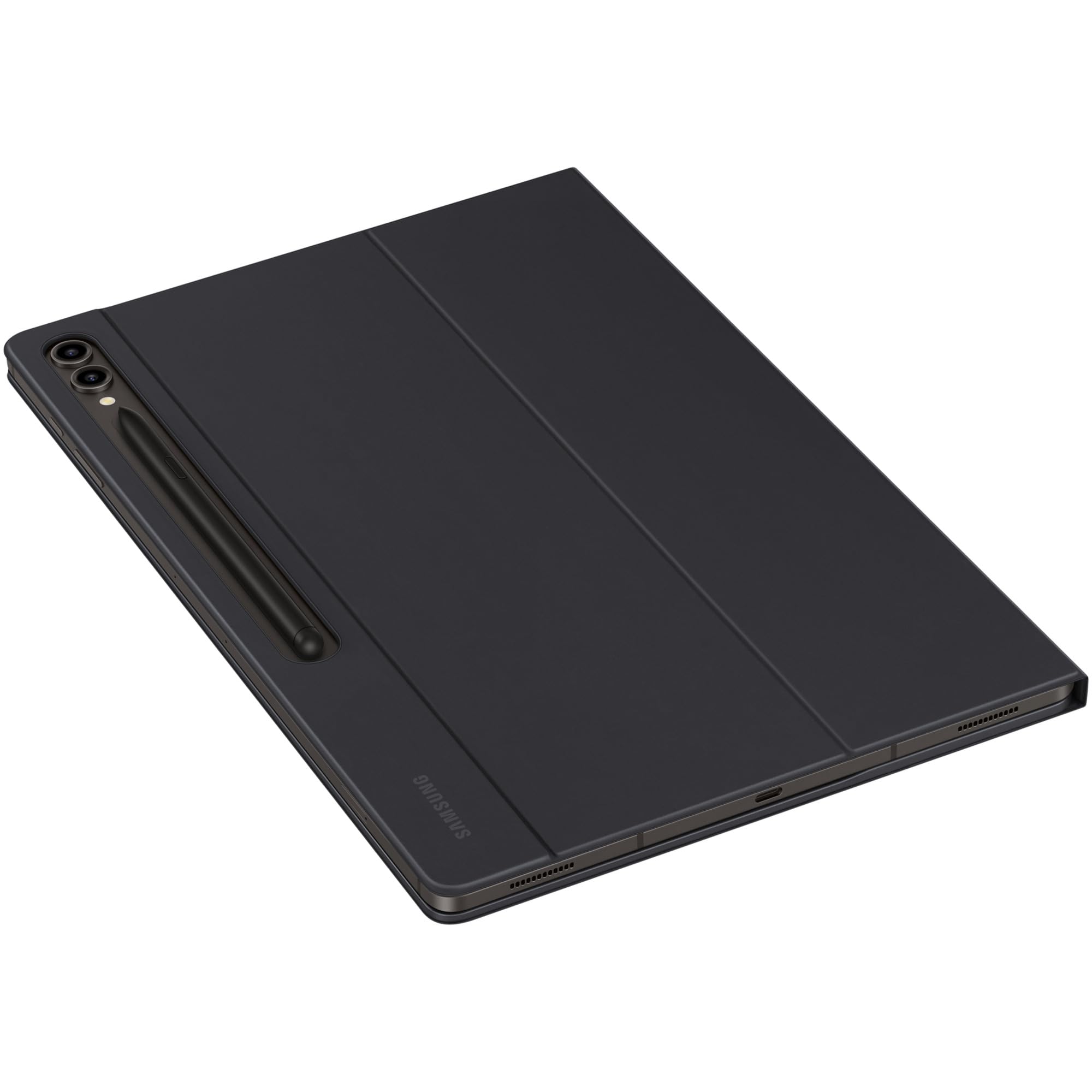
Samsung Galaxy Tab S10+ / S9+ Book Cover Keyboard - White
Be more productive than ever before with the new Book Cover Keyboard (AI Key) for your Galaxy Tab S10 Ultra/S9 Ultra. Elegantly backlit with function keys and a sleek trackpad, this accessory features a contemporary design while also combining with DeX mode to deliver you a PC-like experience all with a single tap. With the touch of a button, the newly added AI key on the Book Cover Keyboard (AI Key) invokes AI-powered solutions through the support of your very own AI assistant. The accessory's magnetic design and great flexibility allow you to easily make adjustments on the fly and personalise it to suit your everyday needs. From studying, to working, to enjoying some entertainment, the Book Cover Keyboard (AI Key) keeps you covered across the board. Grab it in Black or White now to take your experience to the next level.
Be more productive than ever before with the new Book Cover Keyboard (AI Key) for your Galaxy Tab S10 Ultra/S9 Ultra. Elegantly backlit with function keys and a sleek trackpad, this accessory features a contemporary design while also combining with DeX mode to deliver you a PC-like experience all with a single tap. With the touch of a button, the newly added AI key on the Book Cover Keyboard (AI Key) invokes AI-powered solutions through the support of your very own AI assistant. The accessory's magnetic design and great flexibility allow you to easily make adjustments on the fly and personalise it to suit your everyday needs. From studying, to working, to enjoying some entertainment, the Book Cover Keyboard (AI Key) keeps you covered across the board. Grab it in Black or White now to take your experience to the next level.
Be more productive than ever before with the new Book Cover Keyboard (AI Key) for your Galaxy Tab S10 Ultra/S9 Ultra. Elegantly backlit with function keys and a sleek trackpad, this accessory features a contemporary design while also combining with DeX mode to deliver you a PC-like experience all with a single tap. With the touch of a button, the newly added AI key on the Book Cover Keyboard (AI Key) invokes AI-powered solutions through the support of your very own AI assistant. The accessory's magnetic design and great flexibility allow you to easily make adjustments on the fly and personalise it to suit your everyday needs. From studying, to working, to enjoying some entertainment, the Book Cover Keyboard (AI Key) keeps you covered across the board. Grab it in Black or White now to take your experience to the next level.
Be more productive than ever before with the new Book Cover Keyboard (AI Key) for your Galaxy Tab S10 Ultra/S9 Ultra. Elegantly backlit with function keys and a sleek trackpad, this accessory features a contemporary design while also combining with DeX mode to deliver you a PC-like experience all with a single tap. With the touch of a button, the newly added AI key on the Book Cover Keyboard (AI Key) invokes AI-powered solutions through the support of your very own AI assistant. The accessory's magnetic design and great flexibility allow you to easily make adjustments on the fly and personalise it to suit your everyday needs. From studying, to working, to enjoying some entertainment, the Book Cover Keyboard (AI Key) keeps you covered across the board. Grab it in Black or White now to take your experience to the next level.
in 10 offers
The lowest price for Samsung Galaxy Tab S10+ / S9+ Book Cover Keyboard - White right now is $208.01 at PB Tech, compared across 10 retailers.
The all-time low was $152.01 on 23 Aug 2025 — today's price is 37% above the lowest ever. It has been notably cheaper before — worth setting a price alert.
Prices last updated 11 July 2026.
Last updated at 11/07/2026 19:04:57
Samsung Galaxy Tab S10+ / S9+ S9 FE+ Book Cover Keyboard - AI Key ( White )
Delivery between 16–21 July $9
Samsung Book Cover Keyboard with Trackpad for Galaxy Tab S9FE+ / S9+ / S10+ - White
14-day returns
Samsung Book Cover Keyboard with Trackpad for Galaxy Tab S9FE+ / S9+ / S10+ - White
Free delivery
Samsung EF-DX825 31.5 cm (12.4") Flip case White
Free delivery
Samsung Galaxy Tab S9+ / Tab S10+ Book Cover Keyboard - AI Key (White)
Free delivery
Samsung Galaxy Tab S9+ / Tab S10+ Book Cover Keyboard - Ai Key (white)
Free delivery
Affiliate Disclosure: We may receive a small commission for purchases made through this link at no extra cost to you. This helps support our site. Thank you!
Samsung Galaxy Tab S9+ / Tab S10+ Book Cover Keyboard - AI Key (White) (EF-DX825UWEGWW)
Free delivery
Samsung Galaxy Tab S9+ / Tab S10+ Book Cover Keyboard - AI Key (White)
Delivery $10
Samsung Samsung Galaxy Tab S9+/Tab S10+ Book Cover in White
Free delivery
Samsung Book Cover Keyboard Case For Galaxy Tab S10+/S9+/S9 FE+ - White
Free delivery between Tue – Fri
originally posted on bestbuy.com
I've got mixed feelings about this case, especially considering how expensive it is.Yes it has a keyboard built in, yes it fits.That's about the best I can say for the case though as I've got some serious gripes about this case that sells anywhere from $120-160.From worst to least bad my complaints are:The case attaches to the tablet using magnets with nothing else to hold it in. I've had multiple instances where the tablet just falls out of the case which is extremely bad. It's the baseline reason for the case's entire existence and it just sometimes fails.The keyboard has about a 30% failure rate where you'll prop the tablet up to use the keyboard and it just won't connect and you'll have to disconnect it and reconnect it to get it to work.The case only ... MoreI've got mixed feelings about this case, especially considering how expensive it is.Yes it has a keyboard built in, yes it fits.That's about the best I can say for the case though as I've got some serious gripes about this case that sells anywhere from $120-160.From worst to least bad my complaints are:The case attaches to the tablet using magnets with nothing else to hold it in. I've had multiple instances where the tablet just falls out of the case which is extremely bad. It's the baseline reason for the case's entire existence and it just sometimes fails.The keyboard has about a 30% failure rate where you'll prop the tablet up to use the keyboard and it just won't connect and you'll have to disconnect it and reconnect it to get it to work.The case only supports one orientation which is very awkward when the program you're trying to use has a vertical orientation.It feels cheap, it feels like cheap textured plastic over a cardboard core while somehow still making the tablet 50% heavier.This cover costs far too much for such a poor design and construction. I wish I hadn't just assumed that the official case from Samsung was going to be the same level of quality as the tablet it's designed for. I would say avoid this case unless it's being given to you as a free accessory.
originally posted on samsung.com
I hesitated buying this keyboard because of the language issue mentioned in the other review. But I had already been using a Samsung bilingual keyboard for over 9 years with my S4, so I thought I'd give it a try. I am glad that I did.The fix is simple: there is a key just beside the space bar on the right hand side written "Lang" and a picture of a small keyboard. With one tap, you can switch between english to french. This is how my previous keyboard worked. If you hit it by mistake, you'll know - but it's an easy fix. And it's very practical if you are bi- or multilingual and deal with correspondence in more than one language. If you want a different language or even more than 2, you just need to go to the Keyboard Settings on your S9 and choose the desired ... MoreI hesitated buying this keyboard because of the language issue mentioned in the other review. But I had already been using a Samsung bilingual keyboard for over 9 years with my S4, so I thought I'd give it a try. I am glad that I did.The fix is simple: there is a key just beside the space bar on the right hand side written "Lang" and a picture of a small keyboard. With one tap, you can switch between english to french. This is how my previous keyboard worked. If you hit it by mistake, you'll know - but it's an easy fix. And it's very practical if you are bi- or multilingual and deal with correspondence in more than one language. If you want a different language or even more than 2, you just need to go to the Keyboard Settings on your S9 and choose the desired languages and then your keyboard will flip from one language to another with a simple tap of the button.All in all, it's great for those who love to write or take notes in type and who need a keyboard in more than one language because of the different symbols. You'll get a brief display that will let you know which keyboard you are using every time you switch over.Also, the magnetized case makes it easy to slip on or take off and the stylus slips incognito behind the tablet while staying in position in a rather sturdy manner. The case provides a space for it. Over all, I really like it.
originally posted on samsung.com
Keyboard is only available in Canada as the French Canadian keyboard. Huh? No English keyboards at all? Samsung has been selling computers long enough to know better! I am very, very disappointed with customer support on this. As others have stated, why cant they just get keyboards from the US? I am so disappointed on the support for this that I am considering returning the tablet itself, due to Samsung's disrespectful approach; let's just make one model for Canada, and they'll all be happy. And no way to fix it. Doesn't Samsung US also belong to Samsung? Maybe they all want us to change to Apple?
| Interface | POGO |
| Keys Quantity | 80 |
| Touch Pad, Touch Screen | Touch Pad |
| Dimension (WxHxD) | 193.4x286x14.8 mm |
| Compatible Models | Galaxy Tab S10+, Galaxy Tab S9+, Galaxy Tab S9 FE+ |
Samsung Galaxy Tab S10+ / S9+ S9 FE+ Book Cover Keyboard - AI Key ( White )
Delivery between 16–21 July $9
Samsung Book Cover Keyboard with Trackpad for Galaxy Tab S9FE+ / S9+ / S10+ - White
14-day returns
Samsung Book Cover Keyboard with Trackpad for Galaxy Tab S9FE+ / S9+ / S10+ - White
Free delivery
Samsung EF-DX825 31.5 cm (12.4") Flip case White
Free delivery
Samsung Galaxy Tab S9+ / Tab S10+ Book Cover Keyboard - AI Key (White)
Free delivery
I've got mixed feelings about this case, especially considering how expensive it is.Yes it has a keyboard built in, yes it fits.That's about the best I can say for the case though as I've got some serious gripes about this case that sells anywhere from $120-160.From worst to least bad my complaints are:The case attaches to the tablet using magnets with nothing else to hold it in. I've had multiple instances where the tablet just falls out of the case which is extremely bad. It's the baseline reason for the case's entire existence and it just sometimes fails.The keyboard has about a 30% failure rate where you'll prop the tablet up to use the keyboard and it just won't connect and you'll have to disconnect it and reconnect it to get it to work.The case only ... MoreI've got mixed feelings about this case, especially considering how expensive it is.Yes it has a keyboard built in, yes it fits.That's about the best I can say for the case though as I've got some serious gripes about this case that sells anywhere from $120-160.From worst to least bad my complaints are:The case attaches to the tablet using magnets with nothing else to hold it in. I've had multiple instances where the tablet just falls out of the case which is extremely bad. It's the baseline reason for the case's entire existence and it just sometimes fails.The keyboard has about a 30% failure rate where you'll prop the tablet up to use the keyboard and it just won't connect and you'll have to disconnect it and reconnect it to get it to work.The case only supports one orientation which is very awkward when the program you're trying to use has a vertical orientation.It feels cheap, it feels like cheap textured plastic over a cardboard core while somehow still making the tablet 50% heavier.This cover costs far too much for such a poor design and construction. I wish I hadn't just assumed that the official case from Samsung was going to be the same level of quality as the tablet it's designed for. I would say avoid this case unless it's being given to you as a free accessory.
I hesitated buying this keyboard because of the language issue mentioned in the other review. But I had already been using a Samsung bilingual keyboard for over 9 years with my S4, so I thought I'd give it a try. I am glad that I did.The fix is simple: there is a key just beside the space bar on the right hand side written "Lang" and a picture of a small keyboard. With one tap, you can switch between english to french. This is how my previous keyboard worked. If you hit it by mistake, you'll know - but it's an easy fix. And it's very practical if you are bi- or multilingual and deal with correspondence in more than one language. If you want a different language or even more than 2, you just need to go to the Keyboard Settings on your S9 and choose the desired ... MoreI hesitated buying this keyboard because of the language issue mentioned in the other review. But I had already been using a Samsung bilingual keyboard for over 9 years with my S4, so I thought I'd give it a try. I am glad that I did.The fix is simple: there is a key just beside the space bar on the right hand side written "Lang" and a picture of a small keyboard. With one tap, you can switch between english to french. This is how my previous keyboard worked. If you hit it by mistake, you'll know - but it's an easy fix. And it's very practical if you are bi- or multilingual and deal with correspondence in more than one language. If you want a different language or even more than 2, you just need to go to the Keyboard Settings on your S9 and choose the desired languages and then your keyboard will flip from one language to another with a simple tap of the button.All in all, it's great for those who love to write or take notes in type and who need a keyboard in more than one language because of the different symbols. You'll get a brief display that will let you know which keyboard you are using every time you switch over.Also, the magnetized case makes it easy to slip on or take off and the stylus slips incognito behind the tablet while staying in position in a rather sturdy manner. The case provides a space for it. Over all, I really like it.
Keyboard is only available in Canada as the French Canadian keyboard. Huh? No English keyboards at all? Samsung has been selling computers long enough to know better! I am very, very disappointed with customer support on this. As others have stated, why cant they just get keyboards from the US? I am so disappointed on the support for this that I am considering returning the tablet itself, due to Samsung's disrespectful approach; let's just make one model for Canada, and they'll all be happy. And no way to fix it. Doesn't Samsung US also belong to Samsung? Maybe they all want us to change to Apple?
WOW!I LOVE this Book Cover Keyboard-black which has the touch pad. I ordered it via the Best Buy website and recieved it in a matter of a few days.Shipping and packaging was great. Product came unharmed and I am using it now to write this review. The touch pad is smooth and responsive. I can't say enough about this Keyboard.I love the fact that it does not need batteries or need charged. You attach you tablet to it and it runs off the tablet power.All you have to do is attach the backing to your tablet which is held in place by magnet and then clip it into the keyboard and your up and running.There is a pull out on the back to allow the tablet to stand on its own while typing.It's secure and comfortable typing as well!Then when you are done, just fold it down ... MoreWOW!I LOVE this Book Cover Keyboard-black which has the touch pad. I ordered it via the Best Buy website and recieved it in a matter of a few days.Shipping and packaging was great. Product came unharmed and I am using it now to write this review. The touch pad is smooth and responsive. I can't say enough about this Keyboard.I love the fact that it does not need batteries or need charged. You attach you tablet to it and it runs off the tablet power.All you have to do is attach the backing to your tablet which is held in place by magnet and then clip it into the keyboard and your up and running.There is a pull out on the back to allow the tablet to stand on its own while typing.It's secure and comfortable typing as well!Then when you are done, just fold it down just like you would a lap top.Great product.I was worried about the cost, but I feel this is worth it, especially if you are using it with a nice tablet like the Galaxy Tab S9+ and It does work with the Galaxy Tab S9 FE+ which I have.Iv'e attached a photo. My apologies for the poor quality of the photo.
Great product, but I had to return it.Warning: Be careful when well-intended store employee tells you that it's compatible with older Galaxy Tabs. IT'S NOT!I bought this for a Galaxy Tab S7 FE. All the connectors line up (i.e. the "posts"), but the firmware won't allow S7 or S8.The box clearly states that it's compatible with S9 Tabs. It doesn't claim compatibility with any other models. The store employee said "Samsung usually just mentions the latest models on the box." He was wrong. OS Firmware/Software in these computers are complicated... DON'T assume just because the connectors line up!
The key board is really nice to type with. Sort of amazing with it being so thin. Feels quality. The only reason I gave it 4 stars is because the keys closer to the top of the keyboard stick when pressed. The corner of the keycap gets hung under the key frame if you don't press directly down on the keys, or if you press them a little too hard. However, it's not enough to affect accuracy, it's just something that catches your attention when it happens. I have no other tablet keyboard cases to compare it to, but it would be hard to beat the overall enjoyable typing experience on a genuine Samsung keyboard case.
I loved the keyboard's response, how tactile it was, and its easability to be attached or removed. I even loved the track pad. But what I didn't like was how exposed the tablet was, especially with the keyboard removed. The book cover offers no side protection against drops and nothing for the back of the tablet if the keyboard is removed. I'm sure there are some that will use the keyboard all the time but I am not one of them (or I would have bought a laptop). I expected more protection for the price of the book cover keyboard. I'm returning it for a $20 book cover with full surround protection and a folding Bluetooth keyboard.
The labels on the keys do not match what you get when you press them. Pressing the "Lang" key changes nothing. This keyboard can't be used to type any punctuation and is entirely useless. I took it back to the Samsung store where I got it (Burnaby) and they couldn't make it work either, but, since I bought this with my S9+ back in September, typed a few words, and didn't need it again until now, and it's over 15 days and I no longer have the box, they refuse to give me a refund, and now I'm out $250 w tax. They guys in the store said I'm not the first person to come in about this - which means they know it's a problem but keep selling it anyway.
I paid $230 for this book cover keyboard for my Samsung S9+ and the "H" key just disappeared 3 weeks after I got it. No drops ... no damage ... no wear and tear ... I just opened the cover and the "H" key was gone. That sounds like a material defect to me. No worries. I'll just call Samsung and get it fixed or replaced. I spent two hours on the phone with them and escalated to a supervisor. They told me, that even though it was still under warranty, it was considered "damage" and not a "defect" so they couldn't/wouldn't help me. To me "damage" is when something external happens to the keyboard and "defect" is when a key just disappears for no reason. My tablet, phone, TVs and appliances are all Samsung ... that'll soon be "were all Samsung".
Bought this for my hubby after constant moaning his was non android tablet was too old!! After the initial set up slightly confusing with keeping apps and a week later he is now converted!!! Absolutely loves it. Super screen size and exceptionally fast (we life in a remote village!). The offer of free keyboard,/case was well worth me buying from John Lewis rather than elsewhere for the same price. The tablet although a tad more weighty than his non Android ticked all the boxes. The screen size and clarity is outstanding and a super speaker too. Would recommend this product for those that like a bigger screen and navigation ease.
| Interface | POGO |
| Keys Quantity | 80 |
| Touch Pad, Touch Screen | Touch Pad |
| Dimension (WxHxD) | 193.4x286x14.8 mm |
| Compatible Models | Galaxy Tab S10+, Galaxy Tab S9+, Galaxy Tab S9 FE+ |