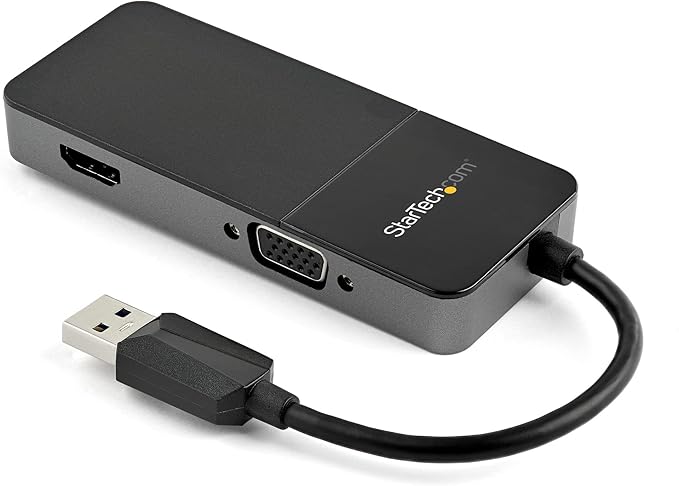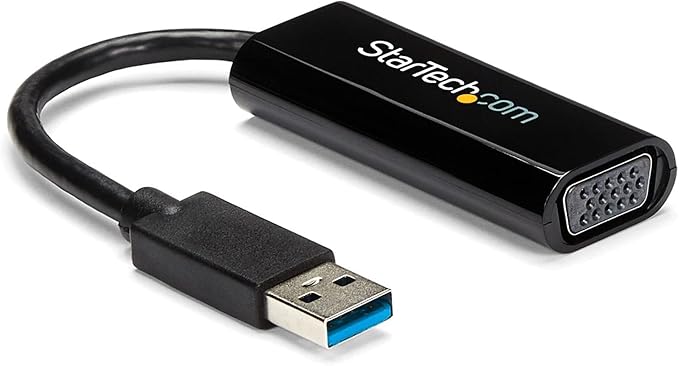
StarTech Slim USB 3.0 to VGA Adapter
The USB 3.0 to VGA Adapter External from StarTech is a versatile and convenient solution for connecting your computer or laptop to a VGA monitor or projector. With its USB 3.0 interface, this adapter offers high-speed data transfer rates and ensures a seamless connection between your device and the VGA display. This adapter is perfect for presentations, meetings, or simply expanding your workspace. It allows you to extend or mirror your desktop onto a secondary display, giving you more screen real estate to work with. Whether you need to showcase your latest project, deliver a captivating presentation, or immerse yourself in a movie, this adapter delivers sharp and clear VGA video output. The USB 3.0 to VGA Adapter External is easy to install and requires no additional drivers. Simply plug it into your USB 3.0 port, connect your VGA display, and you're ready to go. Its compact and lightweight design makes it highly portable, so you can easily carry it with you on the go. Upgrade your connectivity options with the USB 3.0 to VGA Adapter External from StarTech.
The USB 3.0 to VGA Adapter External from StarTech is a versatile and convenient solution for connecting your computer or laptop to a VGA monitor or projector. With its USB 3.0 interface, this adapter offers high-speed data transfer rates and ensures a seamless connection between your device and the VGA display. This adapter is perfect for presentations, meetings, or simply expanding your workspace. It allows you to extend or mirror your desktop onto a secondary display, giving you more screen real estate to work with. Whether you need to showcase your latest project, deliver a captivating presentation, or immerse yourself in a movie, this adapter delivers sharp and clear VGA video output. The USB 3.0 to VGA Adapter External is easy to install and requires no additional drivers. Simply plug it into your USB 3.0 port, connect your VGA display, and you're ready to go. Its compact and lightweight design makes it highly portable, so you can easily carry it with you on the go. Upgrade your connectivity options with the USB 3.0 to VGA Adapter External from StarTech.
The USB 3.0 to VGA Adapter External from StarTech is a versatile and convenient solution for connecting your computer or laptop to a VGA monitor or projector. With its USB 3.0 interface, this adapter offers high-speed data transfer rates and ensures a seamless connection between your device and the VGA display. This adapter is perfect for presentations, meetings, or simply expanding your workspace. It allows you to extend or mirror your desktop onto a secondary display, giving you more screen real estate to work with. Whether you need to showcase your latest project, deliver a captivating presentation, or immerse yourself in a movie, this adapter delivers sharp and clear VGA video output. The USB 3.0 to VGA Adapter External is easy to install and requires no additional drivers. Simply plug it into your USB 3.0 port, connect your VGA display, and you're ready to go. Its compact and lightweight design makes it highly portable, so you can easily carry it with you on the go. Upgrade your connectivity options with the USB 3.0 to VGA Adapter External from StarTech.
The USB 3.0 to VGA Adapter External from StarTech is a versatile and convenient solution for connecting your computer or laptop to a VGA monitor or projector. With its USB 3.0 interface, this adapter offers high-speed data transfer rates and ensures a seamless connection between your device and the VGA display. This adapter is perfect for presentations, meetings, or simply expanding your workspace. It allows you to extend or mirror your desktop onto a secondary display, giving you more screen real estate to work with. Whether you need to showcase your latest project, deliver a captivating presentation, or immerse yourself in a movie, this adapter delivers sharp and clear VGA video output. The USB 3.0 to VGA Adapter External is easy to install and requires no additional drivers. Simply plug it into your USB 3.0 port, connect your VGA display, and you're ready to go. Its compact and lightweight design makes it highly portable, so you can easily carry it with you on the go. Upgrade your connectivity options with the USB 3.0 to VGA Adapter External from StarTech.
in 33 offers
The lowest price for StarTech Slim USB 3.0 to VGA Adapter right now is $34.87 at PB Tech, compared across 23 retailers.
The all-time low was $25.08 on 16 July 2025 — today's price is 39% above the lowest ever. It has been notably cheaper before — worth setting a price alert.
Prices last updated 28 June 2026.
Last updated at 28/06/2026 21:24:37
StarTech.com Slim USB 3.0 to VGA External Video Card Multi Monitor Adapter 1920x1200/1080p (USB32VGAES)
Affiliate Disclosure: We may receive a small commission for purchases made through this link at no extra cost to you. This helps support our site. Thank you!
StarTech.com USB32VGAES USB3.0 to VGA Multi Monitor Adapter
7-day returns
STARTECH USB 3.0 TO VGA ADAPTER, USB POWER, 2YR - USB32VGAES
Delivery between 2–7 July $15
StarTech.com USB 3.0 to VGA Adapter, USB to VGA Monitor Converter for Windows, Slim (no support for macOS/ChromeOS/Linux) - TAA
STARTECH USB 3.0 to VGA Adapter - Slim Design - 1920x1200 - External Video & Graphics Card - Dual Monitor Display Adapter - Supports Windows (
Delivery $25
[USB32VGAES] StarTech Slim USB 3.0 to VGA External Video Card Multi Monitor Adapter 1920x1200/1080p
7-day returns
StarTech Slim USB 3.0 to VGA External Video Card - USB32VGAES
Delivery $12.99
USB 3.0 to VGA Adapter, USB to VGA Monitor Converter for Windows, Slim (no support for macOS/ChromeOS/Linux) - TAA
USB 3.0 to VGA Adapter, USB to VGA Monitor Converter for Windows, Slim (no support for macOS/ChromeOS/Linux) - TAA
USB 3.0 to VGA Adapter, USB to VGA Monitor Converter for Windows, Slim (no support for macOS/ChromeOS/Linux) - TAA
originally posted on homeessentialsdirect.com
I am writing this almost a year after purchasing this device. I am using it in Windows 10. Most devices of this type require the drivers to be installed BEFORE connecting them. This is VERY important. I have this connected to a 24" HP monitor and the image quality is perfect. Video plays fine - even full-screen - but the drawback to this (and pretty much any such device) is that it taxes your CPU and your USB buss. If you're using a low-power / older system with an older / slower CPU, you might find this device unsatisfactory. I originally used this on an older laptop with an AMD CPU / chipset. On that older laptop, the CPU fan would spool up and run a mid / high speed any time this was connected, and high-definition full-screen video was not smooth. A few months ... MoreI am writing this almost a year after purchasing this device. I am using it in Windows 10. Most devices of this type require the drivers to be installed BEFORE connecting them. This is VERY important. I have this connected to a 24" HP monitor and the image quality is perfect. Video plays fine - even full-screen - but the drawback to this (and pretty much any such device) is that it taxes your CPU and your USB buss. If you're using a low-power / older system with an older / slower CPU, you might find this device unsatisfactory. I originally used this on an older laptop with an AMD CPU / chipset. On that older laptop, the CPU fan would spool up and run a mid / high speed any time this was connected, and high-definition full-screen video was not smooth. A few months later, I connected it to a new laptop with an i7 processor and there was no such trouble - you can't even tell you're looking at a USB adapter on the newer system. Just be aware of this - your mileage may vary, depending on your computer's specification.
originally posted on homeessentialsdirect.com
I like this a lot when it works. As others have noted in their reviews, it suffers from three problems that happen intermittently. 1. Second monitor does not wake up from sleep. Only option is to unplug device from USB (or use bat file that one review provided) 2. Audio gets switched to HDMI. Really seems to confuse up my Skype sessions. 3. Second monitor will just freeze. Image remains on the screen but will not refresh. Again only option is to unplug device from USB. It is really simple to use and works great, when it works. If they can work out the issues I am getting then it would be a 5 star product.
originally posted on homeessentialsdirect.com
I work from home when I'm able and I was working off of a laptop screen so I decided to buy 2 monitors. Problem is my laptop only has 1 HDMI. This was the perfect solution. Pro's: When you finally get it to work it's great! Cons: Instructions could be more detailed. I'm pretty good with computers normally but I almost gave up on this. The Intel Display Software on my Dell laptop would only recognize 1 display. It wasn't until I just used the other display options that I actually could get it to work. Then it was a snap. Complete detailed instructions would have gotten this unit 6 stars. :) UPDATE: I stated above that it was the Intel software on my computer but, on 2nd thought, it was the monitors' software. If you have 2 different display options try them both ... MoreI work from home when I'm able and I was working off of a laptop screen so I decided to buy 2 monitors. Problem is my laptop only has 1 HDMI. This was the perfect solution. Pro's: When you finally get it to work it's great! Cons: Instructions could be more detailed. I'm pretty good with computers normally but I almost gave up on this. The Intel Display Software on my Dell laptop would only recognize 1 display. It wasn't until I just used the other display options that I actually could get it to work. Then it was a snap. Complete detailed instructions would have gotten this unit 6 stars. :) UPDATE: I stated above that it was the Intel software on my computer but, on 2nd thought, it was the monitors' software. If you have 2 different display options try them both before you give up. UPDATE 6-21-19: I just hooked this up to my work computer. Definitely easier 2nd time around. I followed the instructions. 1. Download drivers from StarTech website 2. Let it restart my computer 3. plugged in the usb with the displays already connected (main screen mirrored on all at this point) 4. Went to display options and extended the display. Good to go! I decided I love this unit! Changed rating to 5 stars. BTW - I didn't use the Intel display option to extend the display...
| General | |
| Cable Type | Adapter |
| Interface Supported | VGA / USB |
| Jacket Material | Plastic |
| Compliant Standards | USB 2.0/ USB 3.0 |
StarTech.com Slim USB 3.0 to VGA External Video Card Multi Monitor Adapter 1920x1200/1080p (USB32VGAES)
Affiliate Disclosure: We may receive a small commission for purchases made through this link at no extra cost to you. This helps support our site. Thank you!
StarTech.com USB32VGAES USB3.0 to VGA Multi Monitor Adapter
7-day returns
STARTECH USB 3.0 TO VGA ADAPTER, USB POWER, 2YR - USB32VGAES
Delivery between 2–7 July $15
StarTech.com USB 3.0 to VGA Adapter, USB to VGA Monitor Converter for Windows, Slim (no support for macOS/ChromeOS/Linux) - TAA
STARTECH USB 3.0 to VGA Adapter - Slim Design - 1920x1200 - External Video & Graphics Card - Dual Monitor Display Adapter - Supports Windows (
Delivery $25
I am writing this almost a year after purchasing this device. I am using it in Windows 10. Most devices of this type require the drivers to be installed BEFORE connecting them. This is VERY important. I have this connected to a 24" HP monitor and the image quality is perfect. Video plays fine - even full-screen - but the drawback to this (and pretty much any such device) is that it taxes your CPU and your USB buss. If you're using a low-power / older system with an older / slower CPU, you might find this device unsatisfactory. I originally used this on an older laptop with an AMD CPU / chipset. On that older laptop, the CPU fan would spool up and run a mid / high speed any time this was connected, and high-definition full-screen video was not smooth. A few months ... MoreI am writing this almost a year after purchasing this device. I am using it in Windows 10. Most devices of this type require the drivers to be installed BEFORE connecting them. This is VERY important. I have this connected to a 24" HP monitor and the image quality is perfect. Video plays fine - even full-screen - but the drawback to this (and pretty much any such device) is that it taxes your CPU and your USB buss. If you're using a low-power / older system with an older / slower CPU, you might find this device unsatisfactory. I originally used this on an older laptop with an AMD CPU / chipset. On that older laptop, the CPU fan would spool up and run a mid / high speed any time this was connected, and high-definition full-screen video was not smooth. A few months later, I connected it to a new laptop with an i7 processor and there was no such trouble - you can't even tell you're looking at a USB adapter on the newer system. Just be aware of this - your mileage may vary, depending on your computer's specification.
I like this a lot when it works. As others have noted in their reviews, it suffers from three problems that happen intermittently. 1. Second monitor does not wake up from sleep. Only option is to unplug device from USB (or use bat file that one review provided) 2. Audio gets switched to HDMI. Really seems to confuse up my Skype sessions. 3. Second monitor will just freeze. Image remains on the screen but will not refresh. Again only option is to unplug device from USB. It is really simple to use and works great, when it works. If they can work out the issues I am getting then it would be a 5 star product.
I work from home when I'm able and I was working off of a laptop screen so I decided to buy 2 monitors. Problem is my laptop only has 1 HDMI. This was the perfect solution. Pro's: When you finally get it to work it's great! Cons: Instructions could be more detailed. I'm pretty good with computers normally but I almost gave up on this. The Intel Display Software on my Dell laptop would only recognize 1 display. It wasn't until I just used the other display options that I actually could get it to work. Then it was a snap. Complete detailed instructions would have gotten this unit 6 stars. :) UPDATE: I stated above that it was the Intel software on my computer but, on 2nd thought, it was the monitors' software. If you have 2 different display options try them both ... MoreI work from home when I'm able and I was working off of a laptop screen so I decided to buy 2 monitors. Problem is my laptop only has 1 HDMI. This was the perfect solution. Pro's: When you finally get it to work it's great! Cons: Instructions could be more detailed. I'm pretty good with computers normally but I almost gave up on this. The Intel Display Software on my Dell laptop would only recognize 1 display. It wasn't until I just used the other display options that I actually could get it to work. Then it was a snap. Complete detailed instructions would have gotten this unit 6 stars. :) UPDATE: I stated above that it was the Intel software on my computer but, on 2nd thought, it was the monitors' software. If you have 2 different display options try them both before you give up. UPDATE 6-21-19: I just hooked this up to my work computer. Definitely easier 2nd time around. I followed the instructions. 1. Download drivers from StarTech website 2. Let it restart my computer 3. plugged in the usb with the displays already connected (main screen mirrored on all at this point) 4. Went to display options and extended the display. Good to go! I decided I love this unit! Changed rating to 5 stars. BTW - I didn't use the Intel display option to extend the display...
I've got a laptop setup as I cant afford a pc atm. I have this running through one of the usbs on my laptop and it works great. Just set my settings to not turn off laptop when closed, turned off my laptop display, made one of the monitors the main display then extended it to the other monitor. Not much of an input lag either while gaming. Would reccomend.
Installed the latest driver from the website, rebooted, plugged the device into a standard USB Type A port, plugged the other end into the HDMI cable of an external monitor and bang the monitor lit up. This enabled me to connect 2 external monitors to a laptop that only had 1 video port. Laptop had 1 HDMI port and nothing else but standard USB 3.0 ports. The 2 monitors are independent. They do not simply mirror the same image. And the image quality was great. Could not detect a difference between plugging a monitor into this device vs plugging the same monitor directly into an HDMI port. The only con, and it's not really a con just an FYI, is that this device can run a little hot. So I place it on a surface that can handle some heat. I don't think it would actually ... MoreInstalled the latest driver from the website, rebooted, plugged the device into a standard USB Type A port, plugged the other end into the HDMI cable of an external monitor and bang the monitor lit up. This enabled me to connect 2 external monitors to a laptop that only had 1 video port. Laptop had 1 HDMI port and nothing else but standard USB 3.0 ports. The 2 monitors are independent. They do not simply mirror the same image. And the image quality was great. Could not detect a difference between plugging a monitor into this device vs plugging the same monitor directly into an HDMI port. The only con, and it's not really a con just an FYI, is that this device can run a little hot. So I place it on a surface that can handle some heat. I don't think it would actually burn anything. You can hold it in your hand. But it does get hot which might surprise someone who was not expecting that.
Tablets and modern laptops don't have VGA ports. This little adapter works as advertised. It takes video (only) from a standard USB port, and sends the signal to a VGA device like a external monitor or a digital projector. An audio patch cord completes the setup. I've been streaming video content through this little adapter and it has performed excellently.
My laptop only has 1 HDMI port, which meant that I could only add a single additional monitor. I needed a USB adapter to add a second external monitor. This little device did the trick. Now I have 3 monitors (including the built-in monitor) and after some adjusting in Windows 10, I have 3 monitors that I can scroll across continuously left to right and have multiple windows open. This is huge when I am working in Excel, PowerPoint and Chrome at the same time. I can even stream videos and music from YouTube and work on the other screens. Very good product. Simple to use by downloading some software and following the instructions. Takes just 5 minutes or so.
This adapter works, but you have to load drivers from web site. First, I loaded the driver from the CD, restarted the PC, then loaded the driver from the web site and restarted PC again. AND BANG! I HAD ANOTHER MONITOR. This is not magic though. You have to understand how Windows 10 controls monitors. Hint - RightClick on the desktop of your main monitor and click Display Settings. Both your main monitor and the new monitor will display, and you can make adjustments to your liking.
This allows me to use two monitors from my laptop. I can see different windows/programs on each screen. I work from home. I have one HDMI port and a VGA on my personal laptop. My work laptop just has one HDMI and the rest are USB. When I switch laptops, I want to keep the connections on my monitors the same. I simply connect the VGA cord to this adaptor and plug it into one of the USB in my work laptop. I cannot tell any difference at all from the direct connection. It is equally clear, consistent, and sharp. The adaptor can get a little warm after 8-9 hours of continuous use, but it has not caused any problems.
This seems to be working fine, I have three of these in use. The only thing you really need to watch out for is that it also transmits audio of HDMI, which is cool, if you want audio over HDMI. If you want to continue using your regular soundcard, make sure to disable the audio portion of this in your Device Manager or you will start to get HDMI audio as your default. Just changing your audio source from HDMI Audio back will work, until you unplug and plug this little guy back in, then it will default back usually. Took a couple of times for me to figure that out for one of our people here at the office. Other than that, it works well, even on USB 2.0 apparently!
| General | |
| Cable Type | Adapter |
| Interface Supported | VGA / USB |
| Jacket Material | Plastic |
| Compliant Standards | USB 2.0/ USB 3.0 |