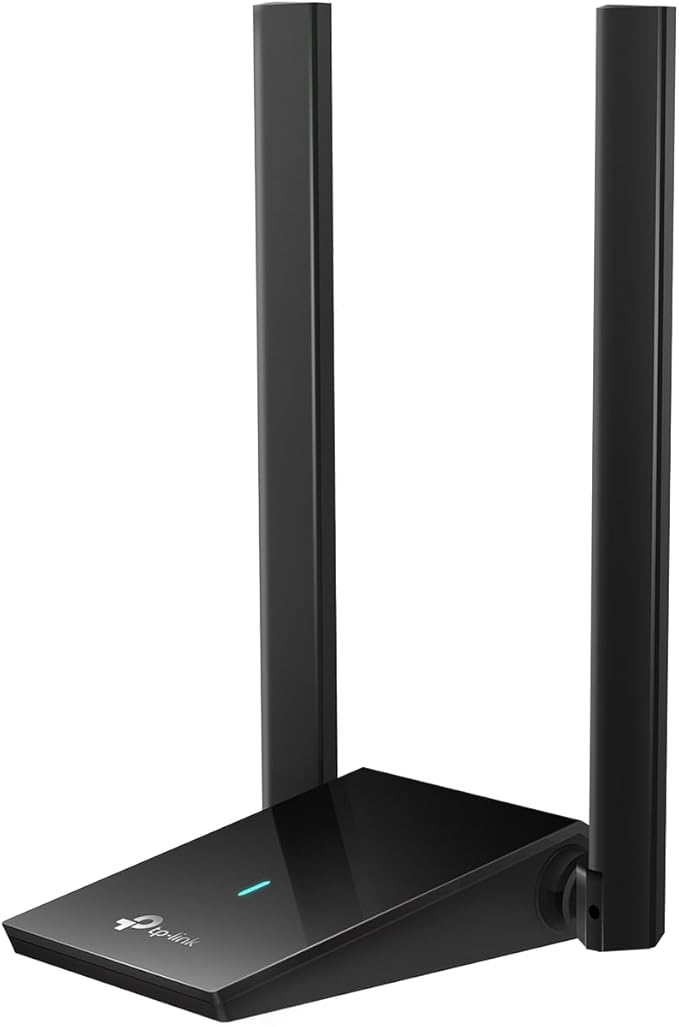
Wireless AC technology means Archer T3U delivers connections that are up to 3x faster than with the previous Wireless N standard. High-speed Wi-Fi (up to 867Mbps over the 5GHz band and 400Mbps over the 2.4GHz band) means Archer T3U is able to support all your online activities, from HD video streaming to lag-free online gaming and web surfing. Archer T3U has a smart design that is tinier than a usual USB adapter. Not only could it be inserted into any USB port, but is quite easy to carry, which is convenient for most usage scenarios.
Wireless AC technology means Archer T3U delivers connections that are up to 3x faster than with the previous Wireless N standard. High-speed Wi-Fi (up to 867Mbps over the 5GHz band and 400Mbps over the 2.4GHz band) means Archer T3U is able to support all your online activities, from HD video streaming to lag-free online gaming and web surfing. Archer T3U has a smart design that is tinier than a usual USB adapter. Not only could it be inserted into any USB port, but is quite easy to carry, which is convenient for most usage scenarios.
in 2 offers
The lowest price for TP-Link AC1300 High Gain Wireless Dual Band USB Adapter (Archer T3U Plus) right now is $41.40 at BIG W, compared across 2 retailers.
The all-time low was $23.50 on 24 Apr 2025 — today's price is 76% above the lowest ever. It has been notably cheaper before — worth setting a price alert.
Prices last updated 14 Sept 2026.
TP-Link AC1300 High Gain Wireless Dual Band USB Adapter (Archer T3U Plus)
Wireless AC technology means Archer T3U delivers connections that are up to 3x faster than with the previous Wireless N standard. High-speed Wi-Fi (up to 867Mbps over the 5GHz band and 400Mbps over the 2.4GHz band) means Archer T3U is able to support all your online activities, from HD video streaming to lag-free online gaming and web surfing. Archer T3U has a smart design that is tinier than a usual USB adapter. Not only could it be inserted into any USB port, but is quite easy to carry, which is convenient for most usage scenarios.
Wireless AC technology means Archer T3U delivers connections that are up to 3x faster than with the previous Wireless N standard. High-speed Wi-Fi (up to 867Mbps over the 5GHz band and 400Mbps over the 2.4GHz band) means Archer T3U is able to support all your online activities, from HD video streaming to lag-free online gaming and web surfing. Archer T3U has a smart design that is tinier than a usual USB adapter. Not only could it be inserted into any USB port, but is quite easy to carry, which is convenient for most usage scenarios.
Last updated at 14/09/2026 19:05:11
TP-Link Mini Wireless USB Adapter (Archer T3U)
Free delivery between Wed – Thu
TP-Link Mini Wireless USB Adapter (Archer T3U)
Delivery between 17–25 Sept $10
originally posted on ebay.com
Really fast connection and no problem setting up.
originally posted on homeessentialsdirect.com
Can't believe this worked. Well I guess I should because it's what it's advertised to do. Long story short, my office laptop is in the room furthest from the xfinity modem. I noticed that there was a discepency between my phone's speed test vs my 2018 Asus laptop's speed test. Phone was getting 90mbs vs the laptop which was getting 16mbs. I didn't want to she'll out the money for a router so I tried an extender, that didn't work. But lo and behold, this antenna worked. Now I'm getting 175 mbs. Lol, this is madness. I wonder how many peoples situation could have been helped by increasing the signal at the computer as compared to the modem. Great product. Note: plug in to usb, go to website and download appropriate drivers, enter wifi password, disabled onboard wifi. ... MoreCan't believe this worked. Well I guess I should because it's what it's advertised to do. Long story short, my office laptop is in the room furthest from the xfinity modem. I noticed that there was a discepency between my phone's speed test vs my 2018 Asus laptop's speed test. Phone was getting 90mbs vs the laptop which was getting 16mbs. I didn't want to she'll out the money for a router so I tried an extender, that didn't work. But lo and behold, this antenna worked. Now I'm getting 175 mbs. Lol, this is madness. I wonder how many peoples situation could have been helped by increasing the signal at the computer as compared to the modem. Great product. Note: plug in to usb, go to website and download appropriate drivers, enter wifi password, disabled onboard wifi. Done.
originally posted on homeessentialsdirect.com
Easy to install and didn’t need any downloads, cds to install - Windows 10 handled that on its own. I’m not getting the speed it’s rated to get from my UniFi wireless access point when other devices much farther away are getting the proper speeds. It’s plugged in to a USB 3.1 port and in the device properties on Windows for this device, it says it will work faster if using USB 3, which I am doing and see no difference.
| General | |
| Device Type | Network adapter |
| Form Factor | External |
| Interface (Bus) Type | SuperSpeed USB 3.0 |
| Networking |
TP-Link Mini Wireless USB Adapter (Archer T3U)
Free delivery between Wed – Thu
TP-Link Mini Wireless USB Adapter (Archer T3U)
Delivery between 17–25 Sept $10
Really fast connection and no problem setting up.
Can't believe this worked. Well I guess I should because it's what it's advertised to do. Long story short, my office laptop is in the room furthest from the xfinity modem. I noticed that there was a discepency between my phone's speed test vs my 2018 Asus laptop's speed test. Phone was getting 90mbs vs the laptop which was getting 16mbs. I didn't want to she'll out the money for a router so I tried an extender, that didn't work. But lo and behold, this antenna worked. Now I'm getting 175 mbs. Lol, this is madness. I wonder how many peoples situation could have been helped by increasing the signal at the computer as compared to the modem. Great product. Note: plug in to usb, go to website and download appropriate drivers, enter wifi password, disabled onboard wifi. ... MoreCan't believe this worked. Well I guess I should because it's what it's advertised to do. Long story short, my office laptop is in the room furthest from the xfinity modem. I noticed that there was a discepency between my phone's speed test vs my 2018 Asus laptop's speed test. Phone was getting 90mbs vs the laptop which was getting 16mbs. I didn't want to she'll out the money for a router so I tried an extender, that didn't work. But lo and behold, this antenna worked. Now I'm getting 175 mbs. Lol, this is madness. I wonder how many peoples situation could have been helped by increasing the signal at the computer as compared to the modem. Great product. Note: plug in to usb, go to website and download appropriate drivers, enter wifi password, disabled onboard wifi. Done.
Easy to install and didn’t need any downloads, cds to install - Windows 10 handled that on its own. I’m not getting the speed it’s rated to get from my UniFi wireless access point when other devices much farther away are getting the proper speeds. It’s plugged in to a USB 3.1 port and in the device properties on Windows for this device, it says it will work faster if using USB 3, which I am doing and see no difference.
I bought a refurbished Windows 10 PC for an elderly relative, set it up, popped in a wifi adapter I had and... garbage. I finally realized that the reason I wasn't finding negative reviews was because most of the buyers of this PC (spec'd properly, like 16GB RAM) were likely deploying it into an enterprise setting, not a home setting (even though it came with Windows 10 Home). Anyway, I took a chance on this wifi adapter and went from an unusable PC to one with 20ms latency and 8 down, 9 up connection speeds. Basically, this adapter turned a PC I was contemplating returning into one that works just as expected. Returning the original garbage wifi adapter and will gladly recommend this one. Only downside was the rear USB ports on the PC are spaced such that a chunky ... MoreI bought a refurbished Windows 10 PC for an elderly relative, set it up, popped in a wifi adapter I had and... garbage. I finally realized that the reason I wasn't finding negative reviews was because most of the buyers of this PC (spec'd properly, like 16GB RAM) were likely deploying it into an enterprise setting, not a home setting (even though it came with Windows 10 Home). Anyway, I took a chance on this wifi adapter and went from an unusable PC to one with 20ms latency and 8 down, 9 up connection speeds. Basically, this adapter turned a PC I was contemplating returning into one that works just as expected. Returning the original garbage wifi adapter and will gladly recommend this one. Only downside was the rear USB ports on the PC are spaced such that a chunky "base" on this adapter doesn't permit it to be installed back there, so the PC owner has a weird antenna sticking out of one of the two front USB ports. Not a showstopper, but also not as elegant a solution as I'd have preferred.
I have a 2012 MacBook Pro with 802-11n, but I have a 802-11ac router. So my Wi-Fi signal has been limited to n speeds. I had lots of trouble with Zoom calls and other high bandwidth resource hogs. This adapter allowed me to add ac speed to my laptop. I now am enjoying 10 times the average speed compared to my built in Wi-Fi. My one knock on this product is that their website is not kept up to date and originally I went to their website to download the driver. I couldn't find the exact model listed so tired a driver for a similar model. That didn't work. I searched for one that matched, but could never find one. Eventually, I tried the CD that came with the product and found a driver on it. After installing, it's worked flawlessly since. If I didn't have a CD drive, ... MoreI have a 2012 MacBook Pro with 802-11n, but I have a 802-11ac router. So my Wi-Fi signal has been limited to n speeds. I had lots of trouble with Zoom calls and other high bandwidth resource hogs. This adapter allowed me to add ac speed to my laptop. I now am enjoying 10 times the average speed compared to my built in Wi-Fi. My one knock on this product is that their website is not kept up to date and originally I went to their website to download the driver. I couldn't find the exact model listed so tired a driver for a similar model. That didn't work. I searched for one that matched, but could never find one. Eventually, I tried the CD that came with the product and found a driver on it. After installing, it's worked flawlessly since. If I didn't have a CD drive, however, I would have had to return it. The other issue, which may or may not be related, is that I am having trouble with my Bluetooth connection for mouse & keyboard and it may be related to interference from this adapter.
I needed wifi for a cheap PC I was building just to show my son how to do it. I bought this unit based on price (very inexpensive), good ratings, and my own personal satisfactory experience with the TP-Link brand. I read reports saying that I'd need internet access to download drivers to install. I can only tell you that on the Windows 10 build -- using Windows installation media downloaded in early January 2021 -- the adapter was recognized and proper drivers installed during the Windows installation. YMMV, I suppose, perhaps based on the age of the installation media you're using. The adapter itself is unremarkable. The antenna barely pokes above the top of our mid-tower case, but obviously placement will vary depending on available USB slots. Tucked away in a ... MoreI needed wifi for a cheap PC I was building just to show my son how to do it. I bought this unit based on price (very inexpensive), good ratings, and my own personal satisfactory experience with the TP-Link brand. I read reports saying that I'd need internet access to download drivers to install. I can only tell you that on the Windows 10 build -- using Windows installation media downloaded in early January 2021 -- the adapter was recognized and proper drivers installed during the Windows installation. YMMV, I suppose, perhaps based on the age of the installation media you're using. The adapter itself is unremarkable. The antenna barely pokes above the top of our mid-tower case, but obviously placement will vary depending on available USB slots. Tucked away in a corner of our basement, it has a strong signal to our wifi mesh, connects at 5 GHz, and matches the download speeds of all the other devices in our house connecting via wi-fi. This was about as painless and satisfactory an experience as I can imagine with a wi-fi adaptor. Like I said, this was for a cheap build, but I wouldn't hesitate to buy this again if I needed wi-fi for a "real" build.
Plus: Located about 20 feet away and 2 sheetrock walls, from the access point and my connection is always 5Ghz. Connection never drops Negative: Throughput is a bit low. My ISP provides 300 down and 350 up. Using speed test.net I'm getting 200 down and 200 up. That's about a 30 % lost When I tested in the same room, I'm getting the words advertised by the ISP. Measured the dbm and found it to be around -55 to -60
Recently bought a PC that has a new 2.5gb wired network adapter built in but I noticed that sometimes it hangs/locks up. This is a known issue with the realtek chipset. While I wait for new drivers and a solution, decided to pick up a wireless adapter to game as getting a new network card is not an option (no space available on the motherboard) I wanted a 2.4/5g adapter as my high end tri band netgear router has both frequencies. After plugging in the device on a usb3.1 port, it was recognized immediately on windows10. I was able to see the 3 bands my router puts out. so I connected to the one I know gets the best speeds (5g channel 153). Then I proceeded to do some speed tests. My PC sits on the other room from the router, separated by a single wall, about 20ft ... MoreRecently bought a PC that has a new 2.5gb wired network adapter built in but I noticed that sometimes it hangs/locks up. This is a known issue with the realtek chipset. While I wait for new drivers and a solution, decided to pick up a wireless adapter to game as getting a new network card is not an option (no space available on the motherboard) I wanted a 2.4/5g adapter as my high end tri band netgear router has both frequencies. After plugging in the device on a usb3.1 port, it was recognized immediately on windows10. I was able to see the 3 bands my router puts out. so I connected to the one I know gets the best speeds (5g channel 153). Then I proceeded to do some speed tests. My PC sits on the other room from the router, separated by a single wall, about 20ft away. My internet speeds top out at 430mbps. I was not able to get over 230mbps with this adapter no matter what I tried. Changed drivers, tried 2 different ones. Change to a lower 5G channel, use different USB ports (3.1 and 3.0) and using a usb extension cable to place the adapter on top of the case. Nothing got me over 230mbps. Also, my ping went from 6ms on ethernet to about 12-16ms on wireless, but that is normal. As a comparison, I placed my samsung note 20 phone next to the usb adapter and ran speed tests using the same server and I was getting 420mbps down. This tells me that the issue cant be the antenna, the ports or the PC. The problem is the cheap bradcomm wifi adapter inside this unit. I mean, my phone has tiny antennas and picks up full signal on the other side of the wall and maxes out on download speeds, while this unit with its supposed high gain antenna cant do better than half the speed. I guess I cant expect too much from a 20 dollar adapter. Its just they should not advertise it with so many great features that dont mean anything if the device is limited by such a crappy chipset. Features like max 867mbps on 5ghz, multi MIMO, high gain antenna and USB 3.0. It is possible that speeds might get better, but I would have to be sitting right next to my router and that defeats the purpose
Does a great job
| General | |
| Device Type | Network adapter |
| Form Factor | External |
| Interface (Bus) Type | SuperSpeed USB 3.0 |
| Networking |