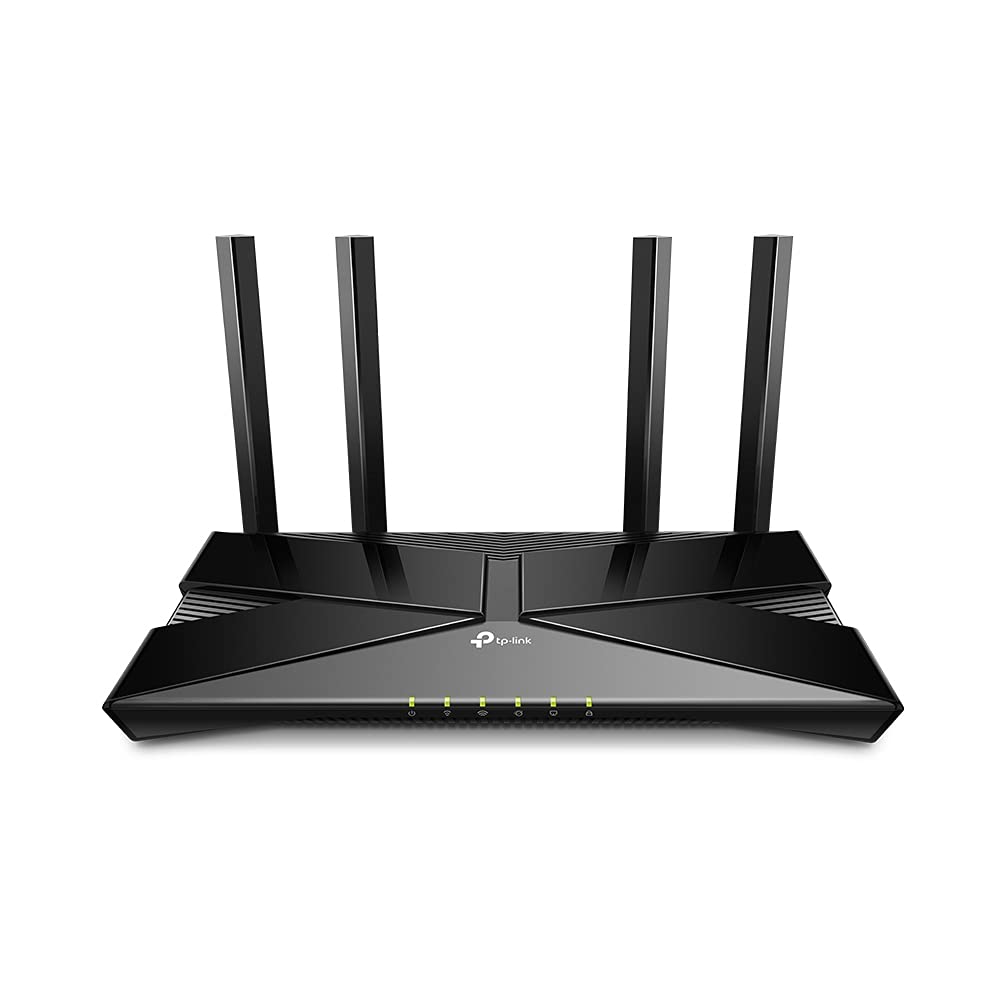
TP-Link Archer AX1800 Dual-Band Wi-Fi 6 Router
The latest generation of WiFi technology brings faster speeds, less lag, and higher capacity, enabling more simultaneous connections on your home network. OFDMA strengthens your WiFi by allowing multiple clients to share one band at the same time, cutting latency and jitter. Enjoy the most versatile yet free parental controls features among all routers, including URL blocking, profile management, pausing, and more. Use with OneMesh extenders to get whole-home coverage and enjoy smooth roaming between signals. Set up your router in minutes with the powerful TP-Link Tether App. Boost WiFi signals throughout your home. Beamforming technology detects devices and concentrates wireless signal strength towards them, especially for previously hard to reach outlets. Archer AX1800 is easy to place vertically on a desktop or mount to a wall. With a horizontal dimension of 150 × 130 × 40.3 mm, it can fit in narrow spaces for more flexibility. If you have any dead zones at home, just add another Easymesh-Compatible router/range extender to further form your whole home multi-gigabit mesh WiFi. No more searching for a stable connection.
The latest generation of WiFi technology brings faster speeds, less lag, and higher capacity, enabling more simultaneous connections on your home network. OFDMA strengthens your WiFi by allowing multiple clients to share one band at the same time, cutting latency and jitter. Enjoy the most versatile yet free parental controls features among all routers, including URL blocking, profile management, pausing, and more. Use with OneMesh extenders to get whole-home coverage and enjoy smooth roaming between signals. Set up your router in minutes with the powerful TP-Link Tether App. Boost WiFi signals throughout your home. Beamforming technology detects devices and concentrates wireless signal strength towards them, especially for previously hard to reach outlets. Archer AX1800 is easy to place vertically on a desktop or mount to a wall. With a horizontal dimension of 150 × 130 × 40.3 mm, it can fit in narrow spaces for more flexibility. If you have any dead zones at home, just add another Easymesh-Compatible router/range extender to further form your whole home multi-gigabit mesh WiFi. No more searching for a stable connection.
The latest generation of WiFi technology brings faster speeds, less lag, and higher capacity, enabling more simultaneous connections on your home network. OFDMA strengthens your WiFi by allowing multiple clients to share one band at the same time, cutting latency and jitter. Enjoy the most versatile yet free parental controls features among all routers, including URL blocking, profile management, pausing, and more. Use with OneMesh extenders to get whole-home coverage and enjoy smooth roaming between signals. Set up your router in minutes with the powerful TP-Link Tether App. Boost WiFi signals throughout your home. Beamforming technology detects devices and concentrates wireless signal strength towards them, especially for previously hard to reach outlets. Archer AX1800 is easy to place vertically on a desktop or mount to a wall. With a horizontal dimension of 150 × 130 × 40.3 mm, it can fit in narrow spaces for more flexibility. If you have any dead zones at home, just add another Easymesh-Compatible router/range extender to further form your whole home multi-gigabit mesh WiFi. No more searching for a stable connection.
The latest generation of WiFi technology brings faster speeds, less lag, and higher capacity, enabling more simultaneous connections on your home network. OFDMA strengthens your WiFi by allowing multiple clients to share one band at the same time, cutting latency and jitter. Enjoy the most versatile yet free parental controls features among all routers, including URL blocking, profile management, pausing, and more. Use with OneMesh extenders to get whole-home coverage and enjoy smooth roaming between signals. Set up your router in minutes with the powerful TP-Link Tether App. Boost WiFi signals throughout your home. Beamforming technology detects devices and concentrates wireless signal strength towards them, especially for previously hard to reach outlets. Archer AX1800 is easy to place vertically on a desktop or mount to a wall. With a horizontal dimension of 150 × 130 × 40.3 mm, it can fit in narrow spaces for more flexibility. If you have any dead zones at home, just add another Easymesh-Compatible router/range extender to further form your whole home multi-gigabit mesh WiFi. No more searching for a stable connection.
in 34 offers
The lowest price for TP-Link Archer AX1800 Dual-Band Wi-Fi 6 Router right now is $83.99 at Techinn.com, compared across 19 retailers.
The all-time low was $49.00 on 25 Apr 2026 — today's price is 71% above the lowest ever. It has been notably cheaper before — worth setting a price alert.
Prices last updated 18 Oct 2026.
Last updated at 18/10/2026 20:35:57
TP-Link Archer AX1800 Dual Band Wi-Fi 6 Router, 1.8 Gbps, EasyMesh, WPA3
Free delivery
Affiliate Disclosure: We may receive a small commission for purchases made through this link at no extra cost to you. This helps support our site. Thank you!
Tp-link Archer Ax1800 Router Silver EU Plug 220V
Delivery $29.49
TP-Link Archer AX1800 - Dual Band Wi-Fi 6 Router
Delivery between 20–29 Oct $15.90
Tp-link Archer Ax1800 Dual Band Wi-fi 6 Gigabit Wireless Router
Free delivery
Affiliate Disclosure: We may receive a small commission for purchases made through this link at no extra cost to you. This helps support our site. Thank you!
TP Link Dual Band Wi Fi 6 Router Archer AX1800 - Routers
Delivery $14.37
TP Link Dual Band Wi Fi 6 Router Archer AX1800 - Routers
Delivery $13
TP-Link Archer AX1800 V1.2 Dual-Band Wi-Fi 6 Router
Delivery between Tue – Fri $19.98
TP-Link Archer AX1800 Dual-Band Wi-Fi 6 Router | Best Online Computer Store
Delivery $12.12
TP-Link Archer AX1800 Dual-Band Wi-Fi 6 Router, Super-Fast 1.8Gbps Wi-Fi, One Mesh
Delivery between Wed – Sat $10
TP-Link Archer AX1800 AX1800 Dual-Band Wi-Fi 6 Router, 574 Mbps at 2.4 GHz + 1201 Mbps at 5 GHz, Dual-Core CPU, Gigabit WAN Port + Gigabit LAN P
Free delivery
originally posted on pbtech.co.nz
I had one of these, and to improve coverage I added a second in a mesh configuration. I do not like the app, but that seems to be the only way to configure a mesh. When meshed, the reliability dropped through the floor, requiring a reboots of the "master" node regularly as the wifi had simply failed. In addition, there were weird performance problems.Removing the mesh node completely restored reliability. As a mesh solution, this device was a miserable failure.The management of these things is frankly annoying. There's a web interface and an app, and neither do everything. The management seems like it wants to be in router mode, but the router functionality is far too basic for my needs so I needed to use it in bridge mode, and it really feels like bridge mode ... MoreI had one of these, and to improve coverage I added a second in a mesh configuration. I do not like the app, but that seems to be the only way to configure a mesh. When meshed, the reliability dropped through the floor, requiring a reboots of the "master" node regularly as the wifi had simply failed. In addition, there were weird performance problems.Removing the mesh node completely restored reliability. As a mesh solution, this device was a miserable failure.The management of these things is frankly annoying. There's a web interface and an app, and neither do everything. The management seems like it wants to be in router mode, but the router functionality is far too basic for my needs so I needed to use it in bridge mode, and it really feels like bridge mode was an afterthought. For example, there's no way to set the NTP parameters in bridge mode - it's all greyed out. (And can only be done via the web interface, not the app.) So it's stuck on the wrong timezone (because that's greyed out), which means the thing isn't doing its automatic software updates at the right time,. Actually, I can find no evidence that it is doing updates at all.In bridge mode, the guest network feature does nothing useful - there's no VLAN capability, and no filtering, so if someone joins your "guest" network, they've joined your WHOLE network. A VLAN capability would be useful here, but ... well, it doesn't have that.Basically:* As a basic, stand-alone WiFi 6 AP, it works fine.* Mesh capability: utter garbage* Management tools: utter garbage* Advanced capabilities: almost non-existent.
originally posted on ebay.com
The Netgear R6700ax was dropping WiFi on my Dell notebook computer. It also took two evenings running the setup wizard for it to connect to my Motorola Surfboard cable modem. The TP-link AX21 found the internet connection before the setup wizard was even ran. I used the same SSID and network key and it connected to all my wireless devices without doing anything more after router setup. I was impressed. I setup a Netgear R6700ac and it also had problems finding the internet connection (cable modem) at a friends house. Just kept saying there was no network cable connected. I also setup a TP-Link AX20 for someone and it setup with no issues and the wireless was very fast. So I bought the TP-Link AX21. No more Netgear anything for me.
originally posted on ebay.com
Excellent overall. It was easy to install as a replacement for my previous router. Turns out my ISP requires a fixed/known MAC address for the router - and, of course, the default is not that. So i interrogated my old router and discovered it uses a MAC address one higher than that printed on the bottom. Then I had to change the TP-Link router to use that address - ummm. Amazingly all went well on my first attempt - otherwise I might be looking a dead box and have to start from scratch again. Nope - I changed the two places where the MAC address is set and on rebooting - I was still live AND had internet. Having got over that panic I was then surprised by every place in my house that suddenly had blazingly fast internet. Nice product - a little under documented, to ... MoreExcellent overall. It was easy to install as a replacement for my previous router. Turns out my ISP requires a fixed/known MAC address for the router - and, of course, the default is not that. So i interrogated my old router and discovered it uses a MAC address one higher than that printed on the bottom. Then I had to change the TP-Link router to use that address - ummm. Amazingly all went well on my first attempt - otherwise I might be looking a dead box and have to start from scratch again. Nope - I changed the two places where the MAC address is set and on rebooting - I was still live AND had internet. Having got over that panic I was then surprised by every place in my house that suddenly had blazingly fast internet. Nice product - a little under documented, to say the least but the rewards are worth it. No, it is not tri-band but neither are my devices, so it would be no help if it were.
| Processor | Dual-Core CPU |
| Ethernet Ports | 1× Gigabit WAN Port; 4× Gigabit LAN Ports |
| Power | 12 V 1 A |
| WiFi Encryption | WPA; WPA2; WPA3; WPA/WPA2-Enterprise (802.1x) |
| Guest Network | 1× 5 GHz Guest Network; 1× 2.4 GHz Guest Network |

TP-Link Archer AX1800 Dual Band Wi-Fi 6 Router, 1.8 Gbps, EasyMesh, WPA3
Free delivery
Affiliate Disclosure: We may receive a small commission for purchases made through this link at no extra cost to you. This helps support our site. Thank you!
Tp-link Archer Ax1800 Router Silver EU Plug 220V
Delivery $29.49
TP-Link Archer AX1800 - Dual Band Wi-Fi 6 Router
Delivery between 20–29 Oct $15.90
Tp-link Archer Ax1800 Dual Band Wi-fi 6 Gigabit Wireless Router
Free delivery
Affiliate Disclosure: We may receive a small commission for purchases made through this link at no extra cost to you. This helps support our site. Thank you!
TP Link Dual Band Wi Fi 6 Router Archer AX1800 - Routers
Delivery $14.37
I had one of these, and to improve coverage I added a second in a mesh configuration. I do not like the app, but that seems to be the only way to configure a mesh. When meshed, the reliability dropped through the floor, requiring a reboots of the "master" node regularly as the wifi had simply failed. In addition, there were weird performance problems.Removing the mesh node completely restored reliability. As a mesh solution, this device was a miserable failure.The management of these things is frankly annoying. There's a web interface and an app, and neither do everything. The management seems like it wants to be in router mode, but the router functionality is far too basic for my needs so I needed to use it in bridge mode, and it really feels like bridge mode ... MoreI had one of these, and to improve coverage I added a second in a mesh configuration. I do not like the app, but that seems to be the only way to configure a mesh. When meshed, the reliability dropped through the floor, requiring a reboots of the "master" node regularly as the wifi had simply failed. In addition, there were weird performance problems.Removing the mesh node completely restored reliability. As a mesh solution, this device was a miserable failure.The management of these things is frankly annoying. There's a web interface and an app, and neither do everything. The management seems like it wants to be in router mode, but the router functionality is far too basic for my needs so I needed to use it in bridge mode, and it really feels like bridge mode was an afterthought. For example, there's no way to set the NTP parameters in bridge mode - it's all greyed out. (And can only be done via the web interface, not the app.) So it's stuck on the wrong timezone (because that's greyed out), which means the thing isn't doing its automatic software updates at the right time,. Actually, I can find no evidence that it is doing updates at all.In bridge mode, the guest network feature does nothing useful - there's no VLAN capability, and no filtering, so if someone joins your "guest" network, they've joined your WHOLE network. A VLAN capability would be useful here, but ... well, it doesn't have that.Basically:* As a basic, stand-alone WiFi 6 AP, it works fine.* Mesh capability: utter garbage* Management tools: utter garbage* Advanced capabilities: almost non-existent.
The Netgear R6700ax was dropping WiFi on my Dell notebook computer. It also took two evenings running the setup wizard for it to connect to my Motorola Surfboard cable modem. The TP-link AX21 found the internet connection before the setup wizard was even ran. I used the same SSID and network key and it connected to all my wireless devices without doing anything more after router setup. I was impressed. I setup a Netgear R6700ac and it also had problems finding the internet connection (cable modem) at a friends house. Just kept saying there was no network cable connected. I also setup a TP-Link AX20 for someone and it setup with no issues and the wireless was very fast. So I bought the TP-Link AX21. No more Netgear anything for me.
Excellent overall. It was easy to install as a replacement for my previous router. Turns out my ISP requires a fixed/known MAC address for the router - and, of course, the default is not that. So i interrogated my old router and discovered it uses a MAC address one higher than that printed on the bottom. Then I had to change the TP-Link router to use that address - ummm. Amazingly all went well on my first attempt - otherwise I might be looking a dead box and have to start from scratch again. Nope - I changed the two places where the MAC address is set and on rebooting - I was still live AND had internet. Having got over that panic I was then surprised by every place in my house that suddenly had blazingly fast internet. Nice product - a little under documented, to ... MoreExcellent overall. It was easy to install as a replacement for my previous router. Turns out my ISP requires a fixed/known MAC address for the router - and, of course, the default is not that. So i interrogated my old router and discovered it uses a MAC address one higher than that printed on the bottom. Then I had to change the TP-Link router to use that address - ummm. Amazingly all went well on my first attempt - otherwise I might be looking a dead box and have to start from scratch again. Nope - I changed the two places where the MAC address is set and on rebooting - I was still live AND had internet. Having got over that panic I was then surprised by every place in my house that suddenly had blazingly fast internet. Nice product - a little under documented, to say the least but the rewards are worth it. No, it is not tri-band but neither are my devices, so it would be no help if it were.
Made in Vietnam, this router is innovative, well-made, modern, and secure. It is compatible with my almost 11-year-old outdated AT&T 2Wire529 modem. It has updated and modernized my internet Wi-Fi security and has allowed me to utilize the “hidden” feature that keeps my Wi-Fi private and undetectable by neighbors. The four antennas provide better Wi-Fi coverage throughout the house. I love having the capacity to add more devices without slowing down my internet service. It was semi-easy to set up without reading the instructions. It was also easy to connect the system to my U-Verse modem using the enclosed white cable. First, I inserted one end of the white cable to the router and then inserted the other end to the modem via the Ethernet port on the back of the ... MoreMade in Vietnam, this router is innovative, well-made, modern, and secure. It is compatible with my almost 11-year-old outdated AT&T 2Wire529 modem. It has updated and modernized my internet Wi-Fi security and has allowed me to utilize the “hidden” feature that keeps my Wi-Fi private and undetectable by neighbors. The four antennas provide better Wi-Fi coverage throughout the house. I love having the capacity to add more devices without slowing down my internet service. It was semi-easy to set up without reading the instructions. It was also easy to connect the system to my U-Verse modem using the enclosed white cable. First, I inserted one end of the white cable to the router and then inserted the other end to the modem via the Ethernet port on the back of the U-verse modem. This device kept me from replacing the old modem with an expensive, newly updated one.
I upgraded from the original Google Wifi router to this one. I was not using the mesh capabilities, and will not with this new router. But I had been looking for a router that offered me more control of my network. This TP-Link AX1800 fits that bill and offers better security with Wifi 6 capability. The initial install went well, and I had my new network going pretty quickly. Accessing the setup pages after the network is setup is a little more finicky than I'd like. I try to use their website address (which is supposed to be bound to my router configuration page), but it often says that I'm not connected to the TP-Link network...even though I am. I have to clear the browser cache and history, and then it will pick it up. That and it seems that it doesn't like Edge ... MoreI upgraded from the original Google Wifi router to this one. I was not using the mesh capabilities, and will not with this new router. But I had been looking for a router that offered me more control of my network. This TP-Link AX1800 fits that bill and offers better security with Wifi 6 capability. The initial install went well, and I had my new network going pretty quickly. Accessing the setup pages after the network is setup is a little more finicky than I'd like. I try to use their website address (which is supposed to be bound to my router configuration page), but it often says that I'm not connected to the TP-Link network...even though I am. I have to clear the browser cache and history, and then it will pick it up. That and it seems that it doesn't like Edge browser very much, but seems to work fine in Firefox. But besides those couple of software problems, the network has been fine. I haven't noticed any speed increase, but I wasn't expecting any. I get the maximum that my ISP provides for the price, so I'm happy with that. The only other thing that I was hoping, with the four antennas vs the Google Wifi puck with no visible antennas, is that the microwave would no longer interfere with the signal. No such luck there... I guess I'd have to get a less "leaky" microwave to solve that problem!
So, I use to do freelance contract work for one of the national cable company’s that also offers commercial wifi services. They used the top rated APs and charged the top rated price too. The reception, speed and throughput on their units was just as good as or better than some wired connections, I have seen.I am referring to the national cable company's APs not the TP-Link.On the other hand the TP-Link Archer AX1800 Wi-Fi 6 Dual Band AP surprised me with VEEEERY comparable stats. I installed it in a warehouse with plenty of high metal racks. It was very easy to configure and install and it connected right up. I really did not think I could purchase a PoE AP of this quality for the price I paid. The proof will be its longevity. I will keep my eye on it and ... MoreSo, I use to do freelance contract work for one of the national cable company’s that also offers commercial wifi services. They used the top rated APs and charged the top rated price too. The reception, speed and throughput on their units was just as good as or better than some wired connections, I have seen.I am referring to the national cable company's APs not the TP-Link.On the other hand the TP-Link Archer AX1800 Wi-Fi 6 Dual Band AP surprised me with VEEEERY comparable stats. I installed it in a warehouse with plenty of high metal racks. It was very easy to configure and install and it connected right up. I really did not think I could purchase a PoE AP of this quality for the price I paid. The proof will be its longevity. I will keep my eye on it and report back if it encounters any failures.Over all, an excellent product!
The Archer AX20 AX1800 Dual Band Wi-Fi 6 Router performs very well. It has four ethernet local area network ports along with its ethernet wide area network port, enables speeds of up to 1.8 gigabytes per second for wired connections and data transfers, and its dual-band doubles the bandwith to avoid interference and maximize throughput. I have used the router for three devices simultaneously with no apparent slowdown or disruptions. In general I found no meaningful difference in speed using this router compared to my prior router (though this does not mean that this router did not perform well), but I did notice improved responsiveness of a mobile device. The Wifi reception is strong throughout my home (though my home is relatively small) as a result of the router's ... MoreThe Archer AX20 AX1800 Dual Band Wi-Fi 6 Router performs very well. It has four ethernet local area network ports along with its ethernet wide area network port, enables speeds of up to 1.8 gigabytes per second for wired connections and data transfers, and its dual-band doubles the bandwith to avoid interference and maximize throughput. I have used the router for three devices simultaneously with no apparent slowdown or disruptions. In general I found no meaningful difference in speed using this router compared to my prior router (though this does not mean that this router did not perform well), but I did notice improved responsiveness of a mobile device. The Wifi reception is strong throughout my home (though my home is relatively small) as a result of the router's four external high-gain antennas and Beamforming technology. Installation of the router can be done using an Internet browser or an app downloaded to a mobile device. The router enables creation of a separate, password-protected WiFi network for guests, and parental controls that can restrict access to inappropriate content, control and monitor usage, and block specific devices from accessing the Internet. The router also has numerous technical options that users can use to facilitate the security of and access to their networks (the details of these options, as well as the other features of the router, are in a 118-page manual on TP-Link's support website). The router has a USB port to share files and media from a USB storage device over a home network locally, or remotely through the internet. The sharing over a home network locally worked, but not remotely through the internet. Presumably the latter failure was due, as indicated by the router's user manual, because my Internet service provider assigns me a private wide area network address, and private addresses are not routed on the Internet.
This replaced an ASUS that was having issues with the radios (4 years old). It was very easy to get programmed up with my LAN info to be the same as my old LAN IP settings. So far (about a month) it seems to be working fine and the Wi-Fi is speedy and strong. It even covers well outside of our house. There, however, are less options for the unit than the old ASUS. What seems to be lacking isn't a big deal, but it does not have quite as many customization options for the network and external settings - Firewall mainly. It still works fine for my VOIP softphone that connects to work - AFTER disabling SIP ALG. I did not use the app to set it up. I had a bad experience with a different TP Link unit used for work, and I am more of a hands-on guy anyway. The direct IP GUI ... MoreThis replaced an ASUS that was having issues with the radios (4 years old). It was very easy to get programmed up with my LAN info to be the same as my old LAN IP settings. So far (about a month) it seems to be working fine and the Wi-Fi is speedy and strong. It even covers well outside of our house. There, however, are less options for the unit than the old ASUS. What seems to be lacking isn't a big deal, but it does not have quite as many customization options for the network and external settings - Firewall mainly. It still works fine for my VOIP softphone that connects to work - AFTER disabling SIP ALG. I did not use the app to set it up. I had a bad experience with a different TP Link unit used for work, and I am more of a hands-on guy anyway. The direct IP GUI seemed to work fine and made it easy to set up. Overall, a decent unit for our house.
This replaced an ancient (15 years?) Linksys WRT54GL 2.4 GHz wireless router which had been bulletproof until now, when it failed.Setup perhaps took me longer than it might have because I haven't set up a router for some time and was cautious to be sure everything was by the book. Other than that, I chose the web browser approach which was easy to use and everything worked as hoped. [Except my ethernet-attached laser printer which wouldn't print from any of my devices, whether ethernet or WiFi. It turned out there must have been a faulty instruction stuck in the printer's memory acting like a dam against any requests to print. (I discovered the printer's memory was full when I attempted a command at the printer's manual controls). After disconnecting the printer ... MoreThis replaced an ancient (15 years?) Linksys WRT54GL 2.4 GHz wireless router which had been bulletproof until now, when it failed.Setup perhaps took me longer than it might have because I haven't set up a router for some time and was cautious to be sure everything was by the book. Other than that, I chose the web browser approach which was easy to use and everything worked as hoped. [Except my ethernet-attached laser printer which wouldn't print from any of my devices, whether ethernet or WiFi. It turned out there must have been a faulty instruction stuck in the printer's memory acting like a dam against any requests to print. (I discovered the printer's memory was full when I attempted a command at the printer's manual controls). After disconnecting the printer and re-powering it, all of my devices can print to it without problem.]Setup defaulted to having the router allocate 2.4 GHz and 5 GHz itself using a single SSID, which was what I had hoped for. Also, the functions in the router's web browser interface are easy to understand and access.Today I was across the street from my house in a neighbor's backyard pool and I noticed my Android phone was alternately connecting with this router or with LTE. That's unexpected range.I have 50 Mbps download internet service. With my old router the ethernet to internet connection ran around 40 Mbps; with the new router I get the full 50 Mbps. Checking the internet speed of two wireless computers in my home, the old router gave me 14-17 Mbps; the new router 40-45 Mbps.I am pleased with the router.
This is a great router. It has improved my wi-fi speeds tremendously. I was using the router that I rent from my cable company and it was often very slow, and couldn't handle the load of all the devices running in my home. It took forever to load certain apps and often interrupted shows well they were streaming. This router has made everything run so smoothly. Apps that took forever to load, now load instantly. Streaming is also way better. I no longer have to wait for the show to load in the middle of watching it. We are a large family with many devices. There are 10 devices connected to this router and my original router and everything runs great. It was very easy to set up. I'm not the most technically savvy person, and I had very little issue getting it up and ... MoreThis is a great router. It has improved my wi-fi speeds tremendously. I was using the router that I rent from my cable company and it was often very slow, and couldn't handle the load of all the devices running in my home. It took forever to load certain apps and often interrupted shows well they were streaming. This router has made everything run so smoothly. Apps that took forever to load, now load instantly. Streaming is also way better. I no longer have to wait for the show to load in the middle of watching it. We are a large family with many devices. There are 10 devices connected to this router and my original router and everything runs great. It was very easy to set up. I'm not the most technically savvy person, and I had very little issue getting it up and running. Its slim and small and I didn't have any problem finding a place to put it. I was able to set it up right behind my TV by my other router. The app was simple to download and connected easily. Its a really good app, it works great and has nice features. I'm able to see which devices are on at any time and I'm able to disconnect those devices if I need to. I would definitely recommend this router.
| Processor | Dual-Core CPU |
| Ethernet Ports | 1× Gigabit WAN Port; 4× Gigabit LAN Ports |
| Power | 12 V 1 A |
| WiFi Encryption | WPA; WPA2; WPA3; WPA/WPA2-Enterprise (802.1x) |
| Guest Network | 1× 5 GHz Guest Network; 1× 2.4 GHz Guest Network |


