Last updated at 21/03/2026 14:55:56
Wacom Cintiq 22" Creative Pen Display - Black
Free delivery between Tue – Fri
Wacom Cintiq 22 Drawing Tablet with Full HD 21.5-Inch Display Screen, 8192 Pressure Sensitive Pro Pen 2 Tilt Recognition, Compatible with Mac OS Windo
Free delivery
Wacom Cintiq 22 Creative Pen Display
Delivery $36
originally posted on bestbuy.com
This thing is great. I've used plenty of Wacom products in the past, and this has quickly become my favorite. It does have a learning curve, of course, so I wouldn't necessarily recommend it for someone who's new to this kind of device (there are plenty of more affordable alternatives to get started).And don't think this will make you a great artist overnight. You still need to know how to draw, and this is just another tool. Like a pencil, some people can use it to make amazing things, but it takes a lot of practice to get any good.
originally posted on walmart.com
Gives me the same level of comfort as drawing on their Cintiq Pros.The only difference in terms of drawing experience is maybe the screen feel. The texture is more film like, and it feels like I am drawing with the old Intuos Pro I had.This is fine, I never had problems with the way Wacom Tablets feel and they never gave me that sticky feeling either.Also, if you're concerned about the parallax? Don't be. It's entirely unnoticeable. I tried comparing this with my Mobile Studio and there practically no difference in space between the mouse and pen :)This is definitely worthy of its 5 star rating. I think this is an excellent deal since you're getting the Pro Pen 2 with this tablet as well.Cons?• I wish this was more portable and it could be too if it were ... MoreGives me the same level of comfort as drawing on their Cintiq Pros.The only difference in terms of drawing experience is maybe the screen feel. The texture is more film like, and it feels like I am drawing with the old Intuos Pro I had.This is fine, I never had problems with the way Wacom Tablets feel and they never gave me that sticky feeling either.Also, if you're concerned about the parallax? Don't be. It's entirely unnoticeable. I tried comparing this with my Mobile Studio and there practically no difference in space between the mouse and pen :)This is definitely worthy of its 5 star rating. I think this is an excellent deal since you're getting the Pro Pen 2 with this tablet as well.Cons?• I wish this was more portable and it could be too if it were sporting an all-in-1 USB C cable, and hook up via 1 single cable.• No touch, but this isn't really that important to me. although I wish we had a choice• No side buttons. This is a personal taste. I'm sure many don't mind this having no side buttons and are ok with using a $100 remote you purchase separately. Me, I still can't stop using my keyboard. Old habits die hard.
originally posted on bestbuy.com
I’ve used this for a year and it’s amazing for the price. The canvas size should be big enough for most people. If you’re a professional, you should already know where to go. If you’re a hobbyist looking for upgrade from a tablet, I think this model is worth considering. Very intuitive, natural traditional feel and user friendly. The hardest part is setting it up and once that’s done, you’re golden. The only issue I have is the pen. It’s a great pen and no charge required but I disabled the buttons on it because I kept accidentally pressing it at times during use. If you’re not already aware, this is not a giant touchscreen iPad so you’ll need to use it in tandem with a computer or Mac(me) also get an ergo arm, life would be better. Trust me.
| Panel Type | IPS-Type LCD |
| Aspect Ratio | 16-9 |
| Video Ports | 1 x HDMI |
| Contrast Ratio | 1000-1 |
| Color Gamut | 72% NTSC 96% sRGB |
Wacom Cintiq 22" Creative Pen Display - Black
Free delivery between Tue – Fri
Wacom Cintiq 22 Drawing Tablet with Full HD 21.5-Inch Display Screen, 8192 Pressure Sensitive Pro Pen 2 Tilt Recognition, Compatible with Mac OS Windo
Free delivery
Wacom Cintiq 22 Creative Pen Display
Delivery $36
This thing is great. I've used plenty of Wacom products in the past, and this has quickly become my favorite. It does have a learning curve, of course, so I wouldn't necessarily recommend it for someone who's new to this kind of device (there are plenty of more affordable alternatives to get started).And don't think this will make you a great artist overnight. You still need to know how to draw, and this is just another tool. Like a pencil, some people can use it to make amazing things, but it takes a lot of practice to get any good.
Gives me the same level of comfort as drawing on their Cintiq Pros.The only difference in terms of drawing experience is maybe the screen feel. The texture is more film like, and it feels like I am drawing with the old Intuos Pro I had.This is fine, I never had problems with the way Wacom Tablets feel and they never gave me that sticky feeling either.Also, if you're concerned about the parallax? Don't be. It's entirely unnoticeable. I tried comparing this with my Mobile Studio and there practically no difference in space between the mouse and pen :)This is definitely worthy of its 5 star rating. I think this is an excellent deal since you're getting the Pro Pen 2 with this tablet as well.Cons?• I wish this was more portable and it could be too if it were ... MoreGives me the same level of comfort as drawing on their Cintiq Pros.The only difference in terms of drawing experience is maybe the screen feel. The texture is more film like, and it feels like I am drawing with the old Intuos Pro I had.This is fine, I never had problems with the way Wacom Tablets feel and they never gave me that sticky feeling either.Also, if you're concerned about the parallax? Don't be. It's entirely unnoticeable. I tried comparing this with my Mobile Studio and there practically no difference in space between the mouse and pen :)This is definitely worthy of its 5 star rating. I think this is an excellent deal since you're getting the Pro Pen 2 with this tablet as well.Cons?• I wish this was more portable and it could be too if it were sporting an all-in-1 USB C cable, and hook up via 1 single cable.• No touch, but this isn't really that important to me. although I wish we had a choice• No side buttons. This is a personal taste. I'm sure many don't mind this having no side buttons and are ok with using a $100 remote you purchase separately. Me, I still can't stop using my keyboard. Old habits die hard.
I’ve used this for a year and it’s amazing for the price. The canvas size should be big enough for most people. If you’re a professional, you should already know where to go. If you’re a hobbyist looking for upgrade from a tablet, I think this model is worth considering. Very intuitive, natural traditional feel and user friendly. The hardest part is setting it up and once that’s done, you’re golden. The only issue I have is the pen. It’s a great pen and no charge required but I disabled the buttons on it because I kept accidentally pressing it at times during use. If you’re not already aware, this is not a giant touchscreen iPad so you’ll need to use it in tandem with a computer or Mac(me) also get an ergo arm, life would be better. Trust me.
This is definitely an excellent tablet to draw with. I was using my iPad to do digital drawings as well as a Wacom Intuos, but this one takes the cake. Now I have the ability to draw with multiple programs as well as using it with sculpting programs such as Zbrush and blender. AS mentioned in other comments, this amazing machinery does not have any tool buttons to use. I would highly recommend getting something to use other than your basic keyboard. I ended up getting a Razer Tartarus v2. and it works amazingly well with the Wacom tablet. No, it's not portable, but that's why I have an Ipad. Also, I did see questions about it not be able to be used offline.....Well, that's simply not true, you can. This is not a separate tablet so you must use it with a PC, Laptop ... MoreThis is definitely an excellent tablet to draw with. I was using my iPad to do digital drawings as well as a Wacom Intuos, but this one takes the cake. Now I have the ability to draw with multiple programs as well as using it with sculpting programs such as Zbrush and blender. AS mentioned in other comments, this amazing machinery does not have any tool buttons to use. I would highly recommend getting something to use other than your basic keyboard. I ended up getting a Razer Tartarus v2. and it works amazingly well with the Wacom tablet. No, it's not portable, but that's why I have an Ipad. Also, I did see questions about it not be able to be used offline.....Well, that's simply not true, you can. This is not a separate tablet so you must use it with a PC, Laptop of those natures. Definitely a 10/10. Couldn't be happier. When my niece grows up and still likes art I might just buy her one 2.
I use this as a secondary screen next to a bigger cintiq and to travel with. Friends have the 16 pro and I prefer this one. I can hardly appreciate 4k at this size so the normal cintiq is enough. Not too bright though. I take good care and use it only a few times a month. Yet, I had a scanline failure (lines wobble on certain areas because of it). Luckily within warranty period but imo this is a pretty serious hardware failure.
As the title says, the cords ruin this product. There is one central cord the connects to the top of the Wacom display. It is about 4ft long. From the central cord, it has 3 cords that come off it. Where these three cords split off from is about 3ft into a 4ft long cord. Meaning, you only have three 1ft cords to plug into the follow:The first cord plugs into a power supply. The power supply is good because it has a power brick and about 6 feet of cordage. That is the best part of the cords because it gives the user plenty of space to have your powering system (surge proctor) and it doesn't have to be extremely close.The second cord is an hdmi that plugs into your display port on your computer (where your monitor will plug into).The last cord is a usb that ... MoreAs the title says, the cords ruin this product. There is one central cord the connects to the top of the Wacom display. It is about 4ft long. From the central cord, it has 3 cords that come off it. Where these three cords split off from is about 3ft into a 4ft long cord. Meaning, you only have three 1ft cords to plug into the follow:The first cord plugs into a power supply. The power supply is good because it has a power brick and about 6 feet of cordage. That is the best part of the cords because it gives the user plenty of space to have your powering system (surge proctor) and it doesn't have to be extremely close.The second cord is an hdmi that plugs into your display port on your computer (where your monitor will plug into).The last cord is a usb that plugs into your computer (where peripherals would go).That is a lot of wiggle room needed for all of this. A good foot of the central cord is used to plug peripherals and hdmi/display port in. This leaves about 3 feet of cordage...that 3 feet has to work with your computer set up. If you have a laptop, it isn't so bad (unless your display port and USB are on different sides of the laptop...you might run into trouble). However, if you're plugging this into a desktop, it is almost impossible to plug it in, wrap cords around everything, and still have room to prop the screen up in a comfortable location and still be able to use your mouse/keyboard if needed. It is way too cluttered.Beware when purchasing. It does not work very well with my set up. I have a gaming set up on a gaming desk that does not have a lot of room to put this on my desk and use it comfortably along with my mouse and keyboard. IF you have a set up that has enough room, maybe a table on the side or something...it will probably work with you.Highly recommend measuring your set up and make sure you have enough wiggle room for a 3 foot cord that is thick and stiff to maneuver around your desk/monitors/keyboard/mouse/etc.
I'm a professional artist and I wanted to try out a Cintiq as I was starting to have wrist pain issues while using my Intuos tablet. I have limited desk space so this model's size is very nice. Overall I think this was a good investment for me, I only have a few complaints about it.Pros - very ergonomic being able to draw directly on the screen at a nice 20 degree angle. Feels natural to draw/sculpt on. No glare issues.Cons - wish it came with the stand and hotkey remote, Wacom being greedy I guess. The angle the built-in stand goes too isn't quite as high as I'd like. Some programs don't agree well with having their zoom/scale changed to work on this smaller screen.
Great display for someone on an average budget. Good for 3D texturing and sculpting. Response time is great. Pen pressure works great. It doesn't have any buttons on the display itself, but I use keyboard shortcuts so that hasn't affected me.The more you use it the more small scratches will appear on the screen. It probably happens more as the pen nibs wear out and get flat spots. You'll want to have extra nibs for a smooth experience.Overall it's good for the price.I recommend getting the Wacom adjustable Landscape stand if you want to use it in a better position as a second monitor, or if you want to use it hanging off the edge of your desk.
I have had the Wacom Cintiq 22 for under a month and overall it delivers exactly what I would expect from a Wacom. The pen is the best that I have used and is very responsive, although I do have some parallax during drawing. This could be a computer performance issue, but still an issue for me nonetheless.The overall tablet is nice. It is a little on the heavy side but it does come with a stand that can position the tablet in many different angles for drawing comfort. When all the cords are connected, it does feels bulky and is difficult to move around.The absolute biggest issue I have with this tablet is the resolution. Max resolution is 1080p, which I didn't think was going to be a big issue until you look at your drawing on a Mac monitor or any other monitor ... MoreI have had the Wacom Cintiq 22 for under a month and overall it delivers exactly what I would expect from a Wacom. The pen is the best that I have used and is very responsive, although I do have some parallax during drawing. This could be a computer performance issue, but still an issue for me nonetheless.The overall tablet is nice. It is a little on the heavy side but it does come with a stand that can position the tablet in many different angles for drawing comfort. When all the cords are connected, it does feels bulky and is difficult to move around.The absolute biggest issue I have with this tablet is the resolution. Max resolution is 1080p, which I didn't think was going to be a big issue until you look at your drawing on a Mac monitor or any other monitor with a higher resolution. The Wacom display colors are muted, the drawing line is jagged and pixelated and you can not really see any color depth. I would find myself checking my work on my Mac to see where all the issues are. This tablet is basically the same as the Cintiq 16, just bigger. The extra canvas size is not worth the extra cost.I recommend that if you are in the market for a desktop tablet and you want a Wacom, save for the Pro line with a higher resolution. This one falls short for how expensive it is and not worth it.Would I buy one again? No.Pros: It's a Wacom. It is quality and looks great. The pen is amazing and very responsive. The built in stand is great and provides a lot of flexibility.Cons: Expensive for what you are getting. Resolution is low for the cost. The tablet is heavy and bulky when all the cords are connected. Difficult to maneuver around the desk. Some parallax issues when drawing.
Take note of when I purchased the item. Also, I haven't drawn in 15 years so all this tech is new to me. If you're in my boat, then please continue to read.The table pre-set colors are wonderful. After configuring the pen I had no issues. One thing that freaked me out was a red tint that appears after awhile. After some research, I realized my computer's Night Light settings were also affecting the tablet's screen so check for that if you run into the same issue.My first impression is that the tablet would mirror my desktop, and I would see my work on two screens. Not so. Maybe there's a way to do that. However, my computer recognized it as a an extended screen, and I just moved my trial of Clip Studio to the Cintiq window and everything is fine.When I first ... MoreTake note of when I purchased the item. Also, I haven't drawn in 15 years so all this tech is new to me. If you're in my boat, then please continue to read.The table pre-set colors are wonderful. After configuring the pen I had no issues. One thing that freaked me out was a red tint that appears after awhile. After some research, I realized my computer's Night Light settings were also affecting the tablet's screen so check for that if you run into the same issue.My first impression is that the tablet would mirror my desktop, and I would see my work on two screens. Not so. Maybe there's a way to do that. However, my computer recognized it as a an extended screen, and I just moved my trial of Clip Studio to the Cintiq window and everything is fine.When I first installed the drivers I had an issue. So I installed the PREVIOUS driver iteration and upgraded through Wacom's client. That fixed the communication issue between the tablet and my computer. Additionally, when setting up my account with Wacom, for some reason Chrome (even after checking cookies) would not load the website properly. Edge does load Wacom properly so switch browsers if need be.
| Panel Type | IPS-Type LCD |
| Aspect Ratio | 16-9 |
| Video Ports | 1 x HDMI |
| Contrast Ratio | 1000-1 |
| Color Gamut | 72% NTSC 96% sRGB |
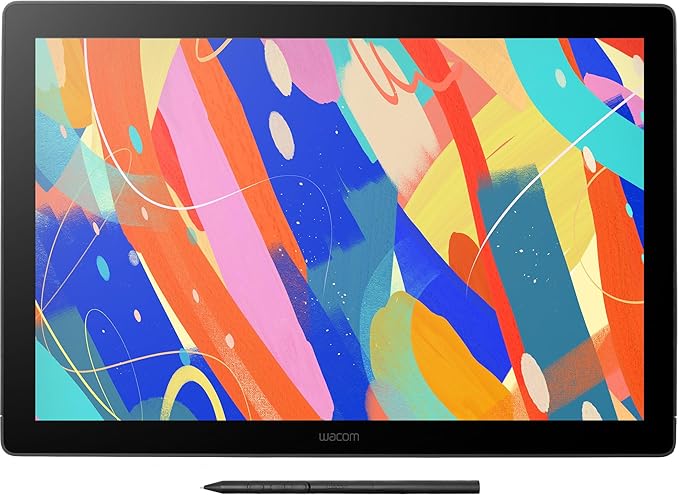
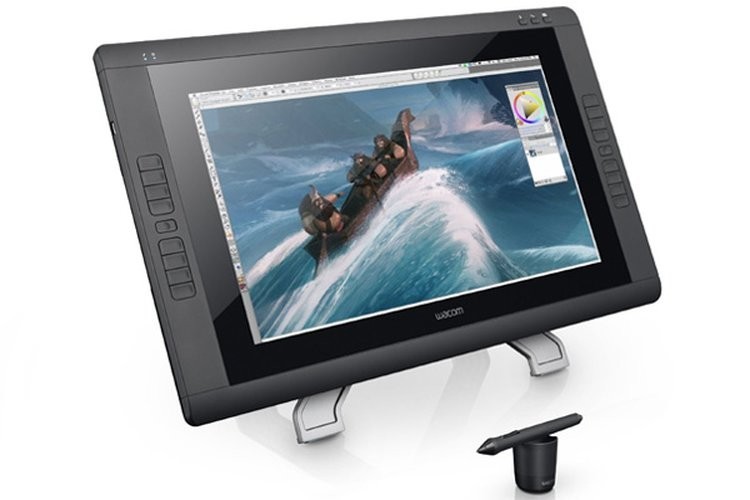
Create beautiful and detailed digital artworks with the Wacom Cintiq 22HD Touch Creative Pen Display. Compatible with both Windows (7 and 8) and Mac OS X (10.6.8 and later), the Cintiq 22HD can be used with various creativity programs.
Create beautiful and detailed digital artworks with the Wacom Cintiq 22HD Touch Creative Pen Display. Compatible with both Windows (7 and 8) and Mac OS X (10.6.8 and later), the Cintiq 22HD can be used with various creativity programs.
in 3 offers
The lowest price for Wacom Cintiq 22 Creative Pen Display right now is $1,797.00 at Horizon Store, compared across 3 retailers.
The all-time low was $810.00 on 15 Nov 2024 — today's price is 122% above the lowest ever. It has been notably cheaper before — worth setting a price alert.
Prices last updated 21 Mar 2026.
Wacom Cintiq 22 Creative Pen Display
Create beautiful and detailed digital artworks with the Wacom Cintiq 22HD Touch Creative Pen Display. Compatible with both Windows (7 and 8) and Mac OS X (10.6.8 and later), the Cintiq 22HD can be used with various creativity programs.
Create beautiful and detailed digital artworks with the Wacom Cintiq 22HD Touch Creative Pen Display. Compatible with both Windows (7 and 8) and Mac OS X (10.6.8 and later), the Cintiq 22HD can be used with various creativity programs.

