Last updated at 29/08/2026 07:25:28
Asus Ax5700 Dual Band Performance Wifi 6 Extendable Gaming Router
Free delivery
Affiliate Disclosure: We may receive a small commission for purchases made through this link at no extra cost to you. This helps support our site. Thank you!
Asus Ax5700 Dual Band Performance Wifi 6 Extendable Gaming Router
Free delivery
Affiliate Disclosure: We may receive a small commission for purchases made through this link at no extra cost to you. This helps support our site. Thank you!
Asus Rt-ax86u Pro Ax5700 Dual Band Wifi 6 Extendable Gaming Router
Free delivery
Affiliate Disclosure: We may receive a small commission for purchases made through this link at no extra cost to you. This helps support our site. Thank you!
Asus RT-AX86U Pro Wi-Fi 6 IEEE 802.11ax Ethernet Wireless Router - Dual Band - 2.40 GHz ISM Band - 5 GHz UNII Band - 4 x Antenna(1 x Internal/3 x - -
Delivery $7.95
Asus RT-AX86U Pro Wi-Fi 6 IEEE 802.11ax Ethernet Wireless Router - Dual Band - 2.40 GHz ISM Band - 5 GHz UNII Band - 4 x Antenna(1 x Internal/3 x - -
Free delivery between 2–5 Sept
originally posted on asus.com
Compared to the (now out of support life), Netgear Nighthawl X4S (Model R7800) being replaced, the ASUS RT-AX86U router wins hands down on features and firmware.The firmware is so much better, especially the availability of the ASUSWRT-MERLIN custom firmware upgrades that fix security bugs and improve & expand the feature set of the built-in ASUS firmware. I have been enjoying using the expanded feature set available.2GHz & 5GHz speeds are good, getting full rated speeds at the router itself, hard wired into our cable ISP modem (300Mbps down / 7Mbps up). Speeds do drop over distance with WiFi (as expected) but are still pretty good for our two nearby home office computers, one hardwired and one wireless. Roku TV's, laptops, phones and generator wireless ... MoreCompared to the (now out of support life), Netgear Nighthawl X4S (Model R7800) being replaced, the ASUS RT-AX86U router wins hands down on features and firmware.The firmware is so much better, especially the availability of the ASUSWRT-MERLIN custom firmware upgrades that fix security bugs and improve & expand the feature set of the built-in ASUS firmware. I have been enjoying using the expanded feature set available.2GHz & 5GHz speeds are good, getting full rated speeds at the router itself, hard wired into our cable ISP modem (300Mbps down / 7Mbps up). Speeds do drop over distance with WiFi (as expected) but are still pretty good for our two nearby home office computers, one hardwired and one wireless. Roku TV's, laptops, phones and generator wireless controller all can connect well to both networks (2 & 5GHz).Tried using the "Enable Smart Connect" WiFi feature, to allow the device to automatically pick its network frequency but found many of my devices chose 2GHz rather than the preferred 5GHz speeds, so ended up keeping the network split and manually picking which network frequency to connect each device.Not having any 6GHz devices I can't comment on the 6GHz speeds.Love the ability to select DNS Rebind, DNSSEC, DNS-over-TLS (DoT) with your preferred server, used Cloudflare & quad9 for annonymity of DNS queries. The DNS lookup speeds tested well against our ISP's DNS servers via DNS Benchmark (https://www.grc.com/dns/benchmark.htm).IPv6 firewall I could not yet get to work with our cable ISP even though in theory they support IPv6. Still trying to figure the correct settings out but no joy as yet.Great packet capture for the System Log for trouble-shooting and security monitoring.The built-in Network Printer Server using LPR protocol works great for a small office setup and is completely reliable, since the printer is connected via a USB cable directly into the router. So the referenced printer port IP address is always available.On the Linksys I never could get this to work reliably as our HP LaserJet 400 would go to sleep and loose its DHCP network lease over time (even if using a fixed IP address), regardless of printer settings (short of keeping the printer awake all the time).Having the printer connected via a USB cable to an always on router means the IP address is always available and the DHCP lease expiry is no longer a problem. Practically this means the sleeping printer wakes up correctly every time to print whenever a print job is sent.There are so many other great firmware features but these were the main ones I found most useful compared to the retired Linksys. So far the router has stayed up and not had any problems with 2 desktops, 2 laptops, 2 phones, 1 kindle, 2 Roku enabled TVs, 1 generator wireless controller all connecting.
originally posted on asus.com
I bought this product based on a friends recommendation and the reviews regarding Parental Controls. The configuration and operation are pretty straight forward. You Do Not need a Masters in Computer Science to configure the machine. The WIFI transmitters work better than the upstream modem provided by the "A" company (ISP). All works pretty well, except not being able to block some devices set on a timed schedule. I am working with Tech Support on this and they are interested in the corner case that I gave them. The firewall is pretty comprehensive. Although, I would have liked to have seen URL and keyword filtering by device. Maybe ASUS will read the review and implement the additional features. If it were not for the minor issue that I have uncovered, I would ... MoreI bought this product based on a friends recommendation and the reviews regarding Parental Controls. The configuration and operation are pretty straight forward. You Do Not need a Masters in Computer Science to configure the machine. The WIFI transmitters work better than the upstream modem provided by the "A" company (ISP). All works pretty well, except not being able to block some devices set on a timed schedule. I am working with Tech Support on this and they are interested in the corner case that I gave them. The firewall is pretty comprehensive. Although, I would have liked to have seen URL and keyword filtering by device. Maybe ASUS will read the review and implement the additional features. If it were not for the minor issue that I have uncovered, I would have given the device Five Stars. I read some bad reviews about support. I don't know who these people were speaking to. I had no issues contacting support. I found the support group to be very attentive and followed up without me having to hunt them down. As a former support engineer for few Enterprise computer manufactures, I was appreciative as to how I was treated.
originally posted on asus.com
My 6th Asus router over about 15 years. I've had other brands, but I always come back to Asus and this time I'm not leaving. I am a veteran in the IT business, over 26 years, so I know routers and I can say that the key thing that separates Asus routers from all others is the firmware. Drawing from opensource community experts that have a passion for maximizing functionality, security, and performance while also adding Asus' exclusive features like AIMesh, Guest Network Pro, and kid's wifi for a novel approach to parental control. Oh, yeah, and superb network performance and advanced control if you need it.The Asus approach to online safety for children by creating a "network" exclusively for each child is genius! My son connects his devices to HIS OWN wifi ... MoreMy 6th Asus router over about 15 years. I've had other brands, but I always come back to Asus and this time I'm not leaving. I am a veteran in the IT business, over 26 years, so I know routers and I can say that the key thing that separates Asus routers from all others is the firmware. Drawing from opensource community experts that have a passion for maximizing functionality, security, and performance while also adding Asus' exclusive features like AIMesh, Guest Network Pro, and kid's wifi for a novel approach to parental control. Oh, yeah, and superb network performance and advanced control if you need it.The Asus approach to online safety for children by creating a "network" exclusively for each child is genius! My son connects his devices to HIS OWN wifi network which is managed separately from his sister's wifi network... simply a genius approach to online safety and parental control for the multiple devices that children have these days. Plus it makes them feel special because they have their own wifi!Nearly every update from Asus has a feature enhancement or a new feature. These routers feel future proof. Every time I get a little board (because IT is my passion and I like new and shinny features to play with), Asus drops a new firmware with a new feature and my interest is renewed.Any company can make hardware, the hard part is the firmware and I have yet to use a router from another brand that even comes close to the Asus router firmware, both for feature set as well as performance. And the AIMesh....no other brand has anything close!
| Processor | 2.0GHz quad-core processor |
| Operating Frequency | 2.4 GHz / 5 GHz |
| Router APP | ASUS Router APP |
Asus Ax5700 Dual Band Performance Wifi 6 Extendable Gaming Router
Free delivery
Affiliate Disclosure: We may receive a small commission for purchases made through this link at no extra cost to you. This helps support our site. Thank you!
Asus Ax5700 Dual Band Performance Wifi 6 Extendable Gaming Router
Free delivery
Affiliate Disclosure: We may receive a small commission for purchases made through this link at no extra cost to you. This helps support our site. Thank you!
Asus Rt-ax86u Pro Ax5700 Dual Band Wifi 6 Extendable Gaming Router
Free delivery
Affiliate Disclosure: We may receive a small commission for purchases made through this link at no extra cost to you. This helps support our site. Thank you!
Asus RT-AX86U Pro Wi-Fi 6 IEEE 802.11ax Ethernet Wireless Router - Dual Band - 2.40 GHz ISM Band - 5 GHz UNII Band - 4 x Antenna(1 x Internal/3 x - -
Delivery $7.95
Asus RT-AX86U Pro Wi-Fi 6 IEEE 802.11ax Ethernet Wireless Router - Dual Band - 2.40 GHz ISM Band - 5 GHz UNII Band - 4 x Antenna(1 x Internal/3 x - -
Free delivery between 2–5 Sept
Compared to the (now out of support life), Netgear Nighthawl X4S (Model R7800) being replaced, the ASUS RT-AX86U router wins hands down on features and firmware.The firmware is so much better, especially the availability of the ASUSWRT-MERLIN custom firmware upgrades that fix security bugs and improve & expand the feature set of the built-in ASUS firmware. I have been enjoying using the expanded feature set available.2GHz & 5GHz speeds are good, getting full rated speeds at the router itself, hard wired into our cable ISP modem (300Mbps down / 7Mbps up). Speeds do drop over distance with WiFi (as expected) but are still pretty good for our two nearby home office computers, one hardwired and one wireless. Roku TV's, laptops, phones and generator wireless ... MoreCompared to the (now out of support life), Netgear Nighthawl X4S (Model R7800) being replaced, the ASUS RT-AX86U router wins hands down on features and firmware.The firmware is so much better, especially the availability of the ASUSWRT-MERLIN custom firmware upgrades that fix security bugs and improve & expand the feature set of the built-in ASUS firmware. I have been enjoying using the expanded feature set available.2GHz & 5GHz speeds are good, getting full rated speeds at the router itself, hard wired into our cable ISP modem (300Mbps down / 7Mbps up). Speeds do drop over distance with WiFi (as expected) but are still pretty good for our two nearby home office computers, one hardwired and one wireless. Roku TV's, laptops, phones and generator wireless controller all can connect well to both networks (2 & 5GHz).Tried using the "Enable Smart Connect" WiFi feature, to allow the device to automatically pick its network frequency but found many of my devices chose 2GHz rather than the preferred 5GHz speeds, so ended up keeping the network split and manually picking which network frequency to connect each device.Not having any 6GHz devices I can't comment on the 6GHz speeds.Love the ability to select DNS Rebind, DNSSEC, DNS-over-TLS (DoT) with your preferred server, used Cloudflare & quad9 for annonymity of DNS queries. The DNS lookup speeds tested well against our ISP's DNS servers via DNS Benchmark (https://www.grc.com/dns/benchmark.htm).IPv6 firewall I could not yet get to work with our cable ISP even though in theory they support IPv6. Still trying to figure the correct settings out but no joy as yet.Great packet capture for the System Log for trouble-shooting and security monitoring.The built-in Network Printer Server using LPR protocol works great for a small office setup and is completely reliable, since the printer is connected via a USB cable directly into the router. So the referenced printer port IP address is always available.On the Linksys I never could get this to work reliably as our HP LaserJet 400 would go to sleep and loose its DHCP network lease over time (even if using a fixed IP address), regardless of printer settings (short of keeping the printer awake all the time).Having the printer connected via a USB cable to an always on router means the IP address is always available and the DHCP lease expiry is no longer a problem. Practically this means the sleeping printer wakes up correctly every time to print whenever a print job is sent.There are so many other great firmware features but these were the main ones I found most useful compared to the retired Linksys. So far the router has stayed up and not had any problems with 2 desktops, 2 laptops, 2 phones, 1 kindle, 2 Roku enabled TVs, 1 generator wireless controller all connecting.
I bought this product based on a friends recommendation and the reviews regarding Parental Controls. The configuration and operation are pretty straight forward. You Do Not need a Masters in Computer Science to configure the machine. The WIFI transmitters work better than the upstream modem provided by the "A" company (ISP). All works pretty well, except not being able to block some devices set on a timed schedule. I am working with Tech Support on this and they are interested in the corner case that I gave them. The firewall is pretty comprehensive. Although, I would have liked to have seen URL and keyword filtering by device. Maybe ASUS will read the review and implement the additional features. If it were not for the minor issue that I have uncovered, I would ... MoreI bought this product based on a friends recommendation and the reviews regarding Parental Controls. The configuration and operation are pretty straight forward. You Do Not need a Masters in Computer Science to configure the machine. The WIFI transmitters work better than the upstream modem provided by the "A" company (ISP). All works pretty well, except not being able to block some devices set on a timed schedule. I am working with Tech Support on this and they are interested in the corner case that I gave them. The firewall is pretty comprehensive. Although, I would have liked to have seen URL and keyword filtering by device. Maybe ASUS will read the review and implement the additional features. If it were not for the minor issue that I have uncovered, I would have given the device Five Stars. I read some bad reviews about support. I don't know who these people were speaking to. I had no issues contacting support. I found the support group to be very attentive and followed up without me having to hunt them down. As a former support engineer for few Enterprise computer manufactures, I was appreciative as to how I was treated.
My 6th Asus router over about 15 years. I've had other brands, but I always come back to Asus and this time I'm not leaving. I am a veteran in the IT business, over 26 years, so I know routers and I can say that the key thing that separates Asus routers from all others is the firmware. Drawing from opensource community experts that have a passion for maximizing functionality, security, and performance while also adding Asus' exclusive features like AIMesh, Guest Network Pro, and kid's wifi for a novel approach to parental control. Oh, yeah, and superb network performance and advanced control if you need it.The Asus approach to online safety for children by creating a "network" exclusively for each child is genius! My son connects his devices to HIS OWN wifi ... MoreMy 6th Asus router over about 15 years. I've had other brands, but I always come back to Asus and this time I'm not leaving. I am a veteran in the IT business, over 26 years, so I know routers and I can say that the key thing that separates Asus routers from all others is the firmware. Drawing from opensource community experts that have a passion for maximizing functionality, security, and performance while also adding Asus' exclusive features like AIMesh, Guest Network Pro, and kid's wifi for a novel approach to parental control. Oh, yeah, and superb network performance and advanced control if you need it.The Asus approach to online safety for children by creating a "network" exclusively for each child is genius! My son connects his devices to HIS OWN wifi network which is managed separately from his sister's wifi network... simply a genius approach to online safety and parental control for the multiple devices that children have these days. Plus it makes them feel special because they have their own wifi!Nearly every update from Asus has a feature enhancement or a new feature. These routers feel future proof. Every time I get a little board (because IT is my passion and I like new and shinny features to play with), Asus drops a new firmware with a new feature and my interest is renewed.Any company can make hardware, the hard part is the firmware and I have yet to use a router from another brand that even comes close to the Asus router firmware, both for feature set as well as performance. And the AIMesh....no other brand has anything close!
My last router was an ASUS RT-ARCH13. I used OpenVPN on it with TAP mode so I could access my home network remotely (remote desktop). I decided to upgrade the router because it's over 8 years old. Unfortunately, when I set up the OpenVPN (one of the built-in VPNs in the ASUS settings), it crashes every single time a client tries to make a connection. I've tried changes settings, yet it persists and I have duplicated the issue too even after exchanging for a new one. This was unacceptable to me because that VPN was one of the factors of purchasing it. While not everyone uses the feature, and it won't affect the majority of users, it is just a feature that is broken and yet to be fixed by ASUS as evident by online forums of multiple people having the same problem with ... MoreMy last router was an ASUS RT-ARCH13. I used OpenVPN on it with TAP mode so I could access my home network remotely (remote desktop). I decided to upgrade the router because it's over 8 years old. Unfortunately, when I set up the OpenVPN (one of the built-in VPNs in the ASUS settings), it crashes every single time a client tries to make a connection. I've tried changes settings, yet it persists and I have duplicated the issue too even after exchanging for a new one. This was unacceptable to me because that VPN was one of the factors of purchasing it. While not everyone uses the feature, and it won't affect the majority of users, it is just a feature that is broken and yet to be fixed by ASUS as evident by online forums of multiple people having the same problem with THIS specific model. I have an ASUS RT-AX56U at my office, and the VPN on that never had any issues, so I will likely just get another one of that model for home use. Such a shame considering the strength of the WiFi is excellent, the design is cool, and the six ethernet ports of the AX86U model.
I was surprised by the extent to which I have come to dislike this router strongly. Aspects of Hits performance are great, but the signal consistency, ease of setup, and software performance leave much to be desired. I would return this router if I still could, but I am barely outside of Best Buy's 14-day return period.This router makes LAN gaming between two computers quite difficult. Auto detection used to easily happen with my previous router setup, but everything needs to be entered manually now in order for our devices to connect. On those rare instances, when our computers can actually see each other within a game, the router invariably terminates the connection within a few minutes.I made the mistake of toggling on the non-AI based parental controls for my ... MoreI was surprised by the extent to which I have come to dislike this router strongly. Aspects of Hits performance are great, but the signal consistency, ease of setup, and software performance leave much to be desired. I would return this router if I still could, but I am barely outside of Best Buy's 14-day return period.This router makes LAN gaming between two computers quite difficult. Auto detection used to easily happen with my previous router setup, but everything needs to be entered manually now in order for our devices to connect. On those rare instances, when our computers can actually see each other within a game, the router invariably terminates the connection within a few minutes.I made the mistake of toggling on the non-AI based parental controls for my phone at one point, and it has permanently applied those settings to my phone, regardless of what I do on the router to change them. I have not yet attempted the complete reset of the router, but it's insane that it applies strict parental controls to devices that have those options toggled off.I really hate this thing,
I've used Asus products for several years & always very pleased with them. I bought this router after much research & review to get a top quality & reliable product to improve my Internet experience at home and take advantage of a FTTP upgrade from my Telco. This new Asus router was very easy & intuitive to set up & helped by very good 'user guide' from Asus. I installed it a week ago & have been happily impressed so far with its performance & reliability. It has many features to allow customisation from its very user friendly interface, so Ive been confident to make changes to the configuration to suit my home needs with over 60 online devices. No longer do I have wi fi dropouts & router crashes as with my previous Telco supplied router. Even more impressive is the ... MoreI've used Asus products for several years & always very pleased with them. I bought this router after much research & review to get a top quality & reliable product to improve my Internet experience at home and take advantage of a FTTP upgrade from my Telco. This new Asus router was very easy & intuitive to set up & helped by very good 'user guide' from Asus. I installed it a week ago & have been happily impressed so far with its performance & reliability. It has many features to allow customisation from its very user friendly interface, so Ive been confident to make changes to the configuration to suit my home needs with over 60 online devices. No longer do I have wi fi dropouts & router crashes as with my previous Telco supplied router. Even more impressive is the iPhone app that enables me top monitor & manage the router & home network when away from home. This is an another very good Asus product that does everything it promised, so I'm very pleased with it. Would very much recommend this product.
I had a device fail and thought I had a substitute in a closet, but it was worthless. Asked my wife to pick something I had seen online. Got it home, hooked it up and it began switching bands for no reason and numerous internet drops. She took it back.I asked Best Buy agent what’s an upgrade and wife brought home the RT - AX86U Pro. I must admit, I was a bit intimidated due to my limited experience working with a device this quality. It has strong angular appearance common it seems in the ASUS line of devices.Wiring is absolutely easy. The termination strip is clearly labeled and color delineated. Wiring is secure and out of sight in the back of device.and thank goodness a simple, toggle on-off power switch. There is even a provided a cable for connection to the ... MoreI had a device fail and thought I had a substitute in a closet, but it was worthless. Asked my wife to pick something I had seen online. Got it home, hooked it up and it began switching bands for no reason and numerous internet drops. She took it back.I asked Best Buy agent what’s an upgrade and wife brought home the RT - AX86U Pro. I must admit, I was a bit intimidated due to my limited experience working with a device this quality. It has strong angular appearance common it seems in the ASUS line of devices.Wiring is absolutely easy. The termination strip is clearly labeled and color delineated. Wiring is secure and out of sight in the back of device.and thank goodness a simple, toggle on-off power switch. There is even a provided a cable for connection to the cable modem.The operating software help lessen my intrepidation. Each function item has a short description of that function performs. Downloading a full manual opened my noobie eyes to the powerful combination of hardware and software.I have a home filled with the usual load of things begging to be properly addressed. You know yourself: camera doorbell, smart thermostat, numerous controllers running countless LED analog and digital lighting strips, etc, etc.In short time, I’m in over my head. ASUS provided a bright red card with the support line for pro and noob questions. Each phone call answered by knowledgeable person able to guide me through the setup and addressing all my things working on both 2.4 and 5G bands.The AX is powerfully spreading wireless network about a two level house. An excellent purchase and good support.
I’ve had this 5 days and installed it without any issues. I only had 2 computers using static addresss and my isp doesn’t use ipv6. We live in an apartment that is 110 sqm and the router is in the comms cabinet inside the 2nd bedroom built in robe and it is metal just to make it tougher.We bought this because of its shape tall, slim - ish & antennas on top, so it stands up in cabinet.We have 256M/50M on fibre to home, it booted and installed as advertised only changed IP to 192.168.50 network. I used same network name and password and all my smart home devices, door locks, blinds, power points, lights, IPhones & IPads to wifi and the hardwired computer, TV and Apple TV all worked. So easy.We were seeing frequent wifi disconnects and this persisted for a couple of ... MoreI’ve had this 5 days and installed it without any issues. I only had 2 computers using static addresss and my isp doesn’t use ipv6. We live in an apartment that is 110 sqm and the router is in the comms cabinet inside the 2nd bedroom built in robe and it is metal just to make it tougher.We bought this because of its shape tall, slim - ish & antennas on top, so it stands up in cabinet.We have 256M/50M on fibre to home, it booted and installed as advertised only changed IP to 192.168.50 network. I used same network name and password and all my smart home devices, door locks, blinds, power points, lights, IPhones & IPads to wifi and the hardwired computer, TV and Apple TV all worked. So easy.We were seeing frequent wifi disconnects and this persisted for a couple of days while I was troubleshooting and eventually turned off the RSSI values disconnect since then all has operated flawlessly and faster, better more reliable than my previous router.Then today our isp dropped out for about 3 hours and the router popped up notifying me, asked if I want to use USB I said yes connected IPhone touched “trust” on the phone and it all worked like a dream. How good is that!Only thing it didn’t do was fail back to the main WAN port when it became available and I had to disconnect my phone for it to switch.Really happy with this router
I’ve been using this router for about two weeks and I’m mostly pleased with the performance and ease of configuration. I configured my WiFi as a mesh network using a companion router, ZenWiFi DX6. I have 18 devices that attach to the WiFi network. The web interface provides the most functionality vs the app, but navigation through the menus is not as intuitive as I would expect. The Asus iOS app does not provide the same level of configuration options as the web interface, so I prefer the web interface.I do have a minor issue in re-establishing a connection between my iPad Pro and a Raspberry Pi when moving between rooms in my home. I have to reset the RPi node’s connection on each WiFi router node. I’m not sure if this is an Apple issue or ASUS issue..I did not ... MoreI’ve been using this router for about two weeks and I’m mostly pleased with the performance and ease of configuration. I configured my WiFi as a mesh network using a companion router, ZenWiFi DX6. I have 18 devices that attach to the WiFi network. The web interface provides the most functionality vs the app, but navigation through the menus is not as intuitive as I would expect. The Asus iOS app does not provide the same level of configuration options as the web interface, so I prefer the web interface.I do have a minor issue in re-establishing a connection between my iPad Pro and a Raspberry Pi when moving between rooms in my home. I have to reset the RPi node’s connection on each WiFi router node. I’m not sure if this is an Apple issue or ASUS issue..I did not observe this issue with my old Apple Airport Extreme Router.One of the reasons I selected this router was for the NAS feature, which turned out to be a big disappointment. It was advertised as supporting iOS and Mac OSX, but I discovered that iOS 17.4.1 and Mac OSX Ventura (recent versions of the respective OS’s) no longer offer compatibility with Samba SMBV1 (released in 1996), which is what this router uses. There is no option to change this. Apple does support SMBV2 and SMBV3. I have Raspberry Pi Samba servers running SMBV3 version and they are compatible with all my Apple devices. Most software companies have removed support of SMBV1 due to vulnerabilities. To get SMBV2 support, I would have to install 3rd party firmware which I’m not inclined to do. Other than that, I have not been able to find a viable workaround after days of research. Asus needs to stop claiming compatibility with newer Apple devices.I would give the router a 5-star rating were it not for the above issues.
Great router, i was having problems with Virgin Media Hub 3 coverage around a typical size house.Im on 350mb broadband but was only achieving 10mb in the bedrooms and kitchen. This router solved all my problems.The performance and coverage around all the house, including the garden, is 350mb - 380mb, with no dropouts.Setting up was a bit tricky. The settings up of the router went well, but logging into the GUI web or mobile app was confusing.However, after 2 hours, i managed to understand the ASUS user name and password that was required, basically what you set up at the start of the router setup.I would have preferred a set of user instructions or at least a QR code or link to the online downloads. After googling the net, i managed to find these.The ... MoreGreat router, i was having problems with Virgin Media Hub 3 coverage around a typical size house.Im on 350mb broadband but was only achieving 10mb in the bedrooms and kitchen. This router solved all my problems.The performance and coverage around all the house, including the garden, is 350mb - 380mb, with no dropouts.Setting up was a bit tricky. The settings up of the router went well, but logging into the GUI web or mobile app was confusing.However, after 2 hours, i managed to understand the ASUS user name and password that was required, basically what you set up at the start of the router setup.I would have preferred a set of user instructions or at least a QR code or link to the online downloads. After googling the net, i managed to find these.The router itself is modern looking, i particularly like the vertical standing position as it has a smaller footprint in the corner of the room. One improvement for me would be the red plastic at the bottom of the router being the same colour of the router black.The GUI mobile app and web portal are very clear, well set out, and really informative. It has loads of functionality, which im currently working through trying to understand.As a mid understanding of computers and networks, this router overall has been quite easy to set up.When you register your router with Asus, you will notice the warranty period is 3 years. I can't remember seeing that published on the Amazon online sellers website, who was suggesting additional payments to extend the warranty to 2 or 3 years.Overall a great modern router wifi 6, i would recommend to anyone using a standard ISP router.
| Processor | 2.0GHz quad-core processor |
| Operating Frequency | 2.4 GHz / 5 GHz |
| Router APP | ASUS Router APP |
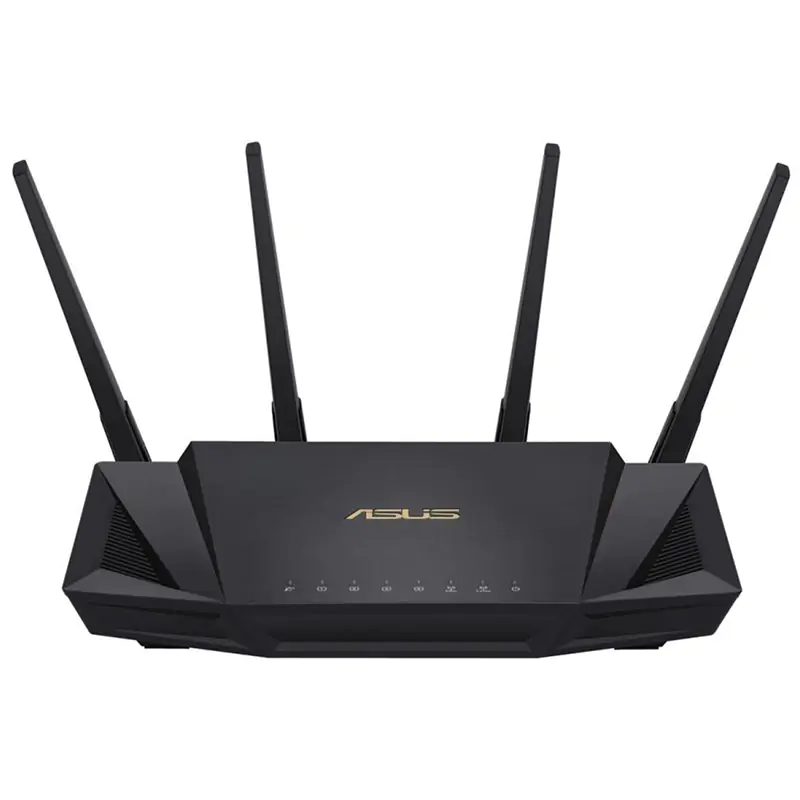
The ASUS AX86U Pro Dual Band Wi-Fi 6 Gaming Router features router boost speeds of up to 5700 Mbps, with 160 MHz channels for better efficiency and throughput, supports Wi-Fi 6 (802.11ax), powered by a 2.0 GHz quad-core 64-bit CPU, Adaptive QoS, supports ASUS AiMesh, and commercial-grade network security functionality.
The ASUS AX86U Pro Dual Band Wi-Fi 6 Gaming Router features router boost speeds of up to 5700 Mbps, with 160 MHz channels for better efficiency and throughput, supports Wi-Fi 6 (802.11ax), powered by a 2.0 GHz quad-core 64-bit CPU, Adaptive QoS, supports ASUS AiMesh, and commercial-grade network security functionality.
in 5 offers
The lowest price for Asus RT-AX86U-PRO AX5700 Dual Band Wifi 6 Gaming Router right now is , compared across 3 retailers.
Asus RT-AX86U-PRO AX5700 Dual Band Wifi 6 Gaming Router
The ASUS AX86U Pro Dual Band Wi-Fi 6 Gaming Router features router boost speeds of up to 5700 Mbps, with 160 MHz channels for better efficiency and throughput, supports Wi-Fi 6 (802.11ax), powered by a 2.0 GHz quad-core 64-bit CPU, Adaptive QoS, supports ASUS AiMesh, and commercial-grade network security functionality.
The ASUS AX86U Pro Dual Band Wi-Fi 6 Gaming Router features router boost speeds of up to 5700 Mbps, with 160 MHz channels for better efficiency and throughput, supports Wi-Fi 6 (802.11ax), powered by a 2.0 GHz quad-core 64-bit CPU, Adaptive QoS, supports ASUS AiMesh, and commercial-grade network security functionality.
The all-time low was $89.00 on 26 Aug 2026 — today's price is 213% above the lowest ever. It has been notably cheaper before — worth setting a price alert.
Prices last updated 29 Aug 2026.

