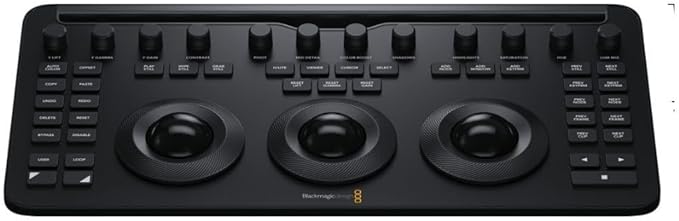
Blackmagic Design Davinci Resolve Speed Editor Bundle With Davinci Resolve 17 Studio (Dongle)
The New DaVinci Resolve Speed Editor offers the function of the full Size Keyboard, but in a smaller, more portable form. Able to perform multiple tasks simultaneously with its multiple control function. Simple functions such as the 'source" button, offers users the ability to search through their media, so the relevant information can be found quickly. Each keyboard comes with a full DaVinci Resolve Studio software License. DaVinci Resolve 18 combines professional 8K editing, colour correction, visual effects and audio post production all in one software tool! You can instantly move between editing, colour, effects, and audio with a single click. DaVinci Resolve Studio is designed for multi user collaboration so editors, assistants, colourists, VFX artists and sound designers can all work live on the same project at the same time! Whether you're an individual artist, or part of a large collaborative team, it's easy to see why DaVinci Resolve is the standard for high end post production and finishing on more Hollywood feature films, television shows and commercials than any other software. DaVinci Resolve runs on all major platforms so you can use it at home or in a post facility on a Mac, at a broadcast facility running Windows, or a VFX studio on Linux. This gives you the freedom to use the platform of your choice, making it easy to integrate with your existing systems and workflows. If you're running Red Hat or CentOS Linux, you can even build your own workstation using low cost motherboards, extremely fast processors, massive amounts of RAM and up to 8 GPUs.
The New DaVinci Resolve Speed Editor offers the function of the full Size Keyboard, but in a smaller, more portable form. Able to perform multiple tasks simultaneously with its multiple control function. Simple functions such as the 'source" button, offers users the ability to search through their media, so the relevant information can be found quickly. Each keyboard comes with a full DaVinci Resolve Studio software License. DaVinci Resolve 18 combines professional 8K editing, colour correction, visual effects and audio post production all in one software tool! You can instantly move between editing, colour, effects, and audio with a single click. DaVinci Resolve Studio is designed for multi user collaboration so editors, assistants, colourists, VFX artists and sound designers can all work live on the same project at the same time! Whether you're an individual artist, or part of a large collaborative team, it's easy to see why DaVinci Resolve is the standard for high end post production and finishing on more Hollywood feature films, television shows and commercials than any other software. DaVinci Resolve runs on all major platforms so you can use it at home or in a post facility on a Mac, at a broadcast facility running Windows, or a VFX studio on Linux. This gives you the freedom to use the platform of your choice, making it easy to integrate with your existing systems and workflows. If you're running Red Hat or CentOS Linux, you can even build your own workstation using low cost motherboards, extremely fast processors, massive amounts of RAM and up to 8 GPUs.
The New DaVinci Resolve Speed Editor offers the function of the full Size Keyboard, but in a smaller, more portable form. Able to perform multiple tasks simultaneously with its multiple control function. Simple functions such as the 'source" button, offers users the ability to search through their media, so the relevant information can be found quickly. Each keyboard comes with a full DaVinci Resolve Studio software License. DaVinci Resolve 18 combines professional 8K editing, colour correction, visual effects and audio post production all in one software tool! You can instantly move between editing, colour, effects, and audio with a single click. DaVinci Resolve Studio is designed for multi user collaboration so editors, assistants, colourists, VFX artists and sound designers can all work live on the same project at the same time! Whether you're an individual artist, or part of a large collaborative team, it's easy to see why DaVinci Resolve is the standard for high end post production and finishing on more Hollywood feature films, television shows and commercials than any other software. DaVinci Resolve runs on all major platforms so you can use it at home or in a post facility on a Mac, at a broadcast facility running Windows, or a VFX studio on Linux. This gives you the freedom to use the platform of your choice, making it easy to integrate with your existing systems and workflows. If you're running Red Hat or CentOS Linux, you can even build your own workstation using low cost motherboards, extremely fast processors, massive amounts of RAM and up to 8 GPUs.
The New DaVinci Resolve Speed Editor offers the function of the full Size Keyboard, but in a smaller, more portable form. Able to perform multiple tasks simultaneously with its multiple control function. Simple functions such as the 'source" button, offers users the ability to search through their media, so the relevant information can be found quickly. Each keyboard comes with a full DaVinci Resolve Studio software License. DaVinci Resolve 18 combines professional 8K editing, colour correction, visual effects and audio post production all in one software tool! You can instantly move between editing, colour, effects, and audio with a single click. DaVinci Resolve Studio is designed for multi user collaboration so editors, assistants, colourists, VFX artists and sound designers can all work live on the same project at the same time! Whether you're an individual artist, or part of a large collaborative team, it's easy to see why DaVinci Resolve is the standard for high end post production and finishing on more Hollywood feature films, television shows and commercials than any other software. DaVinci Resolve runs on all major platforms so you can use it at home or in a post facility on a Mac, at a broadcast facility running Windows, or a VFX studio on Linux. This gives you the freedom to use the platform of your choice, making it easy to integrate with your existing systems and workflows. If you're running Red Hat or CentOS Linux, you can even build your own workstation using low cost motherboards, extremely fast processors, massive amounts of RAM and up to 8 GPUs.
in 3 offers
The lowest price for Blackmagic Design Davinci Resolve Speed Editor Bundle With Davinci Resolve 17 Studio (Dongle) right now is $722.89 at Amazon.com.au, compared across 3 retailers.
The all-time low was $312.96 on 21 Mar 2026 — today's price is 131% above the lowest ever. It has been notably cheaper before — worth setting a price alert.
Prices last updated 20 Oct 2026.
Last updated at 20/10/2026 01:53:29
Blackmagic Design Davinci Resolve Speed Editor with Studio (Activation Key) Bundle
Free delivery
Affiliate Disclosure: We may receive a small commission for purchases made through this link at no extra cost to you. This helps support our site. Thank you!
Blackmagic Design DaVinci Resolve Speed Editor w/ DaVinci Resolve Activation
Delivery between 24–28 Oct $41
Blackmagic Design Davinci Resolve Speed Editor, Bluetooth & USB-C Editing Keyboard Bundle with Davinci Resolve Studio Activation Card
Delivery between 26–29 Oct $29
originally posted on bhphotovideo.com
Had to get DaVinci Resolve for a project. I'm used to working in Premiere + AE, so I was a bit nervous about learning new software. But, since I like gadgets and toys, I figured as long as I have to buy the software, might as well get the speed editor. Great decision. Well built. Solid. Intuitive. And with it sitting on my desk, I really look like I know what I'm doing. As far as learning Resolve, once I got my mind around the workflow, it was pretty straightforward. I might even switch over to it full time.
originally posted on bhphotovideo.com
While the main impetus for grabbing this bit of kit was to finally purchase the studio version of Davinci, I was curious about how useful it might be in my workflow. Though it is really designed around Resolve's cut page (which I haven't used that much), I've had more fun spinning through my timeline and working very quickly even in the edit page for tasks that feel finicky with a mouse. Though it isn't customizable and has quite a few things I wish it could do, the speed editor surprisingly feels more useful than I imagined it would. It breaks much of the monotony of basic editing tasks, and most importantly, it is just fun to work with.
originally posted on bhphotovideo.com
We purchased this mainly because we could get it for not much more than just buying DaVinci Resolve by itself.Although it's not all that intuitive if you've not been using DR regularly, there are a lot of tutorials online.The first thing I noticed was that it increased my editing speed significantly - probably a 50% reduction in time from just using the keyboard.Second, I've rarely used a device where it was do well built and well designed. The keys that are available and where they are located are perfect (after you learn what they are all for and how to use them properly). And it's one of the most soundly built peripherals I've ever purchased.If you only get it for the jog/shuttle wheel, that would be worth the cost alone, but the entire package is worth ... MoreWe purchased this mainly because we could get it for not much more than just buying DaVinci Resolve by itself.Although it's not all that intuitive if you've not been using DR regularly, there are a lot of tutorials online.The first thing I noticed was that it increased my editing speed significantly - probably a 50% reduction in time from just using the keyboard.Second, I've rarely used a device where it was do well built and well designed. The keys that are available and where they are located are perfect (after you learn what they are all for and how to use them properly). And it's one of the most soundly built peripherals I've ever purchased.If you only get it for the jog/shuttle wheel, that would be worth the cost alone, but the entire package is worth the cost.The only 'cons' that I could point out would be that it does NOT come with a USB cable (for charging or connecting via USB), you'll need your own USB-C to whatever your computer uses. And it would be nice to have some sort of documentation included - even if it was just a link to some video tutorials. Although I do prefer the 3rd party tutorials in the end.This was my first Blackmagic hardware purchase, and I think it might not be my last.One note about the DaVinci Resolve studio software itself - I've beenusing the free version for a few years. When I installed the studioversion it now starts faster, and seems to just run faster. I've neverseen that mentioned anywhere, but it was a pleasant surprise - alongwith the other studio-only features.
| Brand | Blackmagic Design |
| Media Type | Video |
| Operating System | Microsoft Windows, Mac OS |

Blackmagic Design Davinci Resolve Speed Editor with Studio (Activation Key) Bundle
Free delivery
Affiliate Disclosure: We may receive a small commission for purchases made through this link at no extra cost to you. This helps support our site. Thank you!
Blackmagic Design DaVinci Resolve Speed Editor w/ DaVinci Resolve Activation
Delivery between 24–28 Oct $41
Blackmagic Design Davinci Resolve Speed Editor, Bluetooth & USB-C Editing Keyboard Bundle with Davinci Resolve Studio Activation Card
Delivery between 26–29 Oct $29
Had to get DaVinci Resolve for a project. I'm used to working in Premiere + AE, so I was a bit nervous about learning new software. But, since I like gadgets and toys, I figured as long as I have to buy the software, might as well get the speed editor. Great decision. Well built. Solid. Intuitive. And with it sitting on my desk, I really look like I know what I'm doing. As far as learning Resolve, once I got my mind around the workflow, it was pretty straightforward. I might even switch over to it full time.
While the main impetus for grabbing this bit of kit was to finally purchase the studio version of Davinci, I was curious about how useful it might be in my workflow. Though it is really designed around Resolve's cut page (which I haven't used that much), I've had more fun spinning through my timeline and working very quickly even in the edit page for tasks that feel finicky with a mouse. Though it isn't customizable and has quite a few things I wish it could do, the speed editor surprisingly feels more useful than I imagined it would. It breaks much of the monotony of basic editing tasks, and most importantly, it is just fun to work with.
We purchased this mainly because we could get it for not much more than just buying DaVinci Resolve by itself.Although it's not all that intuitive if you've not been using DR regularly, there are a lot of tutorials online.The first thing I noticed was that it increased my editing speed significantly - probably a 50% reduction in time from just using the keyboard.Second, I've rarely used a device where it was do well built and well designed. The keys that are available and where they are located are perfect (after you learn what they are all for and how to use them properly). And it's one of the most soundly built peripherals I've ever purchased.If you only get it for the jog/shuttle wheel, that would be worth the cost alone, but the entire package is worth ... MoreWe purchased this mainly because we could get it for not much more than just buying DaVinci Resolve by itself.Although it's not all that intuitive if you've not been using DR regularly, there are a lot of tutorials online.The first thing I noticed was that it increased my editing speed significantly - probably a 50% reduction in time from just using the keyboard.Second, I've rarely used a device where it was do well built and well designed. The keys that are available and where they are located are perfect (after you learn what they are all for and how to use them properly). And it's one of the most soundly built peripherals I've ever purchased.If you only get it for the jog/shuttle wheel, that would be worth the cost alone, but the entire package is worth the cost.The only 'cons' that I could point out would be that it does NOT come with a USB cable (for charging or connecting via USB), you'll need your own USB-C to whatever your computer uses. And it would be nice to have some sort of documentation included - even if it was just a link to some video tutorials. Although I do prefer the 3rd party tutorials in the end.This was my first Blackmagic hardware purchase, and I think it might not be my last.One note about the DaVinci Resolve studio software itself - I've beenusing the free version for a few years. When I installed the studioversion it now starts faster, and seems to just run faster. I've neverseen that mentioned anywhere, but it was a pleasant surprise - alongwith the other studio-only features.
This definitely makes editing faster. My favorite thing about it is the dedicated pause/play button for DaVinci Resolve, since media play buttons often get co-opted by other programs while editing. Ripple delete and split buttons are also awesome. The added features in Studio are also a major boon. Rendering projects is a lot faster when the user can choose the GPU for rendering. The cord is super thick, which is good and bad. The wheel is very sensitive and sometimes just barely brushing up against it moves the play head.
The Speed Editor works well, it is easy to get set up and makes intuitive sense after looking over some basic instructions. The wheel especially feels high quality. It moves smoothly and with a sense of weight that lets you move fast or slow with different types of tracking motions.Along with Resolve Studio, this is a definite upgrade to any editor's workflow, and takes far less space than the editing keyboard or full size panels. The shortcuts are contextual, which means that the buttons are maximized for use. All in all, a great convenience.
First off, I've been using the Cut Page in Davinci Resolve since I started using it about a year ago, which is where the Speed Editor shines. Most of my video work involves talking head shots with some green screen extraction. I made the switch from Premiere and haven't looked back.I use the cut page to do all of my rough cuts, smooth cuts, and apply simple text and transitions. If you're not familiar with the cut page, I highly recommend going through the free training PDF, The Beginner’s Guide to DaVinci Resolve which can be found on Blackmagic Design's website. The training PDF guide will walk you though all of the ins and outs of using the Cut page and it also includes links to demo video clips that you follow along with in the training.Since I was already ... MoreFirst off, I've been using the Cut Page in Davinci Resolve since I started using it about a year ago, which is where the Speed Editor shines. Most of my video work involves talking head shots with some green screen extraction. I made the switch from Premiere and haven't looked back.I use the cut page to do all of my rough cuts, smooth cuts, and apply simple text and transitions. If you're not familiar with the cut page, I highly recommend going through the free training PDF, The Beginner’s Guide to DaVinci Resolve which can be found on Blackmagic Design's website. The training PDF guide will walk you though all of the ins and outs of using the Cut page and it also includes links to demo video clips that you follow along with in the training.Since I was already familiar with the Cut Page, it didn't take me long at all to learn to use the Speed Editor. The build quality is very good and I love the weight and the smooth bearing of the jog wheel. There are two things I think would make the Speed editor keyboard better, a physical power switch and some sort of battery indicator. That aside, the battery lasts a very long time. I spent a few hours editing in Resolve 17 (beta) and only used 5% of the battery. You can check the battery level in Bluetooth devices in Windows 10. Resolve will also show when the battery is low on the bottom right of the page mode panel.The Speed Editor does not come with a USB-C charging cable but I already had several devices that used USB C any way. You can use any USB-C cable to charge it or work wired to your computer.Once you get used to the layout of the keyboard, editing is a breeze. You can quickly move through your source tape footage selecting in and out points and append it to the timeline. Then swicth over to timeline view and fine tune your selections using trim, slip, roll or creating more cuts. I love that I can add smooth cut transitions for almost seamless cuts. I shoot in 4k but edit in 1080p. This makes it easy to zoom into a talking head without losing quality. No need to manually zoom in on a clip because there's a close-up button on the keyboard. It automatically analyzes the clip and zooms into your clip for a few seconds. It addes the clip on top of your zoomed out clip so you can always delete it and go back to the original view. Need more time? No problem just adjust the length of the clip for as long as you need before it returns to the original view.I will be eventually doing some multi-camera setups so syncing and selecting different camera angles will be a breeze with this as well.The Speed Editor was made for the Cut page but it does have some limited functions on the edit page. Typically if I had to do anything on the edit page I wouldn't be using the keyboard anyway. For example, applying effects, extracting my green screen, adjustment clips, fusion clips, etc.Can you use Resolve without it... Absolutely!! However, what I found amazing was that I cut and edited my entire video without ever having to touch the mouse once. I know I did this faster than clicking around with the mouse and my left handed keypad. In the end, this really did save me time. I highly recommend getting this if you want to become more efficient with your editing skills.
This is a well-designed, high quality 1st gen piece of hardware that clearly adds value to a 17th gen piece of software. It was ambitious for the Blackmagic Design team to completely revamp the tech that supports their DaVinci Resolve workflow, and to that end, they have clearly excelled. The Speed Editor is sturdy, with responsive keys and a search dial that works and feels excellent. They clearly put time into each key's purpose, location, size, and color...and the rewards from their efforts are clearly visible. This single piece of tech is a massive boon to efficiency and quality of life when working with DaVinci Resolve's software.That said, no 1st gen tech is without issues, and the Speed Editor could benefit from a few improvements. Perhaps most notable is ... MoreThis is a well-designed, high quality 1st gen piece of hardware that clearly adds value to a 17th gen piece of software. It was ambitious for the Blackmagic Design team to completely revamp the tech that supports their DaVinci Resolve workflow, and to that end, they have clearly excelled. The Speed Editor is sturdy, with responsive keys and a search dial that works and feels excellent. They clearly put time into each key's purpose, location, size, and color...and the rewards from their efforts are clearly visible. This single piece of tech is a massive boon to efficiency and quality of life when working with DaVinci Resolve's software.That said, no 1st gen tech is without issues, and the Speed Editor could benefit from a few improvements. Perhaps most notable is the fact that the keyboard never turns off...ever...as long as DaVinci Resolve is open. If you keep the software on overnight to render some of your media's cache while the computer is idle, then be forewarned that your Speed Editor keyboard will remain on the entire time. In the short-term, that becomes a problem if the keyboard is running on bluetooth/unplugged. In the long-term, that makes me worry about the longevity of some the red LED lights that often remain on (such as SNAP / SHTL / JOG / SCRL). There is also no way to manually turn the keyboard on/off and no hardware/software means to adjust the brightness of said LEDs. Also, the Bluetooth feature seems responsive when it works, but occasionally I have ran into problems when the keyboard connected via Bluetooth just turns off (while plugged into a wall outlet in order to maximize available USB-C connections on my machine).------Be warned that your Speed Editor may or may not come with a USB-C cable. Mine did not, though I have seen unboxings of others' who did receive the cable. This is a minor inconvenience that is easy enough to fix with future shipments of this hardware, and was inconsequential for me since I had a few USB-C cables lying around. For others, I imagine that omission will have greater consequence.------Finally, the Speed Editor is clearly designed for the Cut page, and works well enough on the Edit page and to some extend the Fairlight audio page (though the Ripple Delete button works as intended on the Edit and Fairlight audio pages...but not on the Cut page). Since DaVinci Resolve 17 is still in beta, there are a few software suggestions I would recommend before official release:- let search dial adjust frames in Fusion and Color pages- let AUDIO LEVEL button adjust audio in Fairlight audio page- fix RIPPL DEL function in Cut page- add a feature to MOVE, SPLIT, AUDIO LEVEL, etc. as a toggle that makes the relevant change to the active track vs all tracks- pressing AUDIO LEVEL defaults to A1, even if the A2 or A3 track is selected as active- when video/audio are linked, the TRIM IN, TRIM OUT, and related functions do not move consistently (one moves faster than the other)
Using this with Davinci Resolve Studio 18.5 on my base model M1 Mac Mini, AND with my M1 iPad Pro, works AWESOME.To be honest I was skeptical of getting it thinking it would merely supplement my work-flow and for the price wasn't sure it would be worth it! So glad I did, it is MORE than worth the price of admission for even the mild hobbyist.Bluetooth connectivity makes this an awesome tool for editing while traveling away from home via the iPad. For those using Davinci Resolve on the iPad, even with a keyboard and Apple pencil it is still quite clunky to move about and operate, the speed editor HELPS soooo much! Being a newb to NLE with no old or bad habits I am able to learn DVR along the lines that BlackMagic designed it, using the CUT page tab, and to be ... MoreUsing this with Davinci Resolve Studio 18.5 on my base model M1 Mac Mini, AND with my M1 iPad Pro, works AWESOME.To be honest I was skeptical of getting it thinking it would merely supplement my work-flow and for the price wasn't sure it would be worth it! So glad I did, it is MORE than worth the price of admission for even the mild hobbyist.Bluetooth connectivity makes this an awesome tool for editing while traveling away from home via the iPad. For those using Davinci Resolve on the iPad, even with a keyboard and Apple pencil it is still quite clunky to move about and operate, the speed editor HELPS soooo much! Being a newb to NLE with no old or bad habits I am able to learn DVR along the lines that BlackMagic designed it, using the CUT page tab, and to be honest I spend most of my time now in the Cut page and this editor even works great for timeline scrubbing on the other pages as well. Also, the build quality of this editor is clearly next level. Battery life is awesome, charges vis USB-C.
The Speed Editor is a solidly built quality tool. Combined with the included Studio version, editing video is easier and faster. It’s forcing me to learn Cut Page and I now appreciate the power of it. There’s a learning curve, but well worth the effort.It’s portable too! I take it on the road and edit on my laptop.I haven’t found any downside yet.Davinci Resolve Studio has so much more capability, I don’t know why anyone uses subscription software anymore.
I mainly work in wedding photography, but I've slowly learned, and been taking on small commercial video work. For years now I've been trying to step away from Adobe, made the switch from Lightroom to Capture One, and now Premier and After Effects have been dumped thanks do DaVinci Resolve Studio. I suppose my switch over to DaVinci must have been easier since I never fully grasped Pr or Ae. Found some really good tutorials on how to properly use this Speed Editor, and I can confidently say that the learning curve for Resolve is not as steep as Premier.The build quality of the Speed Editor is superb, the keys feel and sound very satisfying, the jog wheel is super smooth, with some weight to it. It is a great purchase, specially if you want to get the full Resolve ... MoreI mainly work in wedding photography, but I've slowly learned, and been taking on small commercial video work. For years now I've been trying to step away from Adobe, made the switch from Lightroom to Capture One, and now Premier and After Effects have been dumped thanks do DaVinci Resolve Studio. I suppose my switch over to DaVinci must have been easier since I never fully grasped Pr or Ae. Found some really good tutorials on how to properly use this Speed Editor, and I can confidently say that the learning curve for Resolve is not as steep as Premier.The build quality of the Speed Editor is superb, the keys feel and sound very satisfying, the jog wheel is super smooth, with some weight to it. It is a great purchase, specially if you want to get the full Resolve Studio license.I feel like I've surpassed the skill level I was at in Premier, in a very short time.
| Brand | Blackmagic Design |
| Media Type | Video |
| Operating System | Microsoft Windows, Mac OS |