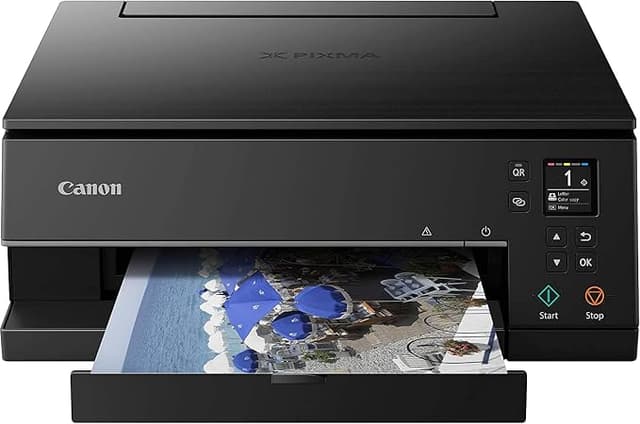
Canon TS5160 PIXMA Home Printer
Every function is easier with the manually adjustable front panel, LCD display and simple interface. The clear buttons mean quick access to the printers primary functions, whether that be printing, copying or scanning. Share Your Memories Experience a completely reimagined way of sharing memories through the Message in Print application. This application will allow you to send images with pre-written text and borders, or even embed videos or maps on it. (Available Nov 2017) Printing Made Easy Print scan and copy, all from this single compact document and photo printer. Produce beautiful photographs and crisp text documents over USB cable, Wi-Fi or via Bluetooth. Canons FINE inkjet print technology brings convenience, cost savings and most of all, great-looking prints.
Every function is easier with the manually adjustable front panel, LCD display and simple interface. The clear buttons mean quick access to the printers primary functions, whether that be printing, copying or scanning. Share Your Memories Experience a completely reimagined way of sharing memories through the Message in Print application. This application will allow you to send images with pre-written text and borders, or even embed videos or maps on it. (Available Nov 2017) Printing Made Easy Print scan and copy, all from this single compact document and photo printer. Produce beautiful photographs and crisp text documents over USB cable, Wi-Fi or via Bluetooth. Canons FINE inkjet print technology brings convenience, cost savings and most of all, great-looking prints.
Every function is easier with the manually adjustable front panel, LCD display and simple interface. The clear buttons mean quick access to the printers primary functions, whether that be printing, copying or scanning. Share Your Memories Experience a completely reimagined way of sharing memories through the Message in Print application. This application will allow you to send images with pre-written text and borders, or even embed videos or maps on it. (Available Nov 2017) Printing Made Easy Print scan and copy, all from this single compact document and photo printer. Produce beautiful photographs and crisp text documents over USB cable, Wi-Fi or via Bluetooth. Canons FINE inkjet print technology brings convenience, cost savings and most of all, great-looking prints.
Every function is easier with the manually adjustable front panel, LCD display and simple interface. The clear buttons mean quick access to the printers primary functions, whether that be printing, copying or scanning. Share Your Memories Experience a completely reimagined way of sharing memories through the Message in Print application. This application will allow you to send images with pre-written text and borders, or even embed videos or maps on it. (Available Nov 2017) Printing Made Easy Print scan and copy, all from this single compact document and photo printer. Produce beautiful photographs and crisp text documents over USB cable, Wi-Fi or via Bluetooth. Canons FINE inkjet print technology brings convenience, cost savings and most of all, great-looking prints.
in 20 offers
The lowest price for Canon TS5160 PIXMA Home Printer right now is $13.99 at eBay.com.au, compared across 17 retailers.
The all-time low was $13.99 on 4 Oct 2026. That's the lowest price we've ever tracked — a great time to buy.
Prices last updated 19 Oct 2026.
Last updated at 19/10/2026 09:50:38
Canon Pixma Home TS5160 Ideal All-in-One Printer (Faulty)
Delivery $9.99
Affiliate Disclosure: We may receive a small commission for purchases made through this link at no extra cost to you. This helps support our site. Thank you!
Canon Pixma MG3660 colour inkjet printer
Delivery between Tue – Thu $15.45
Canon Pixma Home Multifunction Printer (TS5160)
30-day returns
Canon PIXMA HOME TS5160 Inkjet MFP TS5160BK
Free delivery between Tue – Fri
Canon Ts5160 Pixma All-In-One Inkjet Printer Black
Free delivery between 20–27 Oct
Canon Printer Inkjet AIO MFP TS5160BK, Pixma Home Ts5160Bk Aio Printer Black Pixma Home Ts5160Bk Aio Printer Black...
Delivery between 22–26 Oct $17
Canon Ts5160 Pixma All-In-One Inkjet Printer Black
Delivery between 22–26 Oct $10
Canon TS5160 Pixma Wireless Multifunction Inkjet Printer A4 Black
Free delivery between 21–27 Oct
Canon PIXMA HOME TS5160BK
Free delivery
TS5160BK
originally posted on pbtech.co.nz
I bought this printer about a month ago, and have used it a few times since then for printing and scanning. It's replacing an Epson XP-200 printer that I've had for many years, and was recommended to me by a friend who's opinion on these matters I respect who had recently bought the same model. It was easy enough to set up and use for the first time, though it took me a while to discover where the pull-out paper rest was located above the paper tray (I was almost convinced it wasn't included!). I'm a little disappointed that the paper tray doesn't push all the way in to sit flush with the rest of the printer once it's unpacked it from its shipping position, but that's not a big deal and I can live with it. The onscreen scanning tools are different to what I'm used ... MoreI bought this printer about a month ago, and have used it a few times since then for printing and scanning. It's replacing an Epson XP-200 printer that I've had for many years, and was recommended to me by a friend who's opinion on these matters I respect who had recently bought the same model. It was easy enough to set up and use for the first time, though it took me a while to discover where the pull-out paper rest was located above the paper tray (I was almost convinced it wasn't included!). I'm a little disappointed that the paper tray doesn't push all the way in to sit flush with the rest of the printer once it's unpacked it from its shipping position, but that's not a big deal and I can live with it. The onscreen scanning tools are different to what I'm used to, but so far I've managed to do everything I've needed to once I've found the right setting; I'm sure that's just a matter of getting used to it. The biggest downside is the weight of it - I didn't think to consider that when I was looking to buy. I cart my printer around as part of my mobile office, and this one is significantly heavier than my old printer, making it harder to pack into the container I use, and heavier overall to lift to and from the car. I'm rethinking how I transport it to compensate my physical issues; if I didn't need to pack it up and take it elsewhere, this wouldn't be an issue. It's not enough to make me think this printer isn't for me. The printing quality seems fine so far, but I've not challenged it in any way yet, and it does seem to be slower than the old printer - but it does automatic double-sided printing, and I can forgive it a lot just for that feature alone.
originally posted on kogan.com
1. It is a bit tricky to set-up. Must set up through your Broad Band supplier Port- Like "OPTUS" port for wireless printing. Do not do through your Wi FI port. One can get all canon support through the Broad Band port not personal WiFi Port. 2. Set up the paper supply tray. 3. When Idle-- the printer switches OFF, so before printing. Switch ON the printer. 4. I am happy with the TWO ink cartridges as it lasts well. THE ONLY CRITICISM I HAVE--- for Scanning it has no feed SLOT for multiple document scanning, in other CANON printer/scanner this facility is there. Here, one has to scan page by page by lifting the TOP COVER-- that is BORING. But it is a much cheaper unit and works well. I like this light unit--not heavy.
originally posted on thegoodguys.com.au
After a little fiddling to set it up it is a breeze to use. Printing and scanning are both very easy to do. I like the flat paper tray at the bottom. This means I don't have paper bending out of shape at the top anymore and I can also use it for bypass printing on different materials. I'm very happy with my purchase.
| Supported Functions | Print, Scan |
| Paper Size | A4 |
| Paper Type | Plain paper, Envelopes, Photo paper |
| Auto Duplex Printing | Yes |
| Paper Tray Capacity | 100 Sheet |
Canon Pixma Home TS5160 Ideal All-in-One Printer (Faulty)
Delivery $9.99
Affiliate Disclosure: We may receive a small commission for purchases made through this link at no extra cost to you. This helps support our site. Thank you!
Canon Pixma MG3660 colour inkjet printer
Delivery between Tue – Thu $15.45
Canon Pixma Home Multifunction Printer (TS5160)
30-day returns
Canon PIXMA HOME TS5160 Inkjet MFP TS5160BK
Free delivery between Tue – Fri
Canon Ts5160 Pixma All-In-One Inkjet Printer Black
Free delivery between 20–27 Oct
I bought this printer about a month ago, and have used it a few times since then for printing and scanning. It's replacing an Epson XP-200 printer that I've had for many years, and was recommended to me by a friend who's opinion on these matters I respect who had recently bought the same model. It was easy enough to set up and use for the first time, though it took me a while to discover where the pull-out paper rest was located above the paper tray (I was almost convinced it wasn't included!). I'm a little disappointed that the paper tray doesn't push all the way in to sit flush with the rest of the printer once it's unpacked it from its shipping position, but that's not a big deal and I can live with it. The onscreen scanning tools are different to what I'm used ... MoreI bought this printer about a month ago, and have used it a few times since then for printing and scanning. It's replacing an Epson XP-200 printer that I've had for many years, and was recommended to me by a friend who's opinion on these matters I respect who had recently bought the same model. It was easy enough to set up and use for the first time, though it took me a while to discover where the pull-out paper rest was located above the paper tray (I was almost convinced it wasn't included!). I'm a little disappointed that the paper tray doesn't push all the way in to sit flush with the rest of the printer once it's unpacked it from its shipping position, but that's not a big deal and I can live with it. The onscreen scanning tools are different to what I'm used to, but so far I've managed to do everything I've needed to once I've found the right setting; I'm sure that's just a matter of getting used to it. The biggest downside is the weight of it - I didn't think to consider that when I was looking to buy. I cart my printer around as part of my mobile office, and this one is significantly heavier than my old printer, making it harder to pack into the container I use, and heavier overall to lift to and from the car. I'm rethinking how I transport it to compensate my physical issues; if I didn't need to pack it up and take it elsewhere, this wouldn't be an issue. It's not enough to make me think this printer isn't for me. The printing quality seems fine so far, but I've not challenged it in any way yet, and it does seem to be slower than the old printer - but it does automatic double-sided printing, and I can forgive it a lot just for that feature alone.
1. It is a bit tricky to set-up. Must set up through your Broad Band supplier Port- Like "OPTUS" port for wireless printing. Do not do through your Wi FI port. One can get all canon support through the Broad Band port not personal WiFi Port. 2. Set up the paper supply tray. 3. When Idle-- the printer switches OFF, so before printing. Switch ON the printer. 4. I am happy with the TWO ink cartridges as it lasts well. THE ONLY CRITICISM I HAVE--- for Scanning it has no feed SLOT for multiple document scanning, in other CANON printer/scanner this facility is there. Here, one has to scan page by page by lifting the TOP COVER-- that is BORING. But it is a much cheaper unit and works well. I like this light unit--not heavy.
After a little fiddling to set it up it is a breeze to use. Printing and scanning are both very easy to do. I like the flat paper tray at the bottom. This means I don't have paper bending out of shape at the top anymore and I can also use it for bypass printing on different materials. I'm very happy with my purchase.
Wanted to upgrade from my cheap HP printer (which has never failed me before!), thought this was a good buy. Took it home and it would not connect to my wifi. It locates the network and then fails to connect to it. Took it back to store and they couldn't connect it either. Ended up getting a refund. I'm satisfied with the outcome from the good guys though and will continue to buy other products from them, but not Canon unfortunately!
Bought the Canon Pixma TS5160 printer about a month ago. Happy. It's good points are that it is easy to set up, connects to any device without any problem, does everything would want from a nice cheap home printer. Haven't had it long enough to see how fast it eats up the ink cartridges... NOTE: the website address in the setup Manuel doesn't work. But I went to the Canon website, and there are super easy instructions there for connecting the wifi. https://www.canon.com.au/support/printers/print-assist/setup?id=cc09d50a-833e-4334-a15a-1e3e45f1d4b3&firsttime=true That's your link... easy-peezy. The printer is more bulky then I expected. I dislike that the paper tray is always sitting out a bit. I also don't like that the screen has to be lifted up to be in use. They ... MoreBought the Canon Pixma TS5160 printer about a month ago. Happy. It's good points are that it is easy to set up, connects to any device without any problem, does everything would want from a nice cheap home printer. Haven't had it long enough to see how fast it eats up the ink cartridges... NOTE: the website address in the setup Manuel doesn't work. But I went to the Canon website, and there are super easy instructions there for connecting the wifi. https://www.canon.com.au/support/printers/print-assist/setup?id=cc09d50a-833e-4334-a15a-1e3e45f1d4b3&firsttime=true That's your link... easy-peezy. The printer is more bulky then I expected. I dislike that the paper tray is always sitting out a bit. I also don't like that the screen has to be lifted up to be in use. They just seem like parts that might break faster than usual? Don't know, time will tell. Overall, for $80, very happy.
Says on the description that it has Bluetooth and yet there’s nothing on the printer or booklet for Bluetooth. Mine also won’t pick up the internet it’s registering the name of it but apparently can’t find it which makes no sense at all. I asked Harvey Norman to help me but I get asked to bring it in store like my microwave… let’s brings massive objects in store like that. Do not recommend this printer. I’ve had it for 3 weeks and still haven’t sorted the problem
It prints and ink is not extortionately priced (compared to others). Set up was not smooth, refused to connect to network automatically and after multiple attempts of different options had to end up doing a manual entry of network details. Front display was a deciding factor in my choice of this model but has to be tilted up in order for printer to function - which for me defeats the purpose as my printer is on a shelf at my eye level so when tilted up I can't read the display. Printer seems to want to do a full check or something whenever I print anything - so a quick print is not possible as it has to go through its 'process' for a good while before it starts to print luckily I don't print much. Scanner seems to be ok too but requires a separate download of ... MoreIt prints and ink is not extortionately priced (compared to others). Set up was not smooth, refused to connect to network automatically and after multiple attempts of different options had to end up doing a manual entry of network details. Front display was a deciding factor in my choice of this model but has to be tilted up in order for printer to function - which for me defeats the purpose as my printer is on a shelf at my eye level so when tilted up I can't read the display. Printer seems to want to do a full check or something whenever I print anything - so a quick print is not possible as it has to go through its 'process' for a good while before it starts to print luckily I don't print much. Scanner seems to be ok too but requires a separate download of scanner drivers.
Annoying to operate as it constantly asks you to update what type of paper you have put in. Never just prints quickly. I find it very frustrating to use. Colour printing was good quality but thats about the best I can say about it. It is cheap unfortunately all that was in stock at my price point. I was hoping to replace my Epson workforce around $200 but no stock anywhere and I was desperate for a printer that day. Think Ill be giving this one away to the kids.
A little extra cost for an added LCD panel goes a long way for a convenient user experience. Do not get the cheaper models without the LCD. The few dollars off is not worth it. The platen glass (flatbed) scans A4.Anyone with half-a-brain should be able to watch a YouTube video and read the Getting Started manual to configure WiFi pretty easily. I always prefer the CD installation since that method never fails since the 2000's. Everything goes smoothly if you know how to follow instructions.
Thr most frustrating thing is that it keeps telling me i need to load paper in the rear of the machine, despite me not wanting to print from there. I have "registered" the paper in the bottom tray several times but it reverts to the rear tray every time. It is slow, spends of time warming up then makes heaps of noise and time resetting itself afterwards. It looks like it has a touch screen but it hasnt, bit of a silly design. You have to have the front of it open or it wont print, which looks quite messy and not a streamlined design at all. You have to physically go to the printer and turn it on my old one would turn itself when you hit print through the app so you could print from another room and go to the printer and your work would be printed, and that was ... MoreThr most frustrating thing is that it keeps telling me i need to load paper in the rear of the machine, despite me not wanting to print from there. I have "registered" the paper in the bottom tray several times but it reverts to the rear tray every time. It is slow, spends of time warming up then makes heaps of noise and time resetting itself afterwards. It looks like it has a touch screen but it hasnt, bit of a silly design. You have to have the front of it open or it wont print, which looks quite messy and not a streamlined design at all. You have to physically go to the printer and turn it on my old one would turn itself when you hit print through the app so you could print from another room and go to the printer and your work would be printed, and that was ancient! This is a frustrating machine, not happy with it at all.
| Supported Functions | Print, Scan |
| Paper Size | A4 |
| Paper Type | Plain paper, Envelopes, Photo paper |
| Auto Duplex Printing | Yes |
| Paper Tray Capacity | 100 Sheet |