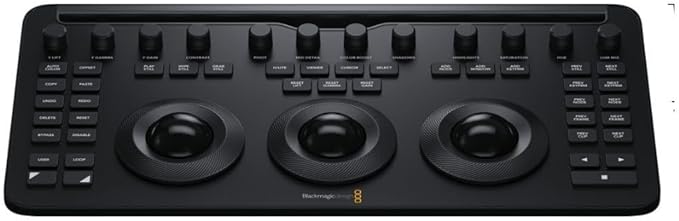
Blackmagic Davinci Resolve Micro Color Panel
The DaVinci Resolve Micro Color Panel is a compact yet powerful color panel that gives you all the control you need to create cinematic images. The Micro Panel features a row of direct control knobs at the top of the panel, three trackballs with rings for color grading and transport keys to speed up your grading session. Includes controls for refined color grading including adding windows and a tablet slot designed to hold an Apple iPad. Connects via Bluetooth or USB‐C.
The DaVinci Resolve Micro Color Panel is a compact yet powerful color panel that gives you all the control you need to create cinematic images. The Micro Panel features a row of direct control knobs at the top of the panel, three trackballs with rings for color grading and transport keys to speed up your grading session. Includes controls for refined color grading including adding windows and a tablet slot designed to hold an Apple iPad. Connects via Bluetooth or USB‐C.
The DaVinci Resolve Micro Color Panel is a compact yet powerful color panel that gives you all the control you need to create cinematic images. The Micro Panel features a row of direct control knobs at the top of the panel, three trackballs with rings for color grading and transport keys to speed up your grading session. Includes controls for refined color grading including adding windows and a tablet slot designed to hold an Apple iPad. Connects via Bluetooth or USB‐C.
The DaVinci Resolve Micro Color Panel is a compact yet powerful color panel that gives you all the control you need to create cinematic images. The Micro Panel features a row of direct control knobs at the top of the panel, three trackballs with rings for color grading and transport keys to speed up your grading session. Includes controls for refined color grading including adding windows and a tablet slot designed to hold an Apple iPad. Connects via Bluetooth or USB‐C.
in 5 offers
The lowest price for Blackmagic Davinci Resolve Micro Color Panel right now is $569.00 at RubberMonkey.com.au, compared across 5 retailers.
The all-time low was $469.00 on 6 June 2026 — today's price is 21% above the lowest ever. It has been notably cheaper before — worth setting a price alert.
Prices last updated 23 Oct 2026.
Last updated at 23/10/2026 20:52:18
Blackmagic Design Micro Color Panel
Free delivery
Affiliate Disclosure: We may receive a small commission for purchases made through this link at no extra cost to you. This helps support our site. Thank you!
Blackmagic DaVinci Resolve Micro Colour Panel
Delivery $6.90
Blackmagic Design DaVinci Resolve Micro Color Panel
Delivery between 29 Oct – 3 Nov $26.64
Blackmagic Design DaVinci Resolve Micro Colour Panel
Free 30-day returns
Blackmagic Design DaVinci Resolve Micro Colour Panel
originally posted on bhphotovideo.com
Overall, I prefer this micro panel over the original micro panel. The reduction in size is great and there is so much more functionality with the new shift up/down keys. Also love the ability to run it wirelessly and the iPad slot is a welcome feature since I use my iPad to display my scopes while coloring.My only negative comments are:1. The trackballs don't roll quite as nice as the original micro panel's, though they are still nice enough.2. It pains me that every button is backlit, but the words for each knob are not. I hated that about the original micro panel as well and thought they would fix it. With enough use, my muscle memory will eventually know which knob is which, but I hate having to lean way into the panel in the dark to see what knob I ... MoreOverall, I prefer this micro panel over the original micro panel. The reduction in size is great and there is so much more functionality with the new shift up/down keys. Also love the ability to run it wirelessly and the iPad slot is a welcome feature since I use my iPad to display my scopes while coloring.My only negative comments are:1. The trackballs don't roll quite as nice as the original micro panel's, though they are still nice enough.2. It pains me that every button is backlit, but the words for each knob are not. I hated that about the original micro panel as well and thought they would fix it. With enough use, my muscle memory will eventually know which knob is which, but I hate having to lean way into the panel in the dark to see what knob I need.Otherwise, great item and definitely recommend to anyone looking for a color panel.
originally posted on adorama.com
This is my first real Davinci Resolve panel. I had originally bought a Streamdeck + to use as a grading interface until I could afford the real thing, but it really was not a good solution. When this was announced, I sold the Streamdeck + and ordered this.I am genuinely blown away at how much better the grading experience is over using mouse and keyboard or even a Streamdeck type device. It really changes the level of nuance I can dial in, and it just works incredibly well. The controls respond very snappily, the balls and rings feel great, and the ability to focus on the reference monitor while making adjustments without having to look at the GUI is amazing.Trying to push a little color in the lift, gamma or gain controls with the mouse is painful, and really ... MoreThis is my first real Davinci Resolve panel. I had originally bought a Streamdeck + to use as a grading interface until I could afford the real thing, but it really was not a good solution. When this was announced, I sold the Streamdeck + and ordered this.I am genuinely blown away at how much better the grading experience is over using mouse and keyboard or even a Streamdeck type device. It really changes the level of nuance I can dial in, and it just works incredibly well. The controls respond very snappily, the balls and rings feel great, and the ability to focus on the reference monitor while making adjustments without having to look at the GUI is amazing.Trying to push a little color in the lift, gamma or gain controls with the mouse is painful, and really almost not possible to achieve consistent color moves. With this, I feel like I have a whole new palette open to me because of how fine the trackballs are able to manipulate the color in a consistent and usable way.Two small gripes that I have so far are that I do not see any control to create a new version of a grade, and I also do not see any save project button. Davinci Resolve does have a great auto-save system, but I still like to manually save after any significant change, so I would have liked a save button. And for the new version, the panel does have a user assignable button that is not currently supported, but is going to be working in a future update. When that does get implemented, I should be able to assign the create new grade version shortcut to it, as well as move forward and back between grade versions using the modifier shift up and shift down keys.All in all I am very happy with this purchase, and I'm really looking forward to using it on a real project soon! If you are on the fence about this, I would say don't hesitate. You will feel like a more experienced colorist with a finer control over the image immediately.
originally posted on bhphotovideo.com
As always, (it seems to me) BMD creates amazing products with amazing build quality at a FAIR price. 2nd best only to Apple (IMO). Packaging is great, Micro Panel is amazing and PERFECT for my traveling. A VERY good mobile solution for when I can't take my Mini Panel with me.Only thing I've noticed on the negative side is that BMD announces a price and then it's ALWAYS a tiny bit higher when you go to any retailer to purchase it. Kinda odd to me but not a deal breaker.
| Computer Interface | USB Type‐C |
| Relative Humidity | 0% to 90% non-condensing |
| In The Box | DaVinci Resolve Micro Color Panel |

Blackmagic Design Micro Color Panel
Free delivery
Affiliate Disclosure: We may receive a small commission for purchases made through this link at no extra cost to you. This helps support our site. Thank you!
Blackmagic DaVinci Resolve Micro Colour Panel
Delivery $6.90
Blackmagic Design DaVinci Resolve Micro Color Panel
Delivery between 29 Oct – 3 Nov $26.64
Blackmagic Design DaVinci Resolve Micro Colour Panel
Free 30-day returns
Blackmagic Design DaVinci Resolve Micro Colour Panel
Overall, I prefer this micro panel over the original micro panel. The reduction in size is great and there is so much more functionality with the new shift up/down keys. Also love the ability to run it wirelessly and the iPad slot is a welcome feature since I use my iPad to display my scopes while coloring.My only negative comments are:1. The trackballs don't roll quite as nice as the original micro panel's, though they are still nice enough.2. It pains me that every button is backlit, but the words for each knob are not. I hated that about the original micro panel as well and thought they would fix it. With enough use, my muscle memory will eventually know which knob is which, but I hate having to lean way into the panel in the dark to see what knob I ... MoreOverall, I prefer this micro panel over the original micro panel. The reduction in size is great and there is so much more functionality with the new shift up/down keys. Also love the ability to run it wirelessly and the iPad slot is a welcome feature since I use my iPad to display my scopes while coloring.My only negative comments are:1. The trackballs don't roll quite as nice as the original micro panel's, though they are still nice enough.2. It pains me that every button is backlit, but the words for each knob are not. I hated that about the original micro panel as well and thought they would fix it. With enough use, my muscle memory will eventually know which knob is which, but I hate having to lean way into the panel in the dark to see what knob I need.Otherwise, great item and definitely recommend to anyone looking for a color panel.
This is my first real Davinci Resolve panel. I had originally bought a Streamdeck + to use as a grading interface until I could afford the real thing, but it really was not a good solution. When this was announced, I sold the Streamdeck + and ordered this.I am genuinely blown away at how much better the grading experience is over using mouse and keyboard or even a Streamdeck type device. It really changes the level of nuance I can dial in, and it just works incredibly well. The controls respond very snappily, the balls and rings feel great, and the ability to focus on the reference monitor while making adjustments without having to look at the GUI is amazing.Trying to push a little color in the lift, gamma or gain controls with the mouse is painful, and really ... MoreThis is my first real Davinci Resolve panel. I had originally bought a Streamdeck + to use as a grading interface until I could afford the real thing, but it really was not a good solution. When this was announced, I sold the Streamdeck + and ordered this.I am genuinely blown away at how much better the grading experience is over using mouse and keyboard or even a Streamdeck type device. It really changes the level of nuance I can dial in, and it just works incredibly well. The controls respond very snappily, the balls and rings feel great, and the ability to focus on the reference monitor while making adjustments without having to look at the GUI is amazing.Trying to push a little color in the lift, gamma or gain controls with the mouse is painful, and really almost not possible to achieve consistent color moves. With this, I feel like I have a whole new palette open to me because of how fine the trackballs are able to manipulate the color in a consistent and usable way.Two small gripes that I have so far are that I do not see any control to create a new version of a grade, and I also do not see any save project button. Davinci Resolve does have a great auto-save system, but I still like to manually save after any significant change, so I would have liked a save button. And for the new version, the panel does have a user assignable button that is not currently supported, but is going to be working in a future update. When that does get implemented, I should be able to assign the create new grade version shortcut to it, as well as move forward and back between grade versions using the modifier shift up and shift down keys.All in all I am very happy with this purchase, and I'm really looking forward to using it on a real project soon! If you are on the fence about this, I would say don't hesitate. You will feel like a more experienced colorist with a finer control over the image immediately.
As always, (it seems to me) BMD creates amazing products with amazing build quality at a FAIR price. 2nd best only to Apple (IMO). Packaging is great, Micro Panel is amazing and PERFECT for my traveling. A VERY good mobile solution for when I can't take my Mini Panel with me.Only thing I've noticed on the negative side is that BMD announces a price and then it's ALWAYS a tiny bit higher when you go to any retailer to purchase it. Kinda odd to me but not a deal breaker.
This is my first dedicated device for DaVinci Resolve and I like it very much. I am able to fine tune my grades easier than using the mouse alone. The price is very good so it's a win-win for me.However, I do have some minor nits:1. I would like a more robust device-specific tutorial rather than he basic one included in the box. Blackmagic refers you to the Mini Panel tutorial.2. The USB-C cable doesn't clip into the connector tightly, thus disengages easily.3. Along the same line as number two, the Bluetooth connection seems a bit unstable. I've experienced this on my older workstation and now my very new one. I don't know whether it's a Windows or Blackmagic Design issue.However, none of the above are deal breakers for me.
The Resolve Micro Color Panel is a great set of wheels for the beginner/intermediate colorist or for the DP that loves to color as well.The panel is built relatively well. It's a lot of plastic but doesn't feel particularly cheap (BMD is known for favoring plastic).The wheels and tracking balls feel solid and are responsive. The Bluetooth connection is solid as well. The buttons feel a lot like those of a keyboard on a macbook pro. They are tactile and have adjustable backlighting.My only gripes so far are:1. BMD has yet to release a full manual with all of the keybinds. The quick start guide included only covers about 50% of them. This leads you to have to blindly press keys and key combos to learn what they do.2. There is no indication of the board being ... MoreThe Resolve Micro Color Panel is a great set of wheels for the beginner/intermediate colorist or for the DP that loves to color as well.The panel is built relatively well. It's a lot of plastic but doesn't feel particularly cheap (BMD is known for favoring plastic).The wheels and tracking balls feel solid and are responsive. The Bluetooth connection is solid as well. The buttons feel a lot like those of a keyboard on a macbook pro. They are tactile and have adjustable backlighting.My only gripes so far are:1. BMD has yet to release a full manual with all of the keybinds. The quick start guide included only covers about 50% of them. This leads you to have to blindly press keys and key combos to learn what they do.2. There is no indication of the board being on or off. After you'r done using it, there is no clear way of turning it off. Once you close Resolve, the backlighting on the panel turns off but it doesn't indicate that it is indeed off.Overall, I highly recommend this panel. Bravo to BMD for providing a better panel at a cheaper price point.
A solid build without being too heavy. The trackballs give fine control over the primaries, log and HDR wheels. The ability to change lift and gain at the same time is great. The HDR wheels do require you use a mouse to select them first versus a button on the panel itself. For someone where color grading is not a full time job this panel does a lot. The shift up and down provide many options but that muscle memory will come with more use.
I LOVE the panel for what it does and at the price that it comes in for. However, they could have done a better job on the trackballs.I sent my first unit back under warranty because I thought it was defective, but when I got the replacement unit it had the same issue!What was that issue you ask?The trackballs do NOT float with a very light touch. Being that they are trackballs I would think a very light touch would spin the balls, but it does not. If you don't press down on the trackballs they will not activate!!!You can buy a $40 trackball from Amazon and the ball will spin with a very light touch, But not this color panel!Bing that the trackballs are a major component of the unit and it doesn't work as I would expect, I took one star off of this review. ... MoreI LOVE the panel for what it does and at the price that it comes in for. However, they could have done a better job on the trackballs.I sent my first unit back under warranty because I thought it was defective, but when I got the replacement unit it had the same issue!What was that issue you ask?The trackballs do NOT float with a very light touch. Being that they are trackballs I would think a very light touch would spin the balls, but it does not. If you don't press down on the trackballs they will not activate!!!You can buy a $40 trackball from Amazon and the ball will spin with a very light touch, But not this color panel!Bing that the trackballs are a major component of the unit and it doesn't work as I would expect, I took one star off of this review. Otherwise I would recommend it but just be aware of the trackball issue.
So this is my first color panel ever and very new to color grading this way. I know color from my photography background so always did pretty well eyeballing my footage dialing it in. I know that wasn't the proper way and I do use my iPad Pro a lot for editing my drone footage and this panel seemed like the perfect time to try one out. Price point is fair....it's small enough and works with an iPad and portable what more can you ask right! Well some things I would ask for. It's backlit yes, but the knobs aren't and the rollers and wheels aren't either. At the very least all the knobs should be lit for their description that would only make sense since you do use them all for grading. It's very cool to have that tactile feel to grading your footage and dialing it in, ... MoreSo this is my first color panel ever and very new to color grading this way. I know color from my photography background so always did pretty well eyeballing my footage dialing it in. I know that wasn't the proper way and I do use my iPad Pro a lot for editing my drone footage and this panel seemed like the perfect time to try one out. Price point is fair....it's small enough and works with an iPad and portable what more can you ask right! Well some things I would ask for. It's backlit yes, but the knobs aren't and the rollers and wheels aren't either. At the very least all the knobs should be lit for their description that would only make sense since you do use them all for grading. It's very cool to have that tactile feel to grading your footage and dialing it in, but if you don't truly know what all the dials and buttons do you can also easily make your footage worse just like not knowing what you're doing in Photoshop with an image and all those controls. It's fun though and a different workflow. I would say a great investment to dive into this color grading world a bit more legit and see if it's for you...not a huge investment. Go to Black magic website and watch their tutorials they really help explain what to do and it's free! This is the link. https://www.blackmagicdesign.com/uk/products/davinciresolve/training
This panel works as advertised, but only in Resolve 19, which is still in beta. I recommend waiting on this until Resolve 19 is out of beta if you want to use it for critical commercial work.In Resolve 18.6, the basic wheels, knobs and trackballs work if you have the lift gamma gain page active, but clip select, keyframe select and playback buttons do not work as expected. Shift functions do not work at all.In Resolve 19, all the controls work really well! I took it on a trip recently and it made grading on my Macbook much nicer because I was able to make the viewer full screen and just use the control surface as the interface.Just in case anybody else was confused, the shift function that allows you to use the wheels and trackballs to change scale and ... MoreThis panel works as advertised, but only in Resolve 19, which is still in beta. I recommend waiting on this until Resolve 19 is out of beta if you want to use it for critical commercial work.In Resolve 18.6, the basic wheels, knobs and trackballs work if you have the lift gamma gain page active, but clip select, keyframe select and playback buttons do not work as expected. Shift functions do not work at all.In Resolve 19, all the controls work really well! I took it on a trip recently and it made grading on my Macbook much nicer because I was able to make the viewer full screen and just use the control surface as the interface.Just in case anybody else was confused, the shift function that allows you to use the wheels and trackballs to change scale and position of a clip currently only modifies the sizing settings in the color page. It does not allow you to set keyframes for clip position and scale on the edit page like I had hoped.I do a lot of Ken Burns effects for stills, so I was hoping this would help me out with those animations and framings, but no dice.
Love this company, but a little disappointed about the release of this product. The product is designed to work with Davinci Resolve 19, but that was not mentioned. DVR 19 is only out in beta, at the moment. The tubers are raving about the beta and the company (I have been using since DVR16) is known for their great products. The quick start manual mention further documentation and training, but they are not to be found. When I inquired from BMD the document they sent refers to DVR19. I am no way sending it back, but I would have appreciated the heads up. The discovery learning is interesting, since the responses of the buttons in DVR 18 are suspect. I am definitely into the company since I own the speed editor, the BM6KG2, and of course the software. I will update ... MoreLove this company, but a little disappointed about the release of this product. The product is designed to work with Davinci Resolve 19, but that was not mentioned. DVR 19 is only out in beta, at the moment. The tubers are raving about the beta and the company (I have been using since DVR16) is known for their great products. The quick start manual mention further documentation and training, but they are not to be found. When I inquired from BMD the document they sent refers to DVR19. I am no way sending it back, but I would have appreciated the heads up. The discovery learning is interesting, since the responses of the buttons in DVR 18 are suspect. I am definitely into the company since I own the speed editor, the BM6KG2, and of course the software. I will update this review when it all comes together. BTW it works with both the IPAD and a desktop/laptop.
| Computer Interface | USB Type‐C |
| Relative Humidity | 0% to 90% non-condensing |
| In The Box | DaVinci Resolve Micro Color Panel |