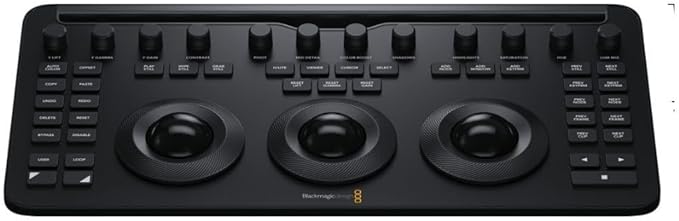
Blackmagic Design Davinci Resolve Advanced Panel
The DaVinci Resolve Advanced Panel from Blackmagic Design is a significant step up in functionality from the Micro or Mini panel. It consists of a main console and two auxiliary consoles, one on each side, as well as a slide-out keyboard in the center console. It enables one-touch access to virtually every control and parameter within the DaVinci Resolve software. The center console incorporates four high-resolution, weighted trackballs and 30 soft, customizable control knobs for accessing color-correction tools in the Resolve software. The custom control knobs feature 4096 steps per rotation and push-button reset so you can achieve high-quality and precise color correction using the DaVinci Resolve system. The Resolve control surface incorporates a slide-out keyboard that is useful when naming or renaming files, and it can be neatly tucked away when not in use. All functions are accessible via separate keys, such as the reference keys, and the fader T-bar that allows you to wipe between reference stills. You can easily control the image sections via keys located for easy access at your natural hand positions. Lift, gamma, and gain adjustments along with RGB control are achieved via trackballs. Menus and indicators are visible via five high-resolution LCD screens that offer a view of the functions of all the knobs and buttons. Soft knobs that can precisely control parameters via single touch are provided, and no electrical contact eliminates wearing out of the knobs. Aesthetically illuminated keys are backlit using RGB color and intensity. Complete control of the project timeline or deck is offered via the jog/shuttle knob and transport controls.
The DaVinci Resolve Advanced Panel from Blackmagic Design is a significant step up in functionality from the Micro or Mini panel. It consists of a main console and two auxiliary consoles, one on each side, as well as a slide-out keyboard in the center console. It enables one-touch access to virtually every control and parameter within the DaVinci Resolve software. The center console incorporates four high-resolution, weighted trackballs and 30 soft, customizable control knobs for accessing color-correction tools in the Resolve software. The custom control knobs feature 4096 steps per rotation and push-button reset so you can achieve high-quality and precise color correction using the DaVinci Resolve system. The Resolve control surface incorporates a slide-out keyboard that is useful when naming or renaming files, and it can be neatly tucked away when not in use. All functions are accessible via separate keys, such as the reference keys, and the fader T-bar that allows you to wipe between reference stills. You can easily control the image sections via keys located for easy access at your natural hand positions. Lift, gamma, and gain adjustments along with RGB control are achieved via trackballs. Menus and indicators are visible via five high-resolution LCD screens that offer a view of the functions of all the knobs and buttons. Soft knobs that can precisely control parameters via single touch are provided, and no electrical contact eliminates wearing out of the knobs. Aesthetically illuminated keys are backlit using RGB color and intensity. Complete control of the project timeline or deck is offered via the jog/shuttle knob and transport controls.
The DaVinci Resolve Advanced Panel from Blackmagic Design is a significant step up in functionality from the Micro or Mini panel. It consists of a main console and two auxiliary consoles, one on each side, as well as a slide-out keyboard in the center console. It enables one-touch access to virtually every control and parameter within the DaVinci Resolve software. The center console incorporates four high-resolution, weighted trackballs and 30 soft, customizable control knobs for accessing color-correction tools in the Resolve software. The custom control knobs feature 4096 steps per rotation and push-button reset so you can achieve high-quality and precise color correction using the DaVinci Resolve system. The Resolve control surface incorporates a slide-out keyboard that is useful when naming or renaming files, and it can be neatly tucked away when not in use. All functions are accessible via separate keys, such as the reference keys, and the fader T-bar that allows you to wipe between reference stills. You can easily control the image sections via keys located for easy access at your natural hand positions. Lift, gamma, and gain adjustments along with RGB control are achieved via trackballs. Menus and indicators are visible via five high-resolution LCD screens that offer a view of the functions of all the knobs and buttons. Soft knobs that can precisely control parameters via single touch are provided, and no electrical contact eliminates wearing out of the knobs. Aesthetically illuminated keys are backlit using RGB color and intensity. Complete control of the project timeline or deck is offered via the jog/shuttle knob and transport controls.
The DaVinci Resolve Advanced Panel from Blackmagic Design is a significant step up in functionality from the Micro or Mini panel. It consists of a main console and two auxiliary consoles, one on each side, as well as a slide-out keyboard in the center console. It enables one-touch access to virtually every control and parameter within the DaVinci Resolve software. The center console incorporates four high-resolution, weighted trackballs and 30 soft, customizable control knobs for accessing color-correction tools in the Resolve software. The custom control knobs feature 4096 steps per rotation and push-button reset so you can achieve high-quality and precise color correction using the DaVinci Resolve system. The Resolve control surface incorporates a slide-out keyboard that is useful when naming or renaming files, and it can be neatly tucked away when not in use. All functions are accessible via separate keys, such as the reference keys, and the fader T-bar that allows you to wipe between reference stills. You can easily control the image sections via keys located for easy access at your natural hand positions. Lift, gamma, and gain adjustments along with RGB control are achieved via trackballs. Menus and indicators are visible via five high-resolution LCD screens that offer a view of the functions of all the knobs and buttons. Soft knobs that can precisely control parameters via single touch are provided, and no electrical contact eliminates wearing out of the knobs. Aesthetically illuminated keys are backlit using RGB color and intensity. Complete control of the project timeline or deck is offered via the jog/shuttle knob and transport controls.
in 22 offers
The lowest price for Blackmagic Design Davinci Resolve Advanced Panel right now is $39,929.55 at Buy Direct & Save, compared across 22 retailers.
The all-time low was $21,051.58 on 12 Mar 2026 — today's price is 90% above the lowest ever. It has been notably cheaper before — worth setting a price alert.
Prices last updated 28 Sept 2026.
Last updated at 28/09/2026 00:21:38
Blackmagic Design DaVinci Resolve Control Surface
Delivery $35.65
Blackmagic DaVinci Resolve Advanced Panel
DaVinci Resolve Advanced Panel – Professional Color Grading Control
Delivery between 1–6 Oct $20
Blackmagic DaVinci Resolve Advanced Panel
Free delivery between 30 Sept – 8 Oct
Blackmagic Design DaVinci Resolve Advanced Panel
Delivery $9.90
Blackmagic DaVinci Resolve Advanced Panel
Delivery by Fri $125
Blackmagic Design Davinci Resolve Advanced Panel
Delivery $16.50
Blackmagic Design DaVinci Resolve Advanced with Control Surface
Delivery $149
Blackmagic Design DaVinci Resolve Advanced Panel (includes DaVinci Resolve)
Delivery between 30 Sept – 9 Oct $15
Blackmagic Design DaVinci Resolve Advanced Panel + DaVinci Resolve Studio
Delivery between Tue – Thu $16
originally posted on bhphotovideo.com
I work as a professional Colorist at a premier facility and I have finally moved up to the new panel... What a relief to have a panel specifically designed for the task! The angle of the screens is perfect and ability to customize the button lights really makes this control surface blend right in to the post production work flow environment. I wish the keyboard had some illumination though because I like to use keyboard shortcuts often and in the low light environment it's just a little dim. Hook up was a breeze and my mac pro recognized it immediately.. Good Job Black Magic
| Display | 5 x LCD |
| Power Source | AC Adapter (Included) |
| AC Input Power | 100 to 240 VAC, 50 / 60 Hz at 1.5 |
| Power Consumption | 80 W (Maximum) |
| Operating Temperature | 32 to 104°F / 0 to 40°C |
Blackmagic Design DaVinci Resolve Control Surface
Delivery $35.65
Blackmagic DaVinci Resolve Advanced Panel
DaVinci Resolve Advanced Panel – Professional Color Grading Control
Delivery between 1–6 Oct $20
Blackmagic DaVinci Resolve Advanced Panel
Free delivery between 30 Sept – 8 Oct
Blackmagic Design DaVinci Resolve Advanced Panel
Delivery $9.90
I work as a professional Colorist at a premier facility and I have finally moved up to the new panel... What a relief to have a panel specifically designed for the task! The angle of the screens is perfect and ability to customize the button lights really makes this control surface blend right in to the post production work flow environment. I wish the keyboard had some illumination though because I like to use keyboard shortcuts often and in the low light environment it's just a little dim. Hook up was a breeze and my mac pro recognized it immediately.. Good Job Black Magic
| Display | 5 x LCD |
| Power Source | AC Adapter (Included) |
| AC Input Power | 100 to 240 VAC, 50 / 60 Hz at 1.5 |
| Power Consumption | 80 W (Maximum) |
| Operating Temperature | 32 to 104°F / 0 to 40°C |