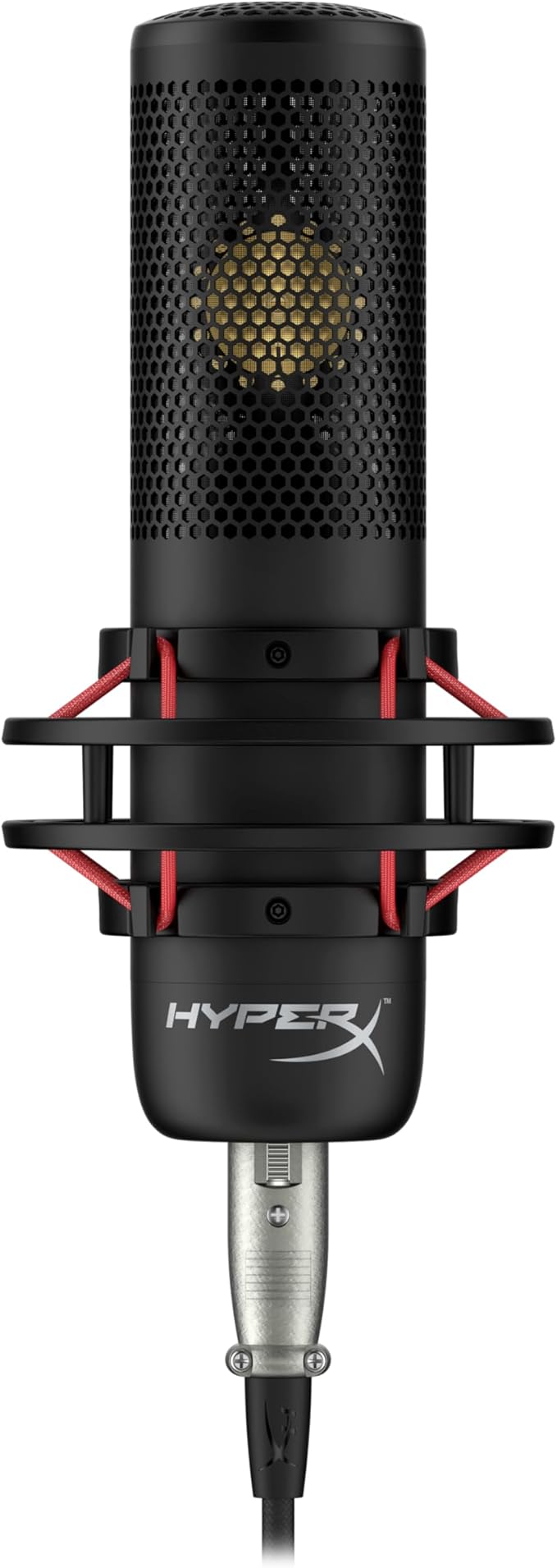
HyperX QuadCast - Microphone - USB
The HyperX QuadCast is the ideal all-inclusive standalone microphone for the aspiring streamer or podcaster looking for a condenser mic with quality sound. QuadCast comes with its own anti-vibration shock mount to help reduce the rumbles of daily life and a built-in pop filter to muffle pesky percussive sounds. Instantly know your mic status with the LED indicator, and simply tap-to-mute to avoid awkward broadcasting accidents. Select between the four polar patterns (stereo, omnidirectional, cardioid, bidirectional) and use the conveniently-located gain control dial to quickly adjust your mic input sensitivity. The included mount adapter fits both 3/8” and 5/8” thread sizes and is compatible with most stands.
The HyperX QuadCast is the ideal all-inclusive standalone microphone for the aspiring streamer or podcaster looking for a condenser mic with quality sound. QuadCast comes with its own anti-vibration shock mount to help reduce the rumbles of daily life and a built-in pop filter to muffle pesky percussive sounds. Instantly know your mic status with the LED indicator, and simply tap-to-mute to avoid awkward broadcasting accidents. Select between the four polar patterns (stereo, omnidirectional, cardioid, bidirectional) and use the conveniently-located gain control dial to quickly adjust your mic input sensitivity. The included mount adapter fits both 3/8” and 5/8” thread sizes and is compatible with most stands.
The HyperX QuadCast is the ideal all-inclusive standalone microphone for the aspiring streamer or podcaster looking for a condenser mic with quality sound. QuadCast comes with its own anti-vibration shock mount to help reduce the rumbles of daily life and a built-in pop filter to muffle pesky percussive sounds. Instantly know your mic status with the LED indicator, and simply tap-to-mute to avoid awkward broadcasting accidents. Select between the four polar patterns (stereo, omnidirectional, cardioid, bidirectional) and use the conveniently-located gain control dial to quickly adjust your mic input sensitivity. The included mount adapter fits both 3/8” and 5/8” thread sizes and is compatible with most stands.
The HyperX QuadCast is the ideal all-inclusive standalone microphone for the aspiring streamer or podcaster looking for a condenser mic with quality sound. QuadCast comes with its own anti-vibration shock mount to help reduce the rumbles of daily life and a built-in pop filter to muffle pesky percussive sounds. Instantly know your mic status with the LED indicator, and simply tap-to-mute to avoid awkward broadcasting accidents. Select between the four polar patterns (stereo, omnidirectional, cardioid, bidirectional) and use the conveniently-located gain control dial to quickly adjust your mic input sensitivity. The included mount adapter fits both 3/8” and 5/8” thread sizes and is compatible with most stands.
in 14 offers
The lowest price for HyperX QuadCast - Microphone - USB right now is $29.00 at Cash Converters, compared across 9 retailers.
The all-time low was $29.00 on 4 June 2026. That's the lowest price we've ever tracked — a great time to buy.
Prices last updated 9 June 2026.
Last updated at 09/06/2026 12:22:05
HP HyperX QuadCast Rouge USB Gaming Desktop Microphone
Free delivery
Affiliate Disclosure: We may receive a small commission for purchases made through this link at no extra cost to you. This helps support our site. Thank you!
Hyperx Black Microphone
Delivery $17.75
HyperX QuadCast Red LED USB Cardioid Microphone - Black
Affiliate Disclosure: We may receive a small commission for purchases made through this link at no extra cost to you. This helps support our site. Thank you!
Hyperx Quadcast - Usb Condenser Gaming Microphone For Pc
Delivery $46.10
Affiliate Disclosure: We may receive a small commission for purchases made through this link at no extra cost to you. This helps support our site. Thank you!
HyperX QuadCast Standalone Microphone - 30211130
Affiliate Disclosure: We may receive a small commission for purchases made through this link at no extra cost to you. This helps support our site. Thank you!
Hyperx Quadcast Red Led Usb Cardioid Microphone - Black
Delivery $18.25
Affiliate Disclosure: We may receive a small commission for purchases made through this link at no extra cost to you. This helps support our site. Thank you!
Quadcast 4p5p6aa Microphone
Free delivery
Affiliate Disclosure: We may receive a small commission for purchases made through this link at no extra cost to you. This helps support our site. Thank you!
Kingston Hyperx Quadcast Standalone Microphone Hx-micqc-bk Japan
Free delivery
Affiliate Disclosure: We may receive a small commission for purchases made through this link at no extra cost to you. This helps support our site. Thank you!
HyperX QuadCast Wired Multi-Pattern Electret Condenser Microphone HX-MICQC-BK Black
Delivery $34.95
HyperX QuadCast Microphone
60-day returns
originally posted on influenster.com
The HyperX QuadCastâ„¢ S is the newest microphone from HyperX. This is the next step up and has everything you would love about the HyperX QuadCast but with more great functional perks! We are Facebook Gaming Partners and were looking to upgrade our mic for our studio. We purchased the Quadcast S microphone for the studio because we loved the RGB lighting and affects. The "Tap to mute sensor with LED indicator" is a MASSIVE perk because there is nothing worse than when you have been streaming forever to find out that you have been muted the whole time. Now, when you are muted, you know by the light no longer being on. The tap to mute is also so quiet and does not give clunky noises clicking on and off like you would with other microphones - again, a huge perk for ... MoreThe HyperX QuadCastâ„¢ S is the newest microphone from HyperX. This is the next step up and has everything you would love about the HyperX QuadCast but with more great functional perks! We are Facebook Gaming Partners and were looking to upgrade our mic for our studio. We purchased the Quadcast S microphone for the studio because we loved the RGB lighting and affects. The "Tap to mute sensor with LED indicator" is a MASSIVE perk because there is nothing worse than when you have been streaming forever to find out that you have been muted the whole time. Now, when you are muted, you know by the light no longer being on. The tap to mute is also so quiet and does not give clunky noises clicking on and off like you would with other microphones - again, a huge perk for streaming!! The HyperX Quadcast is roughly $120-150 CAD range. The HyperX Quadcast S is roughly $200- $230 CAD range. HyperX usually has great sales through there distributors, so its worth keeping your eye out for when it goes on sale. We picked ours up from Best Buy when HyperX had their "LootDrop" customer appreciation sale. Bottom line: The best mic to date we have ever had for our studio streaming set up!
originally posted on jbhifi.com.au
This is the first microphone I bought. All the other microphones I have owned were always part of another device.This microphone was easy to install. Just plug it into the USB port and it's ready. It was immediately recognised by Windows 11 and ready to use.It's not exactly small and does take up some space.I use the microphone mainly for voice recordings for video films. The sound quality is very impressive and from my point of view really good. Background noise is effectively suppressed and the speech is very clear.However, I have no comparison with other microphones, but for my purpose it is excellent and I can recommend it.
originally posted on gadgettree.co.uk
This is a great mic. It is very sensitive, so a separate noise filter is recommended if you have a clicky mechanical keyboard. I use this mic with the NVIDIA broadcast software that utilizes my 2080 Ti to filter out noise. I highly recommend using this with NVIDIA broadcast if you have a 20XX or 30XX graphics card. So far I have not had any complaints from anyone on the other end of my gamevideo chats. The RGB isnt as configurable as I had hoped, but its a nice feature to blend with the RGBs in my PC. It should be noted that the lights can only be configured for either live or mute, not both. So, either it lights up when the mic is live, or it lights up when muted. I would like to have one color setting when live and another when muted, but for now Ill settle for it ... MoreThis is a great mic. It is very sensitive, so a separate noise filter is recommended if you have a clicky mechanical keyboard. I use this mic with the NVIDIA broadcast software that utilizes my 2080 Ti to filter out noise. I highly recommend using this with NVIDIA broadcast if you have a 20XX or 30XX graphics card. So far I have not had any complaints from anyone on the other end of my gamevideo chats. The RGB isnt as configurable as I had hoped, but its a nice feature to blend with the RGBs in my PC. It should be noted that the lights can only be configured for either live or mute, not both. So, either it lights up when the mic is live, or it lights up when muted. I would like to have one color setting when live and another when muted, but for now Ill settle for it being lot up while live and off while muted. There are only two separate LED sections, one on top and one on bottom, which limits RGB controls. Despite the limitations of the RGB controls, it does have a nice look and seems to fadetransition very smoothly. Once you configure it, you can save the setting to the mic so you dont have to launch the HyperX software at startup every time or install the HyperX software on all devices you plan to use this with.To summarize, if youre looking for a mic with great sound quality, this one will definitely do the trick. And if youre a streamer looking for something to add a little more flare to your stream, this one has some decent RGB support, but there are some others out there with more RGB features.
| General | |
| Product Type | Microphone - USB |
| Additional Functions | LED lights |
| Width | 10.17 cm |
| Depth | 12.84 cm |
HP HyperX QuadCast Rouge USB Gaming Desktop Microphone
Free delivery
Affiliate Disclosure: We may receive a small commission for purchases made through this link at no extra cost to you. This helps support our site. Thank you!
Hyperx Black Microphone
Delivery $17.75
HyperX QuadCast Red LED USB Cardioid Microphone - Black
Affiliate Disclosure: We may receive a small commission for purchases made through this link at no extra cost to you. This helps support our site. Thank you!
Hyperx Quadcast - Usb Condenser Gaming Microphone For Pc
Delivery $46.10
Affiliate Disclosure: We may receive a small commission for purchases made through this link at no extra cost to you. This helps support our site. Thank you!
HyperX QuadCast Standalone Microphone - 30211130
Affiliate Disclosure: We may receive a small commission for purchases made through this link at no extra cost to you. This helps support our site. Thank you!
The HyperX QuadCastâ„¢ S is the newest microphone from HyperX. This is the next step up and has everything you would love about the HyperX QuadCast but with more great functional perks! We are Facebook Gaming Partners and were looking to upgrade our mic for our studio. We purchased the Quadcast S microphone for the studio because we loved the RGB lighting and affects. The "Tap to mute sensor with LED indicator" is a MASSIVE perk because there is nothing worse than when you have been streaming forever to find out that you have been muted the whole time. Now, when you are muted, you know by the light no longer being on. The tap to mute is also so quiet and does not give clunky noises clicking on and off like you would with other microphones - again, a huge perk for ... MoreThe HyperX QuadCastâ„¢ S is the newest microphone from HyperX. This is the next step up and has everything you would love about the HyperX QuadCast but with more great functional perks! We are Facebook Gaming Partners and were looking to upgrade our mic for our studio. We purchased the Quadcast S microphone for the studio because we loved the RGB lighting and affects. The "Tap to mute sensor with LED indicator" is a MASSIVE perk because there is nothing worse than when you have been streaming forever to find out that you have been muted the whole time. Now, when you are muted, you know by the light no longer being on. The tap to mute is also so quiet and does not give clunky noises clicking on and off like you would with other microphones - again, a huge perk for streaming!! The HyperX Quadcast is roughly $120-150 CAD range. The HyperX Quadcast S is roughly $200- $230 CAD range. HyperX usually has great sales through there distributors, so its worth keeping your eye out for when it goes on sale. We picked ours up from Best Buy when HyperX had their "LootDrop" customer appreciation sale. Bottom line: The best mic to date we have ever had for our studio streaming set up!
This is the first microphone I bought. All the other microphones I have owned were always part of another device.This microphone was easy to install. Just plug it into the USB port and it's ready. It was immediately recognised by Windows 11 and ready to use.It's not exactly small and does take up some space.I use the microphone mainly for voice recordings for video films. The sound quality is very impressive and from my point of view really good. Background noise is effectively suppressed and the speech is very clear.However, I have no comparison with other microphones, but for my purpose it is excellent and I can recommend it.
This is a great mic. It is very sensitive, so a separate noise filter is recommended if you have a clicky mechanical keyboard. I use this mic with the NVIDIA broadcast software that utilizes my 2080 Ti to filter out noise. I highly recommend using this with NVIDIA broadcast if you have a 20XX or 30XX graphics card. So far I have not had any complaints from anyone on the other end of my gamevideo chats. The RGB isnt as configurable as I had hoped, but its a nice feature to blend with the RGBs in my PC. It should be noted that the lights can only be configured for either live or mute, not both. So, either it lights up when the mic is live, or it lights up when muted. I would like to have one color setting when live and another when muted, but for now Ill settle for it ... MoreThis is a great mic. It is very sensitive, so a separate noise filter is recommended if you have a clicky mechanical keyboard. I use this mic with the NVIDIA broadcast software that utilizes my 2080 Ti to filter out noise. I highly recommend using this with NVIDIA broadcast if you have a 20XX or 30XX graphics card. So far I have not had any complaints from anyone on the other end of my gamevideo chats. The RGB isnt as configurable as I had hoped, but its a nice feature to blend with the RGBs in my PC. It should be noted that the lights can only be configured for either live or mute, not both. So, either it lights up when the mic is live, or it lights up when muted. I would like to have one color setting when live and another when muted, but for now Ill settle for it being lot up while live and off while muted. There are only two separate LED sections, one on top and one on bottom, which limits RGB controls. Despite the limitations of the RGB controls, it does have a nice look and seems to fadetransition very smoothly. Once you configure it, you can save the setting to the mic so you dont have to launch the HyperX software at startup every time or install the HyperX software on all devices you plan to use this with.To summarize, if youre looking for a mic with great sound quality, this one will definitely do the trick. And if youre a streamer looking for something to add a little more flare to your stream, this one has some decent RGB support, but there are some others out there with more RGB features.
Love this mic. Quality build and real quality sound, this mic comes with a fantastic base design that works to dampendeaden sounds and vibrations from the desk it sits on if not on a boom. I love the varied but simple controls built in bottom twist knob to adjust the gain level, a knob on the back to select from four different condenser profiles, and my favorite a sensitive touchpad on top to activatemute the mic activity that also shuts off the LED lights to indicate same. We have had a few Yeti BlueYeti Nanos in the house, and I was nervous about swapping when I know those mics were a standard to measure to at the price point, but Hyper X delivers with this model. Love, love, love the USBC power connect Quadcast S model only over microUSB, and really enjoy the RGB ... MoreLove this mic. Quality build and real quality sound, this mic comes with a fantastic base design that works to dampendeaden sounds and vibrations from the desk it sits on if not on a boom. I love the varied but simple controls built in bottom twist knob to adjust the gain level, a knob on the back to select from four different condenser profiles, and my favorite a sensitive touchpad on top to activatemute the mic activity that also shuts off the LED lights to indicate same. We have had a few Yeti BlueYeti Nanos in the house, and I was nervous about swapping when I know those mics were a standard to measure to at the price point, but Hyper X delivers with this model. Love, love, love the USBC power connect Quadcast S model only over microUSB, and really enjoy the RGB array options over the non S model. I will admit Im a dork for the RGB lights I bought the nonS version first, literally tried it for 24 hours and talked myself into returning it for the S model. The NGenuity software you need to download has a few features, iand makes the lighting pretty customizable. Spent exactly 15 more bucks, but those two details alone sold me, otherwise I think the two models are identical as it relates to the rest of the build and craftsmanship. The sound is crisp, warm and clear I leave it in cardioid mode, best for streaming and general use, and from about 12 inch distance it is clear as a bell and the user sounds pretty much adjacent to you. Got it mostly for gaming, but also to hotswap into my work laptop to manage umpteen zoom calls a day, and Ive actually gotten a lot of complimentscomments on how clear I now sound. Great multitasker so far, would highly recommend.
I picked this mic up about a week ago and Ive been enjoying it for the most part. I am using it predominantly for online school courses and for playing video games. The quality of the mic is top notch for being a USB mic. The only mics that would, in my mind, sound better than this one would be something that plugs into a sound board or other sound equipment. But, for a plug and play, its all you could ask for. I love the red light that comes on when you are live and how it goes black when you are dark. Its more helpful than trying to remember if you pushed the right button or not and having everyone then yell over the call or game that you are muted.The only critiques that I have for this would be 1 the build quality and 2 the placement of the wire ports coming out ... MoreI picked this mic up about a week ago and Ive been enjoying it for the most part. I am using it predominantly for online school courses and for playing video games. The quality of the mic is top notch for being a USB mic. The only mics that would, in my mind, sound better than this one would be something that plugs into a sound board or other sound equipment. But, for a plug and play, its all you could ask for. I love the red light that comes on when you are live and how it goes black when you are dark. Its more helpful than trying to remember if you pushed the right button or not and having everyone then yell over the call or game that you are muted.The only critiques that I have for this would be 1 the build quality and 2 the placement of the wire ports coming out the back. First, the build quality leaves some to be desired. Dont get me wrong, this is still a solid mic option. The thing I have an issue with the most would be the gainfade knob at the bottom of the mic. It is free spinning. The reason this is an issue for me is that any slight bump of the bottom of the mic, this will turn that knob which can throw your sound out of whack. If the knob clicked into place and allowed you to still turn it but then click something to lock it into place, it would be perfect. I get why they did it so you can tweak it ever so slightly to find the perfect point but if you were that concerned with sound, you would just get a 400 mic instead. Second, the placement of the ports for the headphones, polar pattern selector and the power supply are on the back of the mic. Again, I get why they did this so the front of the mic is aesthetically pleasing however, this makes it very awkward to a mount on a mic arm or b change settings should you need to.Overall, this is a great mic still and I would recommend it for someone looking for a good quality mic for instant use.
Good USB microphone. A lot of the price probably comes from the RGB, which make of that what you will. Ive found that while you can just keep it off entirely, without it can be difficult to keep track of whether its physically muted or not. Unless you are sensitive to sound and use mic monitoring by plugging your headphones directly into it.Its convenient that it comes with both a stand and an adapter to screw onto the shock mount to attach it to boom arm. I find it odd that the shock mount is screwed directly onto the mic, but I dont really understand the engineering of that so I wont make any broad, sweeping criticisms about that.Its overall been very good, but Ive found that Ive had issues with it on my new desktop setup. I have been unable to completely narrow ... MoreGood USB microphone. A lot of the price probably comes from the RGB, which make of that what you will. Ive found that while you can just keep it off entirely, without it can be difficult to keep track of whether its physically muted or not. Unless you are sensitive to sound and use mic monitoring by plugging your headphones directly into it.Its convenient that it comes with both a stand and an adapter to screw onto the shock mount to attach it to boom arm. I find it odd that the shock mount is screwed directly onto the mic, but I dont really understand the engineering of that so I wont make any broad, sweeping criticisms about that.Its overall been very good, but Ive found that Ive had issues with it on my new desktop setup. I have been unable to completely narrow downfigure out what exactly the problems are but my guess is that it has something to do with hardware acceleration settings and the amount of power required to power this microphone.Because of the adjustable RGB lighting on this version, it uses USBC which from what I understand requires more power than the last model. After building my new PC, I found that for whatever reason, using certain software or doing certain things in certain software would cause most of my USB devices to experience power issues like constantly disconnecting and reconnecting until I stopped doing whatever it was that caused it. I managed to MOSTLY stopmitigate this issue by disabling hardware acceleration in the things that were causing it the things that at least HAD the option to turn off hardware acceleration, mainly Discord and Google Chrome, and I also bought a USB 3.0 hub that plugs into the wall that I have everything plugged into now. But to this day the mic still experiences this issue as sometimes when I use ShareX to take a screenshot or just something random its pretty much always been something with screen capturing software from what I can recall at this moment the mic will flicker and briefly disconnect before regaining connection, usually once I stop using ShareX, etc.I am unsure if the above problem is the cause of this next issue, which is a really minor one, but ever since I started experiencing these issues, every so often the HyperX NGENUITY software on Windows that is used to change the lighting settings, etc., will constantly tell me I need to update the firmware of the microphone, and Ill follow the instructions, only for it to just tell me to do the same thing some random number of times. From what I can tell after checking it in the settings, the firmware version isnt actually changing so I have no idea if something extremely minor got broken inside the mic from the power delivery issues. Its more annoying than anything the mic still works fine more or less.The final issue I have with this mic, which is most of the reason I cant give this 5 stars is that there must be something wrong with the design of this mic in regard to static electricity. I live in a dry place in the US during the winter and sometimes I can feel the tingling of static electricity within the space between my ears and the earcups of my headphones. When I plug my headphones directly into the microphone, this static electricity is captured by the mics monitoring and I can hear it as very loud, brief buzzing. It is at the end of the day an erratically occurring annoyance, and thanks to NVIDIA Broadcast it solves the biggest part of this problem which is that other people can hear it when I use VoIP software like Discord and so forth. If it werent for NVIDIAs software this would be a tremendous issue that would make me even more frustrated with it. But anyways, I dont know if this is an issue with my headphones as well, as I dont have another pair to test this issue with. I have also read on places like Reddit that people experience this static electricity issue on other HyperX products, so this might just be a common problem among their product lineup. I also dont know if this mostly just me being unlucky with my living environment and the overall compatibility of all the hardware Ive selected for my desktop.In summary, its a good and easy to use USB microphone that sounds good enough. Its probably slightly overpriced, but hey what else would you expect from a gamertargeted product like this
Prior to purchasing this microphone, I was using a standard Corsair headset that got the job done but could have been better. I was between this mic and the AudioTechnica ATR 2500XUSB. I bought both to test them out and decided that I would keep the HyperX. Both of them are great mics and are many steps above the input quality than my Corsair was capable of.I use this microphone mainly for use in Discord voice chat, work meetings Webex, Zoom, etc. and it worked perfectly for what I need. The physical adjustments on the HyperX mic and the software are really what sold me on it. Gain control, Mute, and Polar Pattern are all controlable on the mic itself. This was not something that was available on the Audio Techncia mic. The software that was easily available and ... MorePrior to purchasing this microphone, I was using a standard Corsair headset that got the job done but could have been better. I was between this mic and the AudioTechnica ATR 2500XUSB. I bought both to test them out and decided that I would keep the HyperX. Both of them are great mics and are many steps above the input quality than my Corsair was capable of.I use this microphone mainly for use in Discord voice chat, work meetings Webex, Zoom, etc. and it worked perfectly for what I need. The physical adjustments on the HyperX mic and the software are really what sold me on it. Gain control, Mute, and Polar Pattern are all controlable on the mic itself. This was not something that was available on the Audio Techncia mic. The software that was easily available and accessable on the PC for the HyperX mic. It is very user friendly and enabled me to do just about everything I wanted including the ability to turn off microphone monitoring if I had headphones plugged directly into the mic.This is the first HyperX product I have purchased, and based on my experience with it, it likely will not be my last.
When I started streaming I knew I wanted to get a microphone that was going to give me better vocal quality than what your average headset mic could accomplish, but it took me a long time to settle on which one to buy. I spent a few hours scouring youtube for reviews with my headset on so I could listen to sound quality differences closely, and I believe it was the Hardware Canucks who finally got me convinced to give this one a go.At 139.99 the current price at the time of this review the HyperX Quadcast is definitely a little more pricey than some of its competitors, but not overpriced compared to some of the big names out there, like Blue Yeti. Aesthetically it lives up to that price point, with the shock mount and redglow behind the built in pop filter. ... MoreWhen I started streaming I knew I wanted to get a microphone that was going to give me better vocal quality than what your average headset mic could accomplish, but it took me a long time to settle on which one to buy. I spent a few hours scouring youtube for reviews with my headset on so I could listen to sound quality differences closely, and I believe it was the Hardware Canucks who finally got me convinced to give this one a go.At 139.99 the current price at the time of this review the HyperX Quadcast is definitely a little more pricey than some of its competitors, but not overpriced compared to some of the big names out there, like Blue Yeti. Aesthetically it lives up to that price point, with the shock mount and redglow behind the built in pop filter. Featurewise as well this lives up to the price point. The four selectable audio modes each work well for their purposes. The touchsensitive mute button on top is responsive and unobtrusive, located so it wont be hit accidentally. And the gain adjustment knob on the bottom is very smooth and quality feeling.Its not perfect, though. The shock mount that comes built on doesnt do avery good job. Because it sits on a desk top by default anything that taps against the desk with it tends to be picked up by the mic pretty easily. Fortunately it comes with an adapter that will allow me to mount this onto a microphone boom arm, so hopefully that wont be as much of an issue.I also wish that, in this 2020 era of almost every lit up PC component and accessory having a RGB option, this microphone did too. The solid red backlight doesnt exactly fit my computers aesthetic, but thats a tiny gripe at the very worst and almost not even worth mentioning.All in all I am pretty darn happy with my purchase, and I would be happy to recommend this to anyone who wants a nice quality microphone.
Please note that when I received the HyperX Quadcast, the same week the Quadcast S released. I used the Quadcast before returning it and believe that functionally, theyy are nearly identifical. The biggest difference is the color scheme and the RGB lighting. The Quadcast S uses a USB C connection while the original Quadcast uses a USB Mini connection.The Quadcast is a very high quality product. HyperX which is Kingston Technology Companys gaming division set a high bar with their Cloud line of gaming headsets. And while the Quadcast may not be the BEST microphone you can get your hands on in this price range, its loaded with features that give it value and flexibility.While the Quadcast looks great, especially in an esports environment, the Quadcast S is elegant. I ... MorePlease note that when I received the HyperX Quadcast, the same week the Quadcast S released. I used the Quadcast before returning it and believe that functionally, theyy are nearly identifical. The biggest difference is the color scheme and the RGB lighting. The Quadcast S uses a USB C connection while the original Quadcast uses a USB Mini connection.The Quadcast is a very high quality product. HyperX which is Kingston Technology Companys gaming division set a high bar with their Cloud line of gaming headsets. And while the Quadcast may not be the BEST microphone you can get your hands on in this price range, its loaded with features that give it value and flexibility.While the Quadcast looks great, especially in an esports environment, the Quadcast S is elegant. I would recommend the RGB Quadcast S, unless youre buying multiple microphones and building a themed studio.The recording quality on this microphone is the best Ive ever personally experienced, outside of some specific academic situations. If I project my voice, I can comfortably sit back in my chair and the mic will pick up my voice. It works better when Im in proximity to the mic. Naturally a boom arm will add some flexibility there.Communications and audio devices on computers tend to not be the most straightforward thing, but the mic works plug and play. The tougher part is putting all your audio settings together for, say, game recording. But it is doable and even for an amateur, the endresults are presentable.While playing some crossover Modern Warfare Warzone with friends on PS5, my voice was described as very HDThe only knock I can give it, is you dont really get any kind of way to monitor your levels in real time. Although the pop filter and shock mount help, even just a simple overlay that displayed the levels would have been nice to include. Im sure you can find applications that do this, but since HyperX offers a variety of audio products, they may consider developing their own software sweet for controller and monitoring them.
As any amatuer would be pushed towards the Blue Snowball, Blue Yeti or other various mics I did my own research. This had plenty of positive reviews already and for good reason. Upon receiving it, it was just plug and go. The adaptable jack screw makes it easy to go onto any Mic stand you may purchase. It has a shock mount even. At first I was worried I would need a pop filter. While it does improve slightly with one, it doesnt pick up those nasty S and P's as badly as other mics. I was absolutely astonished at the quality difference when comparing it with my blue yeti. It looked nicer and it's actually of similar price. Probably the best microphone for casual and entry level pros. May even be competitive with higher end ones as well. It will require other tools for ... MoreAs any amatuer would be pushed towards the Blue Snowball, Blue Yeti or other various mics I did my own research. This had plenty of positive reviews already and for good reason. Upon receiving it, it was just plug and go. The adaptable jack screw makes it easy to go onto any Mic stand you may purchase. It has a shock mount even. At first I was worried I would need a pop filter. While it does improve slightly with one, it doesnt pick up those nasty S and P's as badly as other mics. I was absolutely astonished at the quality difference when comparing it with my blue yeti. It looked nicer and it's actually of similar price. Probably the best microphone for casual and entry level pros. May even be competitive with higher end ones as well. It will require other tools for sure if you're looking for more professional use beyond youtube or twitch but super happy with this purchase.
| General | |
| Product Type | Microphone - USB |
| Additional Functions | LED lights |
| Width | 10.17 cm |
| Depth | 12.84 cm |