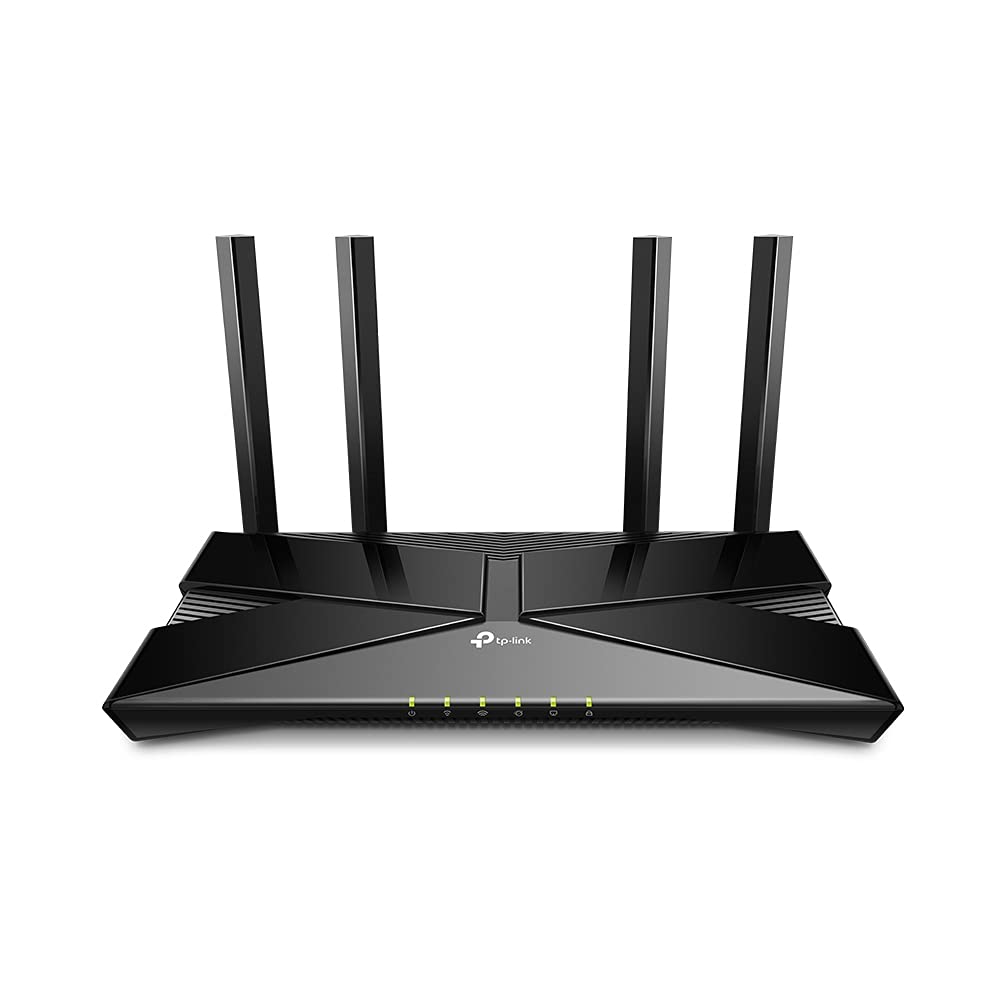
TP-Link Archer AX20 AX1800 Dual-Band WI-FI 6 Router
The latest generation of WiFi technology brings faster speeds, less lag, and higher capacity, enabling more simultaneous connections on your home network. OFDMA strengthens your WiFi by allowing multiple clients to share one band at the same time, cutting latency and jitter. Enjoy the most versatile yet free parental controls features among all routers, including URL blocking, profile management, pausing, and more. Use with OneMesh extenders to get whole-home coverage and enjoy smooth roaming between signals. Set up your router in minutes with the powerful TP-Link Tether App. Boost WiFi signals throughout your home. Beamforming technology detects devices and concentrates wireless signal strength towards them, especially for previously hard to reach outlets. Archer AX1800 is easy to place vertically on a desktop or mount to a wall. With a horizontal dimension of 150 × 130 × 40.3 mm, it can fit in narrow spaces for more flexibility. If you have any dead zones at home, just add another Easymesh-Compatible router/range extender to further form your whole home multi-gigabit mesh WiFi. No more searching for a stable connection.
The latest generation of WiFi technology brings faster speeds, less lag, and higher capacity, enabling more simultaneous connections on your home network. OFDMA strengthens your WiFi by allowing multiple clients to share one band at the same time, cutting latency and jitter. Enjoy the most versatile yet free parental controls features among all routers, including URL blocking, profile management, pausing, and more. Use with OneMesh extenders to get whole-home coverage and enjoy smooth roaming between signals. Set up your router in minutes with the powerful TP-Link Tether App. Boost WiFi signals throughout your home. Beamforming technology detects devices and concentrates wireless signal strength towards them, especially for previously hard to reach outlets. Archer AX1800 is easy to place vertically on a desktop or mount to a wall. With a horizontal dimension of 150 × 130 × 40.3 mm, it can fit in narrow spaces for more flexibility. If you have any dead zones at home, just add another Easymesh-Compatible router/range extender to further form your whole home multi-gigabit mesh WiFi. No more searching for a stable connection.
The latest generation of WiFi technology brings faster speeds, less lag, and higher capacity, enabling more simultaneous connections on your home network. OFDMA strengthens your WiFi by allowing multiple clients to share one band at the same time, cutting latency and jitter. Enjoy the most versatile yet free parental controls features among all routers, including URL blocking, profile management, pausing, and more. Use with OneMesh extenders to get whole-home coverage and enjoy smooth roaming between signals. Set up your router in minutes with the powerful TP-Link Tether App. Boost WiFi signals throughout your home. Beamforming technology detects devices and concentrates wireless signal strength towards them, especially for previously hard to reach outlets. Archer AX1800 is easy to place vertically on a desktop or mount to a wall. With a horizontal dimension of 150 × 130 × 40.3 mm, it can fit in narrow spaces for more flexibility. If you have any dead zones at home, just add another Easymesh-Compatible router/range extender to further form your whole home multi-gigabit mesh WiFi. No more searching for a stable connection.
The latest generation of WiFi technology brings faster speeds, less lag, and higher capacity, enabling more simultaneous connections on your home network. OFDMA strengthens your WiFi by allowing multiple clients to share one band at the same time, cutting latency and jitter. Enjoy the most versatile yet free parental controls features among all routers, including URL blocking, profile management, pausing, and more. Use with OneMesh extenders to get whole-home coverage and enjoy smooth roaming between signals. Set up your router in minutes with the powerful TP-Link Tether App. Boost WiFi signals throughout your home. Beamforming technology detects devices and concentrates wireless signal strength towards them, especially for previously hard to reach outlets. Archer AX1800 is easy to place vertically on a desktop or mount to a wall. With a horizontal dimension of 150 × 130 × 40.3 mm, it can fit in narrow spaces for more flexibility. If you have any dead zones at home, just add another Easymesh-Compatible router/range extender to further form your whole home multi-gigabit mesh WiFi. No more searching for a stable connection.
in 4 offers
The lowest price for TP-Link Archer AX20 AX1800 Dual-Band WI-FI 6 Router right now is $56.34 at eBay.com.au, compared across 3 retailers.
The all-time low was $44.54 on 26 Jan 2026 — today's price is 26% above the lowest ever. It has been notably cheaper before — worth setting a price alert.
Prices last updated 21 Oct 2026.
Last updated at 21/10/2026 16:08:39
Tp-link Wifi 6 Router Ax1800 Smart Wifi Router (archer Ax20) –
Delivery $52.08
Affiliate Disclosure: We may receive a small commission for purchases made through this link at no extra cost to you. This helps support our site. Thank you!
TP-Link TP Link WiFi 6 AX1800 Smart WiFi Router Archer AX20 Dual Band Gigabit Router, USB Port, WPA3 Cyber Security, Parental Controls, Long Range Cov
Free delivery between 30 Oct – 4 Nov
TP-Link Archer AX20 AX1800 Dual Band WiFi 6 Router
originally posted on bestbuy.com
My Wi-Fi comes out of the wall on the east side of my condo. It did not reach the west wall. My whole home is a smart home. Everything electronic is controlled by my Alexa units. I have been complaining to my HOA that nothing is working for months. I finally got a service call that informed me I needed router to expand the signal to my entire home. Why couldn't they have told me that in the beginning. I've been suffering for months. Now everything works and I have not had to restart anything. It's a great help and a wonderful value.
originally posted on bestbuy.com
This is my 2nd TP-Link router. I have been very satisfied with both TP-Link's support as well as the advancement in technology they do in order to stay competitive in terms of both price and quality when compared to Netgear or Linksys or Cisco. I will stick with TP link always.Pros:1. Support for Wifi 6 technology. The speed almost increased by 30% especially on computers that support wifi 6 technology.2. Dual band is really wonderful. Especially when I am 2 rooms away from the router I use to connect my laptop with 5 GHz frequency to get a good speed as the other band is prone to more interferences from other devices in the home.3. Initial setup is very easy.4. 4 antennas with beamforming technology ensures very good signal despite interferences.5. Parental ... MoreThis is my 2nd TP-Link router. I have been very satisfied with both TP-Link's support as well as the advancement in technology they do in order to stay competitive in terms of both price and quality when compared to Netgear or Linksys or Cisco. I will stick with TP link always.Pros:1. Support for Wifi 6 technology. The speed almost increased by 30% especially on computers that support wifi 6 technology.2. Dual band is really wonderful. Especially when I am 2 rooms away from the router I use to connect my laptop with 5 GHz frequency to get a good speed as the other band is prone to more interferences from other devices in the home.3. Initial setup is very easy.4. 4 antennas with beamforming technology ensures very good signal despite interferences.5. Parental controls are very easy to setup from the router page. It's possible to do tons of things like setting up timer to turn on or off the wifi, blacklisting a device are possible.6. Powerful 1.5 GHz core processor.Cons:None
originally posted on bestbuy.com
I set this router up at my parents house to support 30-35 WiFi devices, depending on who is visiting -- 22 smart home devices are on 2.4Ghz only. The iPad 7th gen, two cell phones (iPhone 11, Moto G7), two laptops, and four Roku 4K+ sticks are probably running on 5Ghz, but might dip over to 2.4Ghz depending on what gives better signal, and then 1-5 other devices may connect to their WiFi if family comes over.The router works perfectly well with all of these devices in the single story 1700 square foot home and provides plenty of signal while working outside. They have gigabit fiber optic internet, both up and down, and when I bring over my gaming laptop I am able to pull over 500Mbps down while they are streaming on the Roku in the family room and I am streaming ... MoreI set this router up at my parents house to support 30-35 WiFi devices, depending on who is visiting -- 22 smart home devices are on 2.4Ghz only. The iPad 7th gen, two cell phones (iPhone 11, Moto G7), two laptops, and four Roku 4K+ sticks are probably running on 5Ghz, but might dip over to 2.4Ghz depending on what gives better signal, and then 1-5 other devices may connect to their WiFi if family comes over.The router works perfectly well with all of these devices in the single story 1700 square foot home and provides plenty of signal while working outside. They have gigabit fiber optic internet, both up and down, and when I bring over my gaming laptop I am able to pull over 500Mbps down while they are streaming on the Roku in the family room and I am streaming on the Roku in the front bedroom.The reason I'm giving this 3/5 is because this router does not play nice with the Wyze Cam V3 I installed over there that worked perfectly fine with their previous TP Link AC2300 router. When I swapped their old router, it would not connect. I turned on the hotspot on my phone (2.4Ghz) with the same router settings, to mimic their router, and it connects immediately. If I shut my hotspot off, it takes 10 minutes and it will eventually connect to their router and work perfectly fine. However, if they lose power, there is a strong chance that I will have to go over there and power cycle the router and camera to get it to reconnect. I tested this with another Wyze Cam V3 and it has the same exact problem.I don't know whether this is an issue with the cameras or the router, but if you have Wyze Cam V3 cameras, this router will likely give you a headache. If you aren't, it is an excellent router for the money that punches well above it's cost.
| Wi-Fi Generation | Wi-Fi 6 |
| Network Band | Dual Band |
| Broadband Transmission Technology | Ethernet |
| Wireless LAN Standard | IEEE 802.11ax |
| ISM Band | Yes |
Tp-link Wifi 6 Router Ax1800 Smart Wifi Router (archer Ax20) –
Delivery $52.08
Affiliate Disclosure: We may receive a small commission for purchases made through this link at no extra cost to you. This helps support our site. Thank you!
TP-Link TP Link WiFi 6 AX1800 Smart WiFi Router Archer AX20 Dual Band Gigabit Router, USB Port, WPA3 Cyber Security, Parental Controls, Long Range Cov
Free delivery between 30 Oct – 4 Nov
TP-Link Archer AX20 AX1800 Dual Band WiFi 6 Router
My Wi-Fi comes out of the wall on the east side of my condo. It did not reach the west wall. My whole home is a smart home. Everything electronic is controlled by my Alexa units. I have been complaining to my HOA that nothing is working for months. I finally got a service call that informed me I needed router to expand the signal to my entire home. Why couldn't they have told me that in the beginning. I've been suffering for months. Now everything works and I have not had to restart anything. It's a great help and a wonderful value.
This is my 2nd TP-Link router. I have been very satisfied with both TP-Link's support as well as the advancement in technology they do in order to stay competitive in terms of both price and quality when compared to Netgear or Linksys or Cisco. I will stick with TP link always.Pros:1. Support for Wifi 6 technology. The speed almost increased by 30% especially on computers that support wifi 6 technology.2. Dual band is really wonderful. Especially when I am 2 rooms away from the router I use to connect my laptop with 5 GHz frequency to get a good speed as the other band is prone to more interferences from other devices in the home.3. Initial setup is very easy.4. 4 antennas with beamforming technology ensures very good signal despite interferences.5. Parental ... MoreThis is my 2nd TP-Link router. I have been very satisfied with both TP-Link's support as well as the advancement in technology they do in order to stay competitive in terms of both price and quality when compared to Netgear or Linksys or Cisco. I will stick with TP link always.Pros:1. Support for Wifi 6 technology. The speed almost increased by 30% especially on computers that support wifi 6 technology.2. Dual band is really wonderful. Especially when I am 2 rooms away from the router I use to connect my laptop with 5 GHz frequency to get a good speed as the other band is prone to more interferences from other devices in the home.3. Initial setup is very easy.4. 4 antennas with beamforming technology ensures very good signal despite interferences.5. Parental controls are very easy to setup from the router page. It's possible to do tons of things like setting up timer to turn on or off the wifi, blacklisting a device are possible.6. Powerful 1.5 GHz core processor.Cons:None
I set this router up at my parents house to support 30-35 WiFi devices, depending on who is visiting -- 22 smart home devices are on 2.4Ghz only. The iPad 7th gen, two cell phones (iPhone 11, Moto G7), two laptops, and four Roku 4K+ sticks are probably running on 5Ghz, but might dip over to 2.4Ghz depending on what gives better signal, and then 1-5 other devices may connect to their WiFi if family comes over.The router works perfectly well with all of these devices in the single story 1700 square foot home and provides plenty of signal while working outside. They have gigabit fiber optic internet, both up and down, and when I bring over my gaming laptop I am able to pull over 500Mbps down while they are streaming on the Roku in the family room and I am streaming ... MoreI set this router up at my parents house to support 30-35 WiFi devices, depending on who is visiting -- 22 smart home devices are on 2.4Ghz only. The iPad 7th gen, two cell phones (iPhone 11, Moto G7), two laptops, and four Roku 4K+ sticks are probably running on 5Ghz, but might dip over to 2.4Ghz depending on what gives better signal, and then 1-5 other devices may connect to their WiFi if family comes over.The router works perfectly well with all of these devices in the single story 1700 square foot home and provides plenty of signal while working outside. They have gigabit fiber optic internet, both up and down, and when I bring over my gaming laptop I am able to pull over 500Mbps down while they are streaming on the Roku in the family room and I am streaming on the Roku in the front bedroom.The reason I'm giving this 3/5 is because this router does not play nice with the Wyze Cam V3 I installed over there that worked perfectly fine with their previous TP Link AC2300 router. When I swapped their old router, it would not connect. I turned on the hotspot on my phone (2.4Ghz) with the same router settings, to mimic their router, and it connects immediately. If I shut my hotspot off, it takes 10 minutes and it will eventually connect to their router and work perfectly fine. However, if they lose power, there is a strong chance that I will have to go over there and power cycle the router and camera to get it to reconnect. I tested this with another Wyze Cam V3 and it has the same exact problem.I don't know whether this is an issue with the cameras or the router, but if you have Wyze Cam V3 cameras, this router will likely give you a headache. If you aren't, it is an excellent router for the money that punches well above it's cost.
I purchased this after researching different options of the top rated routers by many tech companies. This replaced an older Linksys router that was several years old, and was causing delay issues.This new router was very easy to hook up and install. The network was also a breeze to setup based on their software. I highly recommend this router to anyone that needs an upgrade!
Short review - This is a "mid range" wifi 6 (ax) router that will work and exceed most people's expectations for its price.Details -This is a wifi 6 router, which means it supports the new wifi convention ax, the previous ones were known as ac, n, g which have now been renames as wifi 5, 4, 3. This means that newer devices that are wifi 6 compatible will really benefit from the new tech which will clear up any congestion on your home network. But if you are using older devices that only have an ac wifi card in your device, do not worry, ALL wifi 6 routers are rated for backwards compatibility.With Wifi 6 , it also comes with MU-MIMO technology, which in laymans terms means you will be getting much better stable connections between all your devices.The 1800 ... MoreShort review - This is a "mid range" wifi 6 (ax) router that will work and exceed most people's expectations for its price.Details -This is a wifi 6 router, which means it supports the new wifi convention ax, the previous ones were known as ac, n, g which have now been renames as wifi 5, 4, 3. This means that newer devices that are wifi 6 compatible will really benefit from the new tech which will clear up any congestion on your home network. But if you are using older devices that only have an ac wifi card in your device, do not worry, ALL wifi 6 routers are rated for backwards compatibility.With Wifi 6 , it also comes with MU-MIMO technology, which in laymans terms means you will be getting much better stable connections between all your devices.The 1800 in the ax1800 stands for up to 574mbps on 2.4ghz channel and 1201 mbps on 5 ghz channel. Frankly I am not sure what the difference between the Archer AX20 vs AX21, since both are listed as Archer AX1800. This might just be something to differentiate between retailers. As far as I can tell on their website the specs are the same across the board.Ethernet ports are rated for gigabit, so thats going to be plenty for most of residential users. The USB port is unfortunately only 2.0, but can still hook up your hdd for a network storage solution.I have this placed in a central location in the house, coming from from a dual band ac600 (300/300) router, I am getting amazing speeds, but importently I am getting 5-4 bars in all 7 rooms in the house, 4 on the same level as the router, with 2-3 walls in between, and the 3 rooms in the basement. I am slowly getting more wifi 6 devices, such as my smartphones, laptop (you can easily upgrade wifi cards in your laptops), ps5 and I am getting amazing wifi speeds. I pay for the 1000 mbps internet service, and at best I was getting around 450 on the 5ghz channel about 10 feet away, with one wall. Now on the TP Link AX20, I am now getting 800-900 on the 5hz channel about 10 feet away with one wall.
My cable company routers could provide wireless to my my phone and televisionsbut often not my laptop., I decided to purchase my own router. I could get the wireless connection with my phone and tv but not with my MacPro laptop.I found hooking it up more cumbersome than I had expected. After following the instructions and fiddling around an Administartor page appeared on my laptop. Once I made myself administrator, I was able to connect. I hadn't seen anything in the instructions for that.Once setup and changing the settings on my various devices, the wirelss works well!
This is the third router I've purchased trying to maintain reasonably fast signal within all corners of our approx. 2500-2750 sq. ft home, with a reliable connection for over 25 regular clients on the network, and upwards of 10 or more guest devices during peak family visits.Also needed something that would extend to our detached garage, approx. 40' from the router, with exterior walls in the line of sight between the router and inside the garage.In the house on the same floor, speeds are reaching 400-500 mbps, upper and lower floors are seeing 100-200 mbps, and the garage is achieving 25-75 mpbs depending on the location in the garage, plenty to stream YouTube video on the TV.User Interface for setup and management of the router has a number of advanced ... MoreThis is the third router I've purchased trying to maintain reasonably fast signal within all corners of our approx. 2500-2750 sq. ft home, with a reliable connection for over 25 regular clients on the network, and upwards of 10 or more guest devices during peak family visits.Also needed something that would extend to our detached garage, approx. 40' from the router, with exterior walls in the line of sight between the router and inside the garage.In the house on the same floor, speeds are reaching 400-500 mbps, upper and lower floors are seeing 100-200 mbps, and the garage is achieving 25-75 mpbs depending on the location in the garage, plenty to stream YouTube video on the TV.User Interface for setup and management of the router has a number of advanced tweaking functionality, but includes a basic mode for unfamiliar users, making it super easy to setup and manage for anyone.Bonus, AX model router supports TP-Link Mesh networking, whereas the upgrade model the AX50 and 55 don't currently support it. Just something to consider, as the mesh setup may not be on your list of needs.Will update the review on stability and longer term performance.
I purchased this router to replace an TP-Link Archer C9 that worked flawlessly for years until one day it just stopped for no apparent reason. I was expecting this newer model to be an upgrade, but it's been a disappointment.The router has all the features I need and more, but it reboots randomly at the worst times (during conference calls) and the 2.4GHz Wifi just stops working randomly until it is disabled and re-enabled, or the whole router rebooted. All my smart home appliances and wifi printer connect to the 2.4GHz wifi, so it is VERY annoying when this happens.I have installed 2 firmware updates already. The most recent one promised to help with the reboots (it is a known issue), but then the 2.4GHz wifi issues started.I am considering returning it, but I ... MoreI purchased this router to replace an TP-Link Archer C9 that worked flawlessly for years until one day it just stopped for no apparent reason. I was expecting this newer model to be an upgrade, but it's been a disappointment.The router has all the features I need and more, but it reboots randomly at the worst times (during conference calls) and the 2.4GHz Wifi just stops working randomly until it is disabled and re-enabled, or the whole router rebooted. All my smart home appliances and wifi printer connect to the 2.4GHz wifi, so it is VERY annoying when this happens.I have installed 2 firmware updates already. The most recent one promised to help with the reboots (it is a known issue), but then the 2.4GHz wifi issues started.I am considering returning it, but I can't be without a router for long because I work from home.
Got this to replace my aging AirPort Extreme with connections to my MacBook, 2 iPads and our TV. At close and medium range it gives me nearly the 400 Mbps of our plan.Surprisingly, at longer ranges it falls a bit short of the old AirPort Extreme... but not by much, and is certainly adequate. Plus, it is easier to tweak settings on the TP-Link.If it holds up as long as the old AirPort Extreme, I will be very satisfied.
I was using a router that was almost 10 years old (or older), so I expected a good improvement from buying a new router. The AX21 was highly rated by Wirecutter (New York Times), so I purchased it. It was extremely easy to set up. By using the same password as my old one, I didn't need to modify any other part of my network. When I did a speed test, the speed of the router was almost as fast as the direct connection using an ethernet cable. I think this lower priced model meets all my needs.
| Wi-Fi Generation | Wi-Fi 6 |
| Network Band | Dual Band |
| Broadband Transmission Technology | Ethernet |
| Wireless LAN Standard | IEEE 802.11ax |
| ISM Band | Yes |